
What should a purchase conversion mean?
A purchase conversion should mean one completed order with one stable order ID and the value your business recognizes. Changing what counts as a purchase changes the basis for every campaign comparison.
Google studied 99 Conversion Lift experiments from April 2024 through April 2025. Advertisers bidding toward value on Search campaigns recorded an average 8 percent incremental return on ad spend after adopting enhanced conversions.
Before you install tracking, write down how you will define and record a purchase. Note the event and what triggers it. Then record the order value with its currency, the order ID, the source that sends the purchase event and any orders you will exclude.
For example, you'll record a purchase only after your store marks payment as successful. A checkout start won't qualify.
| Field | Store decision | Failure it prevents |
|---|---|---|
| Event | Paid order | Checkout starts entering the purchase total |
| Trigger | Payment success | Failed or abandoned payments being counted |
| Value | Recognized order revenue | Tax or shipping rules changing by tag |
| Currency | The order currency | Mixed monetary totals |
| Order ID | One stable transaction key | The same order being counted twice |
| Owner | One purchase source | Native tracking and imports competing |
Say you run the fictitious store Pine and Loom. It records each paid order in the store's currency, using the existing order number.
Add to cart and newsletter signup stay outside that purchase total. Track them separately to see where shoppers drop out.
Before you calculate ROAS, make sure the revenue inside Google Ads belongs to real orders. Duplicated purchases inflate that ratio and can make a weak campaign look profitable.
If you are still learning how Google Ads works, keep one fact in view: Smart Bidding sets bids from the conversions you report.
Choose a Google Ads conversion tracking installation path
Choose a tracking method your team can maintain and test against completed orders. It should send the order ID, value and currency, and it should respect each customer's consent choice.
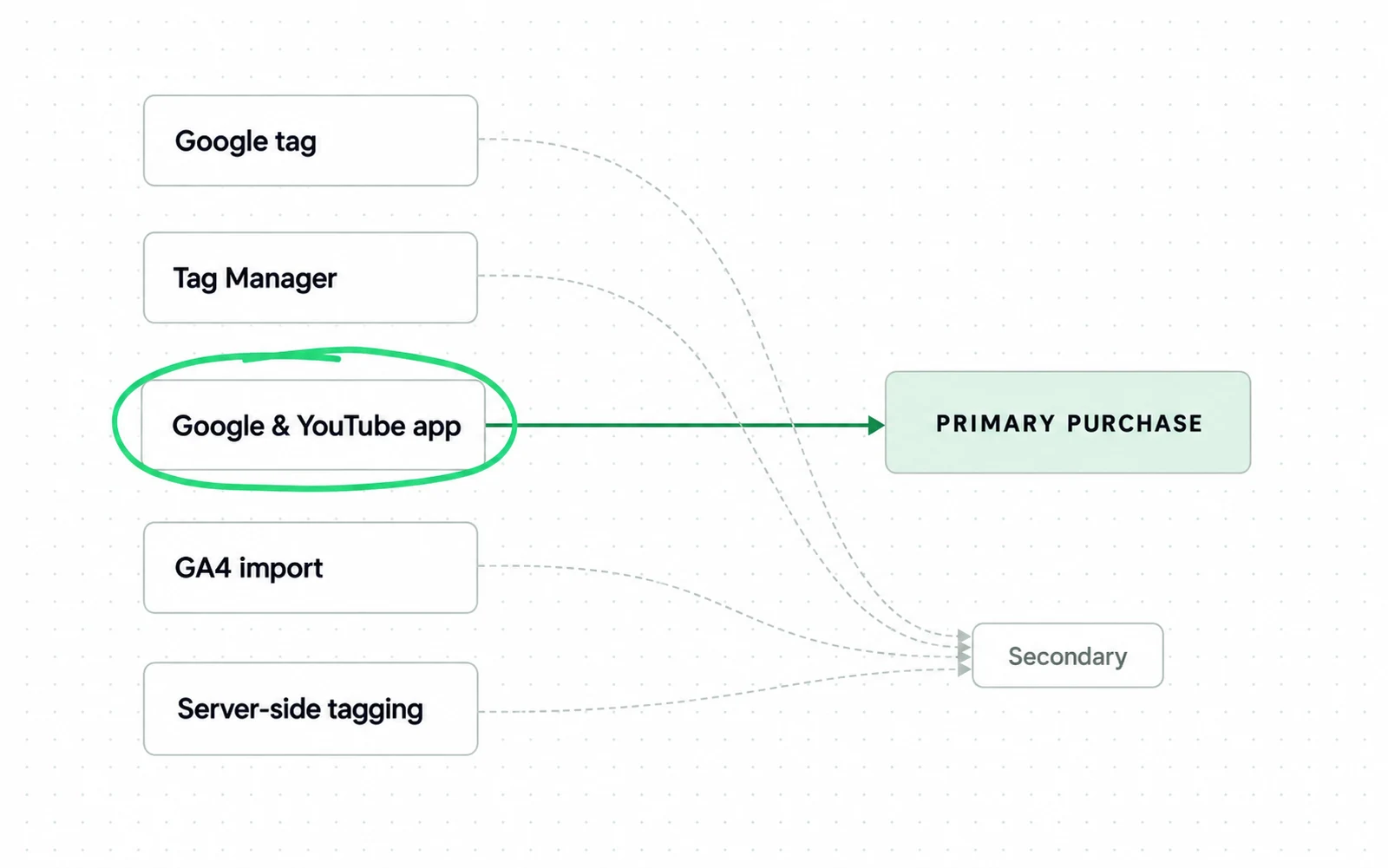
Send the primary purchase from only one tracking method. Other methods can still send their own events for diagnosis, as long as they never fire the primary purchase conversion action.
| Setup path | Best fit store | What it does not measure by itself |
|---|---|---|
| Google tag or gtag | Custom storefront with developer ownership | Payments that never return to the browser success state |
| Google Tag Manager | Store with several marketing tags and a testable data layer | A missing or wrong purchase event in that data layer |
| Shopify Google and YouTube app | Shopify store that wants a supported native route | Orders or adjustments outside the connected store flow |
| GA4 import | Store already using one governed GA4 purchase event | A browser order that GA4 never received |
| Server side tagging | Store with engineering ownership and a stable server event | Bad consent logic or duplicate browser and server submissions |
Use the Google tag when your developer controls the purchase confirmation event. Pass the order ID from the commerce platform instead of creating a random ID in the browser.
Use Google Tag Manager when you already have a dependable purchase data layer. Before you publish, preview a test order and check that it carries the right value, currency and transaction ID.
Shopify tells merchants to connect the Google and YouTube sales channel when they set up Google Analytics. The same native route reduces custom theme code for a standard Shopify checkout.
If you run Google Ads for Shopify campaigns, install that app before you add any custom purchase tag. A second tag on top of the app can count each of your orders twice.
Use a GA4 import when GA4 already records a purchase event you have tested. Keep the import secondary until you confirm that no primary action counts the same order.
Check which purchase action is still primary, because marking the import secondary does not switch off an old primary action.
Use server-side tagging when your team can maintain both the browser event and the server endpoint. A server route won't repair an incorrect order value or consent rule.
Before you credit a server route with recovering lost purchases, test it against your own completed orders. For instance, list the orders the browser tag missed last week and check whether the server route delivered those exact order IDs.
Say Pine and Loom runs Shopify with no custom checkout. It should start with the native app and add another tracking method only if the order comparison shows a specific loss, such as missing Safari orders.
Use the same purchase conversion action for Search and Shopping campaigns. That holds whether you manage Shopping yourself or hand it to our Google Shopping management team.
Teach Google one purchase outcome
For Google to use purchases in bidding, mark the purchase conversion action as primary and include it in the campaign goal. Use secondary events to follow the steps shoppers take before buying, without adding them to bidding.
Keep checkout start, add to cart, product view and newsletter signup secondary unless one of them is the outcome your campaign is paying for.
Google treats your primary actions as reporting and bidding inputs. Your secondary actions are observation only and appear in All conversions.
Treat a refund as a store adjustment that corrects realized value after the purchase. A refund never adds a conversion.
Search Engine Land warned in June 2026 that bad conversion data can distort bids, targeting and budgets.
Set the purchase action to count every conversion. The same customer can place two separate orders after one click.
Send the same transaction ID each time an order's thank you page loads, so a reload or return visit doesn't count the purchase again.
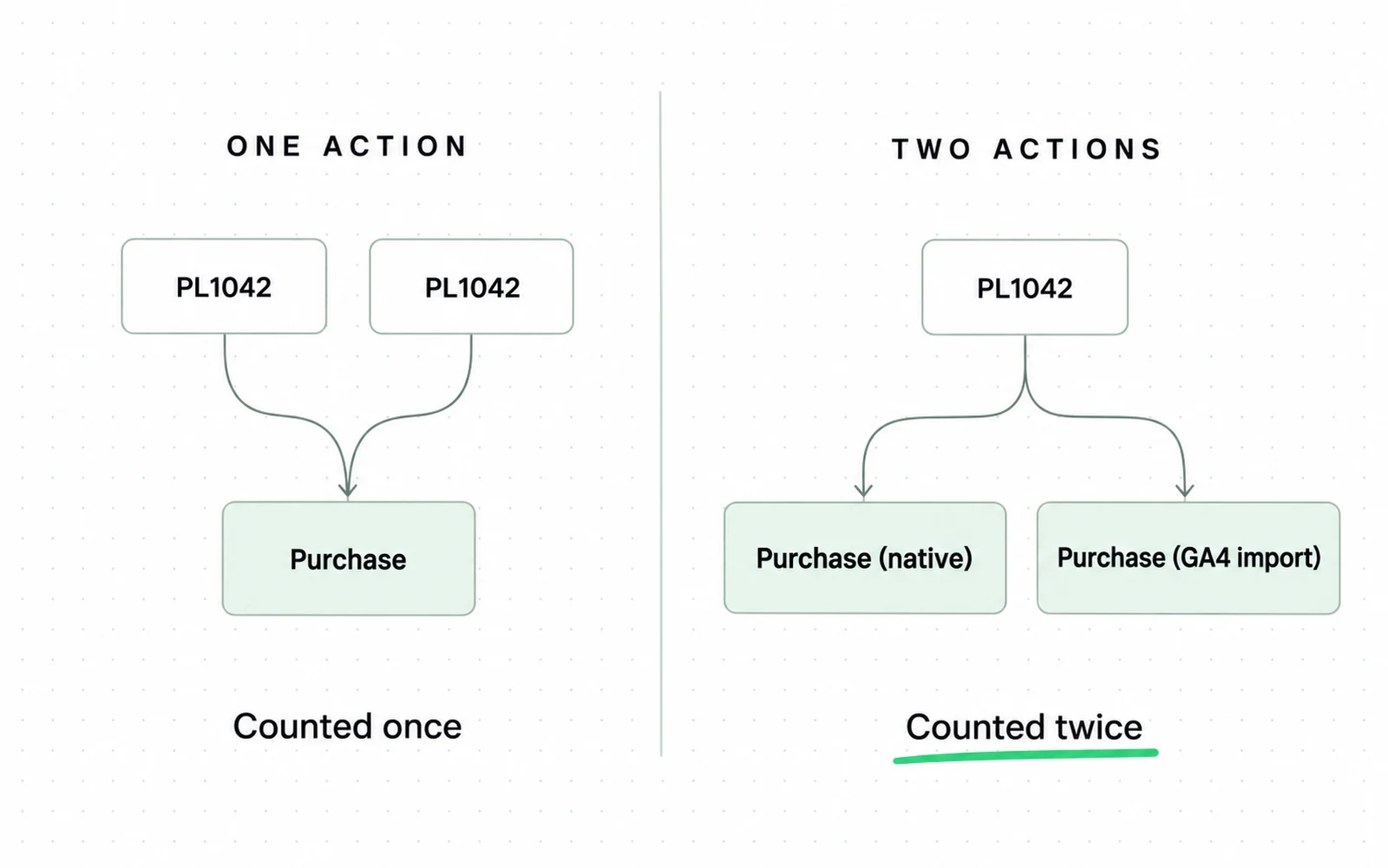
Google ignores the second conversion when the conversion action and transaction ID match. The ID can't stop duplication across two different conversion actions.
For example, a native purchase and a GA4 imported purchase can both count order PL1042. Their action names differ, so the shared order number alone doesn't merge them.
Break down the Conversions column by conversion action before you review campaign totals. That view shows you whether two of your purchase actions are counting the same sale.
Don't treat Google Ads remarketing audience lists as proof of sales.
When you weigh Performance Max vs Standard Shopping, remember that both formats bid on the purchase action you mark as primary.
If an agency runs your Google Ads, check that every campaign uses this same primary purchase action.
Close privacy gaps in Google Ads conversion tracking
Even a correct primary purchase action misses some orders when visitors refuse tracking, so handle consent and customer data matching separately. Use consent mode to control how tags behave. Use enhanced conversions to match conversions with hashed customer data.
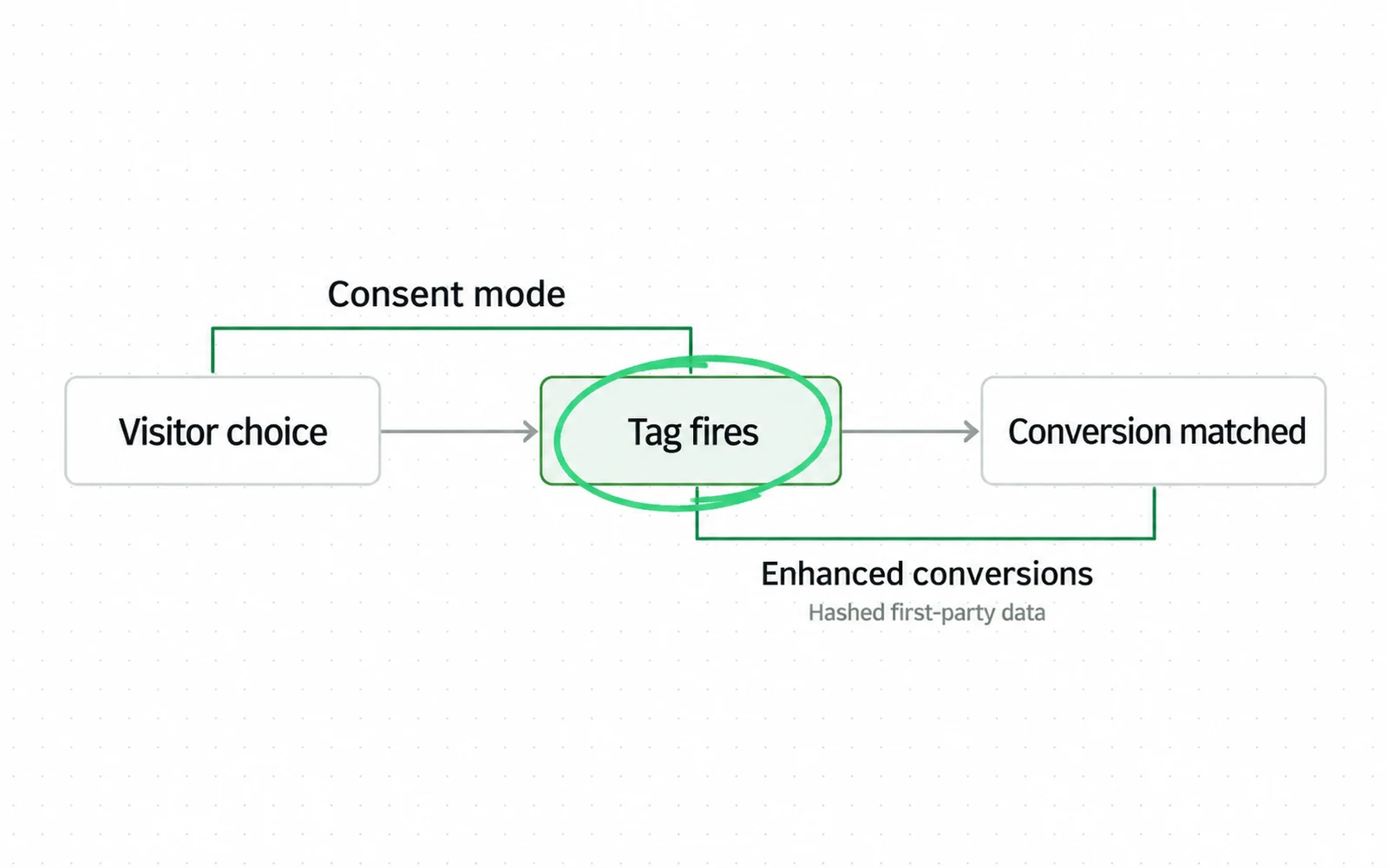
The enhanced conversions feature sends your customers' normalized first-party data through a one-way hashing process. Google uses the hashed data to match a conversion with data from signed-in accounts.
Consent mode changes tag behavior according to your visitor's choice. Basic mode blocks Google tags until consent, while advanced mode can send cookieless pings under denied defaults.
Google says advanced consent mode uses your account's own model. Basic mode relies on a general model because it does not receive pings from visitors who deny consent.
Didomi studied consent behavior across thousands of websites in 35 countries during 2025. Didomi reported web opt in rates from 49.8 percent to 64.4 percent across 16 industries in European markets.
Measure orders by consent state before you estimate the share missing from Google Ads. For instance, split last week's orders by the consent choice your banner recorded, then count how many in each group reached Google Ads.
Test the group with the widest gap first.
Google displays enhanced conversion uplift only during the first 30 days after activation. Write it down next to the activation date before that window closes.
Say Pine and Loom sees fewer recorded purchases from Safari visitors. Compare the share of orders recorded in Google Ads for each browser and consent state.
You shouldn't send customer data without the required notice and consent. Your consent platform and legal basis must govern what the tag receives.
Test one visit with consent granted and one with consent denied. In the browser's network panel, confirm that each visit sends only the signals your consent setup permits.
Some of your orders are finalized after the browser session ends, so decide separately whether to import them.
Handle backend and offline orders in Google Ads conversion tracking
Import backend orders only when a later store or CRM event changes the order value Google should use for bidding. Include an ad identifier or approved first party customer data that can match the order.
Your online store might confirm payment after fraud review or record a phone order after an ad click. In these cases, record the final order status from the store or CRM instead of the thank you page.
Google supports imports that connect later outcomes through identifiers such as GCLID or enhanced conversions for leads. For your store, the useful case is a paid order whose final value is only known after the browser session ends.
Send the stable order ID with the final value and currency. If you already sent the browser purchase, update that conversion with an adjustment upload.
Search Engine Land reported in June 2026 that Google began testing supplemental conversion data. The beta uses a transaction ID to link data recorded later in the backend to an existing conversion.
That beta is not a reason to redesign a stable setup. Use the import or adjustment method available in your account today. Keep your own order records outside Google.
Say Pine and Loom captures an order online, then approves payment after a manual check. Its backend record should update the same order instead of creating a second primary purchase.
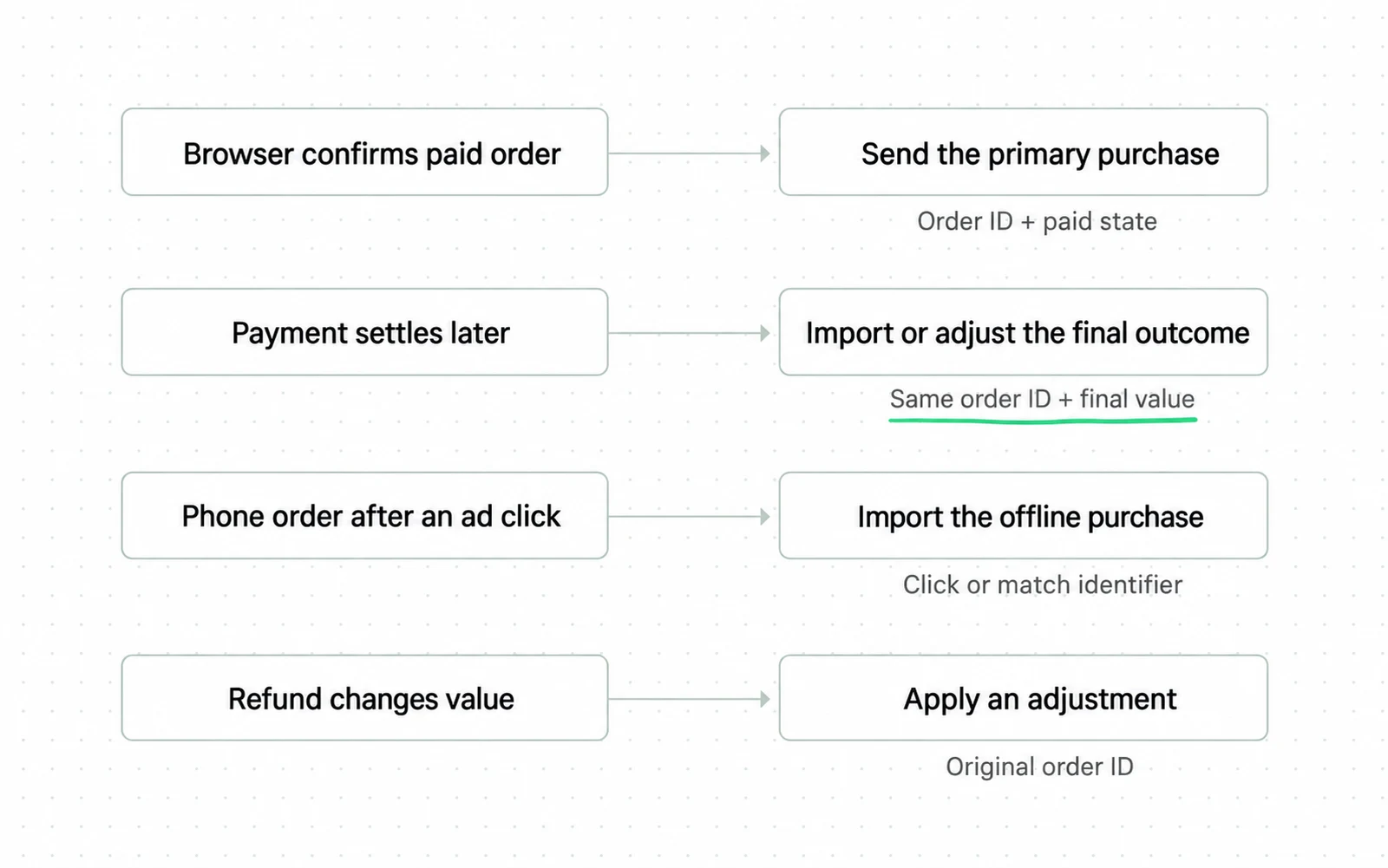
Don't send an offline import and a second browser action for the same sale. Segment your purchases by conversion action and confirm that each order ID appears once in the purchase total.
Keep click IDs and match data only as long as your policy permits. The import pipeline needs access control and a retry log because failed uploads create silent gaps.
Fix the Google Ads conversion tracking mistakes that skew counts
Before you compare daily purchase counts, check for settings that inflate or reduce them on their own. You can fix each of them in your Google Ads settings without installing a new tag.
From Google Ads Help, data discrepancies: factors and troubleshooting, read 8 October 2026.
| Mistake | What it does to your numbers | Fix |
|---|---|---|
| Add to cart set as a primary action with a value | Inflates conversion value and counts the sale twice | Set it to secondary or remove its value |
| Comparing Google Ads with your store on the same dates | Google Ads reports a conversion on the ad impression date, your store on the order date | Add the conversion-time columns before comparing |
| Judging a change the next day | Data can take up to 7 days to appear after significant changes | Wait the week, and 24 to 48 hours after linking Analytics |
| Expecting view-through orders in the main column | View-through conversions are left out of the Conversions column by default | Add the column, or accept the gap |
| Reading a later drop as lost tracking | Google removes some conversions it later finds invalid | Check invalid traffic before rebuilding the tag |
For example, if your purchase value doubles the week you add an add-to-cart action, check that action's role before you look at the tag.
Compare daily totals again after you correct these settings.
Verify Google Ads conversion tracking against seven days of orders
Run the daily comparison for seven days after launch or after any material tracking change. A tag that sends requests can still miss orders or count them twice, so match the purchases Google Ads records against completed store orders.
Tag Assistant confirms that the tag sent a request and shows the fields it included. It cannot confirm that every row represents one real order or that missing orders were recovered.
In your comparison sheet, note which date the Google Ads report uses and which conversion actions it includes.
Each difference points to a different correction
pine-and-loom-seven-day-check.csv
day,store_orders,google_ads_conversions,difference,class,next_action
1Mon,18,20,+2,double_count,inspect_purchase_actions
Tue,16,12,-4,consent_denial,segment_consent_state
2Wed,21,18,-3,delayed_attribution,recheck_after_sync
Thu,14,14,0,aligned,keep_monitoring
Fri,24,25,+1,click_date_shift,compare_order_ids
3Sat,27,23,-4,missing_return,inspect_payment_paths
Sun,19,19,0,aligned,close_daily_check
- 1Pine and Loom is fictional. Every value is illustrative and does not describe a real account.
- 2A positive difference starts with duplicate actions. A negative difference starts with consent or payment return. Reporting delay is the next check.
- 3Order ID matching separates timing movement from a missing or duplicated order.
Google Ads assigns a conversion to the date of the ad interaction. Your store usually assigns the order to the payment date, so daily totals can move even when the same order exists in both systems.
Google says to allow 24 to 48 hours for Analytics and Google Ads data to sync before comparing results. Conversion data can take up to 7 days to fully appear after account linking or significant changes.
Match order IDs before you calculate a percentage gap. An ID match tells you whether the order is missing or duplicated. If both systems record the same order on different dates, timing explains the difference in daily counts.
-
Keep the comparison rules fixed
Apply the same currency rule to every completed order and use the same conversion actions each day. Save the report date and time zone with the sheet.
-
Test one real checkout
Place a controlled order and confirm its event name and order ID. Check that the value and currency it sends match the consent state you chose.
-
Record the daily counts
Enter store orders and Google Ads conversions side by side. Record the difference before you interpret it.
-
Match the order IDs
Look at the extra and missing rows. Tell duplicate records apart from attribution delays and from payments where the browser never came back to the confirmation page.
-
Check value and currency
Compare matched orders individually. A correct count can still carry the wrong revenue.
-
Fix one cause
Fix one problem in the purchase tracking source, the consent settings, the payment return or an import rule. Then restart the comparison window.
-
Document unresolved differences
Record the remaining gap and its known causes. Assign an owner to anything unresolved.
For example, if Google Ads records two purchases for one Shopify order, check for duplicate conversion actions first. If it records one purchase for two Shopify orders, check whether consent blocked the tag or the browser never returned after payment.
Shopify warns that its reports can disagree with third party platforms. Their attribution models and their data processing are not the same. Match the orders in both systems before you judge campaign attribution.
Once your order counts match the store, the conversion rate calculator gives a rate you can trust. The ROAS calculator needs one more check first, because conversion value also has to match your store records.
A gap that stays inside your fixed percentage can still hide a change in which orders are missing. Instead, write down the order types you excluded, the consent states you left out and the timing rule you used.
For instance, you might exclude phone orders from the comparison because they never pass through the browser tag.
At the end of the week, decide whether to keep the setup or change it. If it needs to change, fix the one cause you identified or switch the method that sends purchase events, then run the seven day check again.
What Google Ads conversion tracking costs
Of these setup options, only moving tagging onto your own server carries a monthly bill. Google's own guide puts each tagging server on Cloud Run at about $45 a month, and recommends running at least two.
Google's recommended two-server setup costs at least about $90 a month, before higher traffic requires more instances.
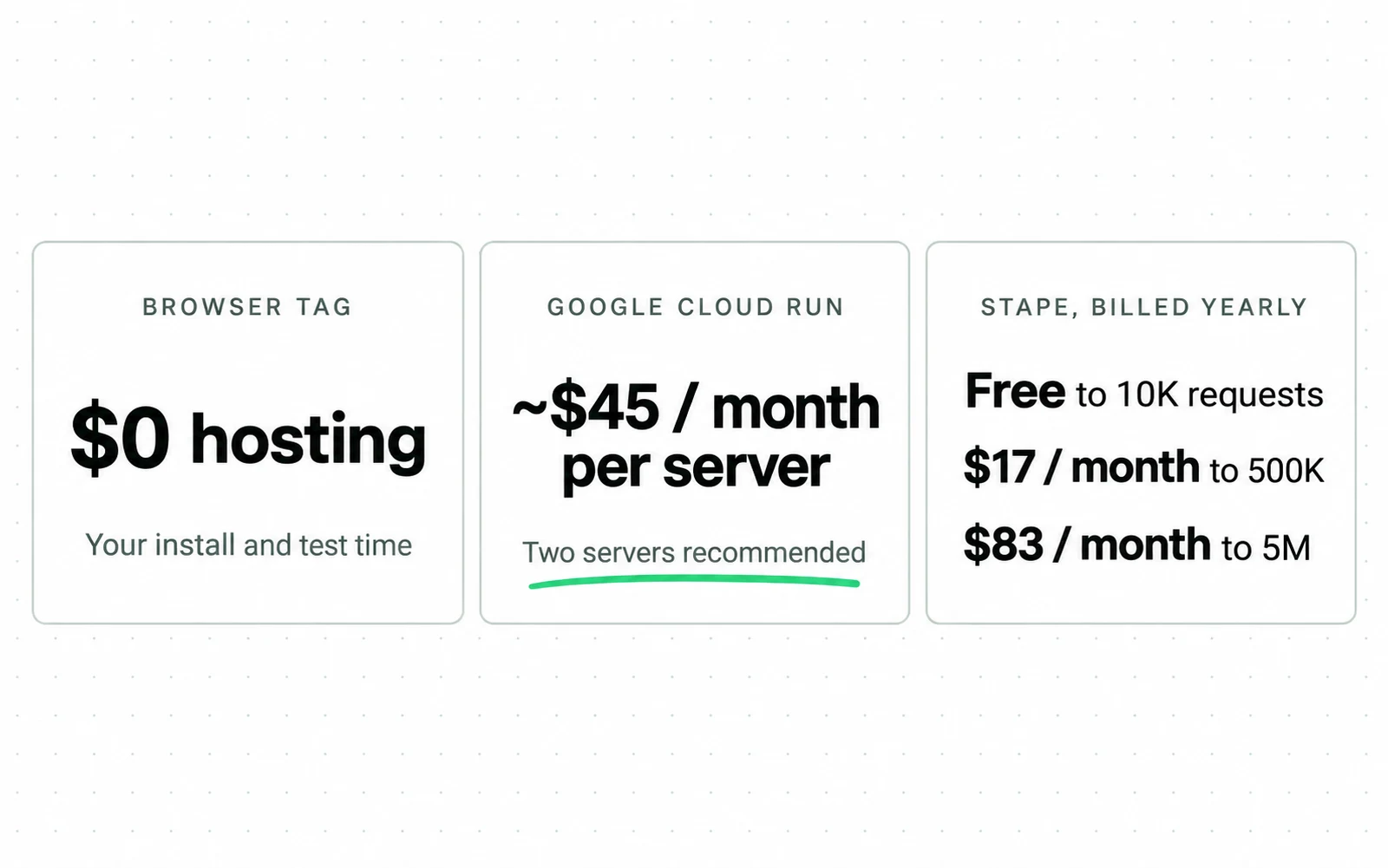
For example, a store sending 300,000 requests a month fits Stape's Pro plan, $17 a month billed yearly or $20 billed monthly. On Google's setup, the same store pays for the recommended minimum of two servers.
Developer time is the larger cost and has no list price. It depends mainly on which installation method you chose.
Sources
- Google Tag Platform Set up server-side tagging with Cloud Run: each server costs approximately $45 a month, a minimum of two instances recommended
- Stape Pricing: free to 10K requests, Pro $17 a month to 500K, Business $83 to 5M, Enterprise $167 to 20M, billed yearly
- Google Ads Help About primary and secondary conversion actions
- Google Ads Help How Google Ads tracks website conversions
- Google Ads Help Enhanced conversions diagnostics
- Google Tag Platform Consent mode overview
- Google Ads Help Data discrepancies: Factors and troubleshooting
- Google Ads Help About offline conversion imports
- Google Enhanced Conversions
- Shopify Help Center Set up Google Analytics
- Shopify Help Center Marketing performance
- Shopify Enhanced Conversions for Google Ads Dated 2025 with no month given, so its exact age is not knowable from the source.
- Search Engine Land Bad data creates bad reports and poor ad delivery
- Search Engine Land Google Ads launches beta for supplemental conversion data
- Search Engine Land Google Tag Manager adds guided setup for Google Ads purchase tracking
- Analytics Mania Google Ads conversion tracking with Google Tag Manager
- Semrush Google Ads Best Practices Dated 2025 with no month given, so its exact age is not knowable from the source.
- Stape Server Side Google Ads Conversion Tracking in Shopify
- Optmyzr PPC Data Tracking: What to Monitor and Why
- Didomi Consent Collection Benchmark 2025 Dated 2025 with no month given, so its exact age is not knowable from the source.
- Workshop Digital Enhanced Conversions Drive a 29 Percent Lift in Tracked Form Fills Dated 2025 with no month given, so its exact age is not knowable from the source.
- Search Engine Journal Ads Measurement and Privacy Plan for 2024 and Beyond Dated 2024 with no month given, so its exact age is not knowable from the source.
- Didomi Didomi Benchmark 2025 Dated 2025 with no month given, so its exact age is not knowable from the source.
- Workshop Digital The Benefits of Enhanced Conversions in Google Ads Dated 2025 with no month given, so its exact age is not knowable from the source.
Questions people ask
Why do I need Google Ads conversion tracking?
You need it to connect ad interactions with paid orders and order value. Your purchase data also feeds your campaign reports and any bidding strategy that uses the primary purchase action.
Why is Google Ads not tracking my conversions?
Start with the purchase event and consent state. Then check the payment return path and report delay. Match transaction IDs against store orders because a daily total cannot separate missing orders from shifted dates.
How do I know conversion tracking works?
Confirm the tag request and match Google Ads purchases with completed orders for seven days. Check each purchase's transaction ID, value and currency. Then inspect the conversion action and attribution date for every mismatch.
What are Google Ads enhanced conversions?
The enhanced conversions feature uses hashed first-party customer data to match conversions. It supplements a valid conversion event. You still need a purchase trigger, consent rules and order reconciliation.
Should I import GA4 purchases into Google Ads?
Import GA4 purchases when GA4 already records them with a purchase event you have tested and you want to use those events in Google Ads. Keep the import secondary until you confirm that another primary action is not counting the same orders.