
What is Google Ads remarketing?
Google Ads remarketing is the use of first-party audience data to reach or analyze people who already interacted with your business. Your useful unit is not "a visitor." It is a person whose latest known event makes your specific message, product, or exclusion appropriate.
Google now calls remarketing lists "your data segments." Four sources can feed your segments: your website or app, an uploaded customer list, YouTube activity, and engagement with your business on Google properties.
Remarketing is now called your data
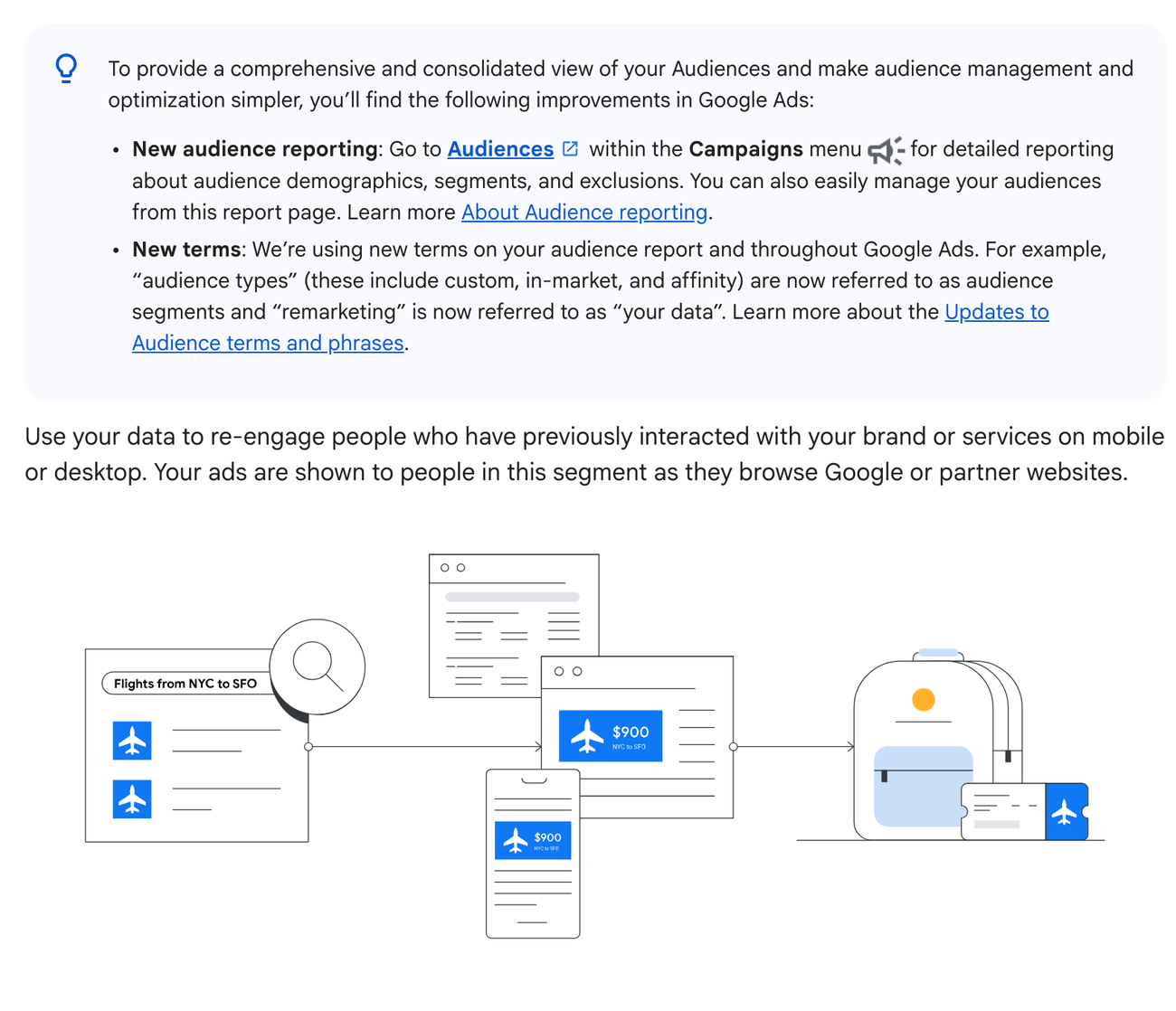
- 1The terminology box changes "remarketing" to "your data." Account labels and operating notes should use both terms until every stakeholder recognizes the new one.
- 2The same box places audience demographics, segments, and exclusions in one reporting view. A list definition and its exclusion should therefore be reviewed together.
- 3The diagram presents re-engagement as a flow from prior interaction to later delivery. It does not say that every campaign using the data stays inside the original segment.
That terminology matters because your list is not your campaign. You can use a cart-abandoner audience to restrict a Search ad group, sit in Observation, seed a campaign that can expand beyond it, or suppress your ads after purchase.
Say you build your store's remarketing campaigns around the audience "viewed product in the last 14 days and has not purchased." That audience is actionable. If you choose "all visitors," you say almost nothing about intent.
Shopify's 24 August 2025 commerce guide likewise narrows a remarketing audience by the action a visitor took. Keep that separate from your custom prospecting: a July 2025 custom-audience guide builds custom segments from competitor URLs, which answers a different audience question for your account.
| Source | What it can represent | Main control to check |
|---|---|---|
| Google tag | Page views and custom ecommerce parameters | Tag coverage and item IDs |
| Google Analytics 4 | Event sequences such as add_to_cart without purchase | Linked account and audience rule |
| Customer Match | Consented first-party customer records | Policy eligibility and list freshness |
| Google-engaged audience | People who interacted with the business on Google properties | Automatic list availability |
| Merchant Center feed | The products available for dynamic ads | Approval status and ID match |
Standard remarketing uses a shared message for a defined audience. Dynamic remarketing shows products or services that people previously viewed, and it requires a feed plus a tag that connects visitor activity to feed items.
In a field experiment with an online travel firm, the Journal of Marketing Research found generic ads beat dynamic product ads on average until preferences had narrowed. Test your product detail against intent.
For retail, the feed lives in Merchant Center and the Google Ads tag sends item identifiers that must match the feed. For example, a product-view event with the wrong ID does not become a personalized product ad just because the audience list is large.
A lifecycle, not one list
- 1 Visited Observed the store but showed little product intent.
- 2 Viewed Saw a product or category but did not add it.
- 3 Carted Added a product but did not purchase.
- 4 Purchased Should usually leave acquisition audiences and enter retention logic.
How does Google Ads remarketing work?
Your remarketing system has four moving parts: a data source records an event, an audience rule decides eligibility, a campaign decides how to use that audience, and conversion tracking reports what happened later. Confuse any two and your campaign looks configured but behaves differently from your plan.
Current Google Ads documentation sets the minimum at 100 active users in the previous 30 days for Display, Search, and YouTube data segments. Your new or edited segments can take 48 to 72 hours to populate.
The threshold tells you about a serving condition, not a quality score. One hundred unrelated visitors do not make your audience strong. Your smaller, high-intent rule can be strategically better while still being too small to serve on its own.
One serving threshold across three surfaces
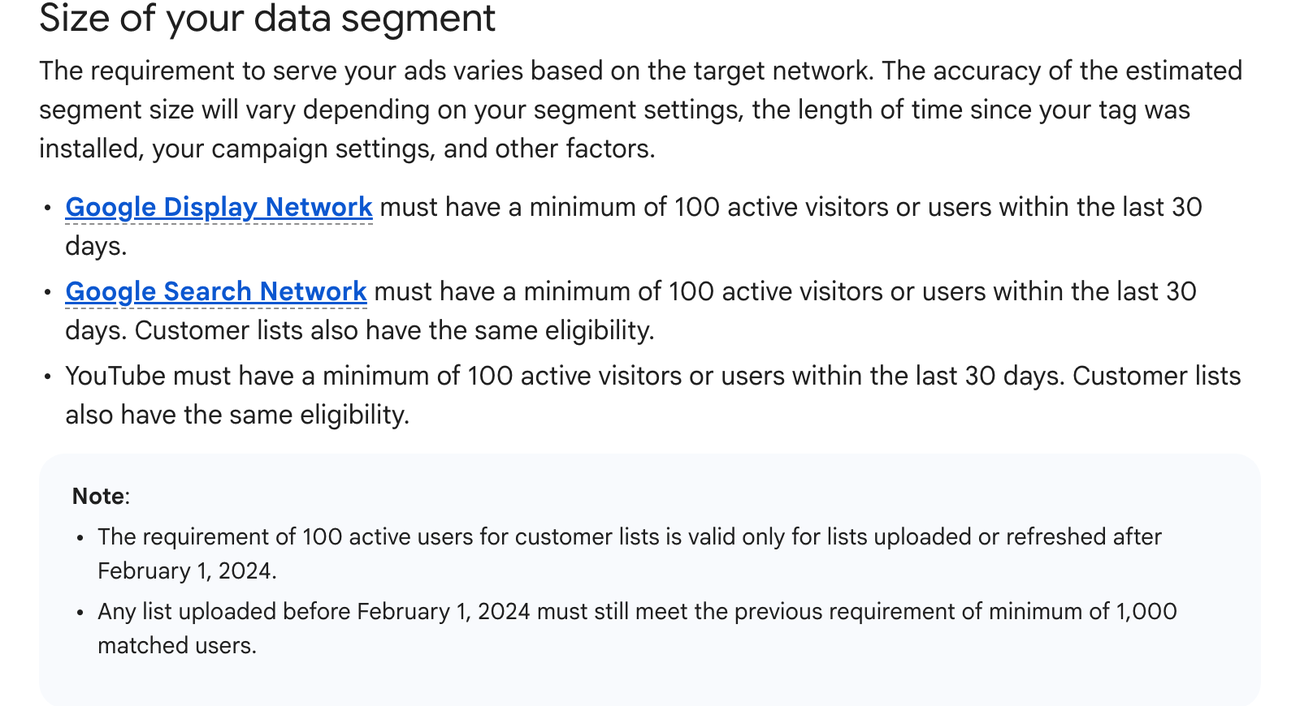
- 1Display, Search, and YouTube each show 100 active users in the previous 30 days. The Note underneath keeps one older state alive: a customer list uploaded before 1 February 2024 still has to meet the previous minimum of 1,000 matched users until it is refreshed.
- 2The count is a serving threshold, not a measure of audience quality. Keep intent, exclusion, and expected value beside the eligible-user number.
- 3The note dates a customer-list policy change to 1 February 2024. It applies to customer lists, so it should not be generalized to every website or Analytics segment.
| Campaign behavior | What the audience does | What to watch |
|---|---|---|
| Targeting | Restricts eligible users to the selected audience | Reach can become narrow |
| Observation | Leaves reach open and adds audience reporting | Do not read it as audience-only delivery |
| Audience signal | Gives automation a starting point | Delivery can extend beyond the signal |
| Exclusion | Removes users who match the rule | Membership and refresh logic |
| Dynamic feed match | Selects products related to recorded item IDs | Tag-to-feed ID consistency |
In your Search campaigns, you can use audience segments as Targeting or Observation. Google says Search list size is based on people in the segment who searched on Google in the previous 30 days, so your reported size is not simply every site visitor in the rule.
Optimized targeting can move beyond the audience signals supplied to Display, Demand Gen, and Video action campaigns. Performance Max and App campaigns always use automated expansion behavior.
A 2025 Management Science field experiment with one automaker found contextual targeting plus retargeting improved visits, engagement and soft conversions. Test your context and message together.
This is where our Google Ads management has to be precise. If a report calls every conversion from a signal-led automated campaign a remarketing conversion, it is describing the input, not necessarily the delivered audience.
The remarketing control system
| Audit question | |
|---|---|
| Source | Which first-party event or customer record entered the system? |
| Rule | Who qualifies, for how long, and who is excluded? |
| Behavior | Does the audience restrict, observe, seed, or suppress delivery? |
| Outcome | Did it add profitable orders or only claim attributed ones? |
How to set up Google Ads remarketing
A conversion report is only as honest as its data path, so build yours before you build ads. Start with consent and conversion events, then your audiences and exclusions, then the product match, and assign campaign behavior last.
-
1. Map the buying events
Write your store's smallest useful event sequence. That may be product view, add to cart, begin checkout, then purchase and repeat purchase. Assign an owner and source to each of your events.
-
2. Implement consent behavior
Decide when your advertising tags may read or write data, pass the required consent signals, and document the regional rule used by your store.
-
3. Connect the source
Use the Google tag, a linked Google Analytics 4 property, Customer Match, or the relevant commerce connection. Confirm that your events arrive with your expected parameters.
-
4. Build inclusion and exclusion together
Create your intended segment and its opposite. A cart-abandoner rule should exclude your purchasers for the same relevant window.
-
5. Prove the retail match
For dynamic retail ads, compare the item ID sent by your site with the exact product ID in Merchant Center. Test more than one product and variant.
-
6. Choose campaign behavior
State whether the audience restricts delivery, adds observation, seeds automation, or excludes users. Record that choice in the campaign name or operating note.
-
7. Launch with a measurement plan
Check source health and eligible size first. Then reach, frequency and conversions. Purchaser leakage and order economics close the cadence.
A practical Google Analytics 4 audience is users who triggered add_to_cart but did not trigger purchase. Google Analytics automatically exports an audience to linked advertising accounts when ads personalization is enabled for the link.
Google Analytics 4 standard properties allow up to 100 audiences and Analytics 360 properties allow up to 400. A new audience can prepopulate up to 30 days of qualifying users when data is available.
Do not create dozens of nearly identical windows just because the limit exists. Start with windows that correspond to a real consideration cycle, stock pattern, or replenishment need. Then keep only the splits that change a decision.
| Consent state | Tag behavior | Remarketing implication |
|---|---|---|
| Basic implementation, no consent | Advertising tags are blocked before interaction | No advertising data is sent before consent |
| Advanced implementation, denied | Tags can send cookieless measurements | Remarketing data is not received when ad_personalization is denied |
| Granted | Tags operate according to the granted signals | Audience use remains subject to policy and local law |
Google states that consent mode does not provide a consent banner or widget and does not handle consent management. If ad_personalization is denied, remarketing does not receive the advertising data.
Didomi's 2025 benchmark draws on 30,000 or more websites and apps. It shows your consent collection can vary by region, industry, device and banner design.
Tag Inspector found 79 percent of 450 US sites still loaded at least one advertising or targeting tag after opt-out in 2025. Audit your actual tag behavior.
Dataships compared more than 100 consent A/B tests across 15 million Shopify Plus checkout sessions in 2025. It measured email and SMS permission, not your Google Ads audience.
Personalized advertising policies prohibit personally identifiable information in remarketing tags, data segments or product data. Sensitive-interest restrictions can limit personalized targeting on top of that.
For stores using Shopify, Google Ads for Shopify should begin with a connection audit, not a second tag pasted into the theme. Confirm the existing Google tag, Analytics link, Merchant Center connection, and consent behavior before adding another implementation path.
The feed and event implementation sit beside Google Shopping management, because the product record that earns an impression must be the same product record the site event identifies. Retail dynamic remarketing requires linked Merchant Center and Google Ads accounts, a Merchant Center feed, and a Google Ads tag with dynamic event parameters.
An independent feed setup guide makes the same operational check: the item ID collected by the remarketing event must match the ID attribute in the product feed.
Two IDs, one product, and the only difference is capitalization
event payload vs Merchant Center feed row
// what the remarketing event recorded on the product page
items: [
1 { id: 'SKU-4471-BLK-M', google_business_vertical: 'retail' }
]
// what the Merchant Center feed publishes for the same product
2id: 'sku-4471-blk-m'
title: 'Corduroy jacket, black, M'
availability: 'in_stock'
- The event and the feed must carry the same identifier. A page view that fires correctly still fails dynamic remarketing if the string differs.
- Capitalization and variant suffixes are where this breaks in practice, and neither side reports an error when they disagree.
- Check a second product before calling it fixed. One matching ID can be a coincidence of how that item was created.
What remarketing should cost
There is no responsible universal daily budget for Google Ads remarketing. Your budget depends on how many eligible people can be reached, how quickly your audience turns over, what an order contributes, and how often another impression remains helpful.
The 100-active-user platform minimum is not a budget recommendation. It only tells you whether your segment is large enough to serve on the named surfaces during the stated 30-day window.
| Input | Question | Budget effect |
|---|---|---|
| Eligible reach | How many people can the campaign reach? | Caps realistic delivery |
| Audience turnover | How many new eligible users enter each day? | Determines how quickly spend can renew |
| Buying window | How long does the decision usually take? | Shapes membership duration |
| Contribution per order | What remains after product and variable costs? | Sets the economic ceiling |
| Frequency | How often are people seeing the message? | Reveals saturation before budget does |
| Incremental value | How many orders would not happen without the ads? | Prevents attributed revenue from becoming the only target |
WordStream's 2026 benchmark covers 7,074 display campaigns. For example, your apparel context is a $2.64 click and a $198.34 lead, not a remarketing quote.
Ahrefs found 37.9 percent of advertised websites already ranked in the organic top 10 across 2.3 million keywords. Your budget decision should therefore test channel overlap.
Semrush measured 544.2 billion visits in 2025. Display contributed 0.09 percent and paid search 0.49 percent. Use these traffic shares to frame your channel mix.
Start with enough budget to observe the audience without forcing delivery. Suppose frequency rises while your eligible reach stays flat. Raising your budget can buy more repetition rather than more customers.
Good PPC work connects spend to contribution and incrementality, not traffic alone; that is the standard any PPC management is held to. Hold the campaign to the order, then ask how many of those orders it added.
If the audience is too small, do not pad it with low-intent visitors merely to spend more. Use Observation where appropriate, combine only groups that deserve the same decision, or improve the acquisition and onsite flow that creates the audience.
Which remarketing mistakes waste budget
Padding a small audience wastes your budget, and most waste starts even earlier, before your bid. Diagnose in order: your list holds the wrong people, your campaign uses it differently than you expect, or your site has a conversion problem another impression cannot solve.
| Symptom | Likely cause | First check |
|---|---|---|
| List is too small | Broken source, narrow rule, consent effect, or genuine low traffic | Source event volume and list status |
| Purchasers still see acquisition ads | Missing or stale purchase exclusion | Exclusion rule and membership refresh |
| Wrong products appear | Event item IDs do not match feed IDs | Tag payload against Merchant Center |
| Signal campaign reaches new users | Automation expanded beyond the supplied signal | Campaign behavior and audience report |
| Revenue looks strong but lift is unclear | Attributed conversions include people who would buy anyway | Holdout or lift-test feasibility |
| Spend stalls | Audience is below a serving threshold or has little reachable demand | Active-user count by surface |
Using a stale audience threshold
Some current commerce guides still state that Search remarketing needs 1,000 users. Current Google Ads Help states 100 active users in the previous 30 days for Search, Display, and YouTube. The older number survives in one place only: a customer list uploaded before 1 February 2024 must still meet the previous minimum of 1,000 matched users until it is uploaded or refreshed again. Read the live platform status for the list in front of you rather than an inherited checklist.
Starting with all visitors
All visitors is five audiences in one. It holds accidental visits and research sessions next to product viewers, cart abandoners and paying customers. If the message or bid should differ, the audience should differ. If the audience is only a signal, report it as a signal.
Baymard Institute's 2025 cart-abandonment review separates natural browsing behavior from checkout problems that a store can fix. An abandonment event alone therefore does not justify the same bid or message for every shopper.
The Journal of Marketing Research randomized frequency across 234,595 product viewers. Retargeting brought 14.6 percent more of them back within four weeks.
One-third of that first-week effect arrived on day one. The experiment lacked power for a purchase effect, so your frequency rule still needs account evidence.
Treating consent mode as consent
Consent mode adjusts tag behavior from the signals it receives. It does not create a lawful basis, collect the choice, or replace a consent-management system. Get jurisdiction-specific advice when the rule is uncertain.
Calling every attributed order incremental
Google defines incremental conversions in Conversion Lift as the difference between the treatment group and the control group. That is a different question from how many conversions were attributed after an impression or click.
Trying to advertise around a weak checkout
Baymard scored 41,000 or more checkout elements across 327 leading ecommerce sites in its 2025 benchmark. It rated 64 percent of desktop sites, 63 percent of mobile sites, and 46 percent of mobile apps as mediocre or worse for checkout user experience.
Share rated mediocre or worse for checkout UX
| Share | |
|---|---|
| Desktop sites | 64 percent |
| Mobile sites | 63 percent |
| Mobile apps | 46 percent |
If cart traffic is healthy but checkout completion is weak, inspect the checkout before buying the same visitor again. Remarketing can restore attention. It cannot remove an unclear delivery date, a forced account, a payment error, or an unexpected cost.
How to measure remarketing
Measure your remarketing in three layers. First prove that your source and audience are healthy. Then inspect your delivery and saturation. Finally judge your order economics and incrementality. Your campaign can pass the first two layers and still fail the third.
Three levels of proof
- 1 1. Source health Event volume, consent state, list status, item-ID match, purchaser exclusion.
- 2 2. Delivery Eligible reach, impressions, frequency, audience behavior, product coverage.
- 3 3. Business outcome Orders, contribution, new versus returning customers, and incremental conversions.
Google reports a view-through conversion when someone sees an ad, does not interact with it, and later converts. A longer view-through window can increase the reported count, and view-through conversions are generally reported outside the main Conversions column.
Read view-through performance with reach, frequency, other channel activity, and the selected window beside it. A larger attributed count does not by itself establish added demand.
The 2025 ANA and Demand Metric benchmark surveyed 324 marketers, and 75 percent used multichannel strategies. Your view-through conversion therefore needs other-channel context.
A 2024 Marketing Science retailer experiment found cookie-level retargeting analysis missed offline sales. Multi-cookie users also crossed treatment and control groups in your apparent split.
Where account eligibility and volume allow it, Conversion Lift uses treatment and control groups to estimate the conversions caused by the ads. Google notes that Conversion Lift is not available to every account.
Across 15 US experiments, 500 million user-experiment observations and 1.6 billion impressions, Marketing Science found observational estimates often missed randomized effects. Test your attributed result.
A Marketing Science Institute study repeated the comparison across 663 Facebook experiments and 5,000 or more features. Neither method recovered causal effects reliably in that sample. Treat your attribution as unproven.
The Quarterly Journal of Economics examined 25 retailer and brokerage field experiments representing $2.8 million in ad spend. Even your randomized ROI estimate can remain wide.
For routine operations, build a compact weekly check. Source rows first: audience entrants, excluded purchasers and eligible users by surface. Delivery rows next: spend, reach and frequency. Outcome rows last: conversions, order contribution and any test result. Keep campaign type and audience behavior visible beside every number.
Remarketing questions people ask first
Four questions come up before anyone writes the first audience rule. What the minimum really is. What it costs. Which campaign type to start with, and what to exclude.
The short answers are below. The setup sections above explain the controls behind them.
Sources
- Google Ads Help About Audience Manager
- Google Ads Help How your data segments work
- Google Ads Help Retail dynamic remarketing
- Google Ads Help About using data segments in Search campaigns
- Google Ads Help About optimized targeting
- Google Ads Help About your data segments
- Google Analytics Help Create a Google Ads remarketing audience
- Google Analytics Help Create and edit audiences
- Google for Developers Consent mode overview
- Google Ads Policy Personalized advertising
- Search Engine Land Google Ads retargeting and data segments
- Search Engine Land Audience targeting for Google Ads Search campaigns
- Shopify Google Ads for ecommerce
- Baymard Institute The current state of checkout UX
- Optmyzr 2025 PPC feature updates
- Tinuiti All leads are not created equal Measured 15 months ago, on a surface that has moved since.
- IAB Europe Transparency and Consent Framework policies
- Information Commissioner's Office Storage and access technologies impact assessment
- Google Ads Help About Conversion Lift
- Google Ads Help About view-through conversions
- Shopify How to launch Google Shopping ads
- Shopify What Google Ads remarketing is and how it works Measured 13 months ago, on a surface that has moved since.
- Baymard Institute Cart abandonment rate statistics
- Optmyzr Why competitor audience targeting is the future of PPC Measured 14 months ago, on a surface that has moved since.
- DataFeedWatch What is Google Remarketing and How to Set it Up This page carries no publication date of its own.
- WordStream by LocaliQ Display & Video Ads Benchmarks 2026: Exclusive Data & Insights for Every Industry This page carries no publication date of its own.
- Ahrefs Is Your PPC Strategy Sabotaging Your SEO? 2.3M Keyword Study Measured 20 months ago, on a surface that has moved since.
- Semrush We analyzed billions of web visits: How AI is reshaping traffic channels This page carries no publication date of its own.
- Didomi Data privacy benchmark on consent collection in Europe and North America Measured 19 months ago, on a surface that has moved since.
- Tag Inspector by InfoTrust The State of Consent Compliance 2025 Dated 2025 with no month given, so its exact age is not knowable from the source.
- Dataships 2025 Shopify Checkout Consent Benchmark Dated 2025 with no month given, so its exact age is not knowable from the source.
- Management Science Combining Ad Targeting Techniques: Evidence from a Field Experiment in the Auto Industry
- Marketing Science What Cookie-Based Advertising Effectiveness Fails to Measure
- Journal of Marketing Research An Experimental Investigation of the Effects of Retargeted Advertising: The Role of Frequency and Timing
- Journal of Marketing Research When Does Retargeting Work? Information Specificity in Online Advertising
- Marketing Science A Comparison of Approaches to Advertising Measurement: Evidence from Big Field Experiments at Facebook
- Marketing Science Institute Close Enough? A Large-Scale Exploration of Non-Experimental Approaches to Advertising Measurement
- The Quarterly Journal of Economics The Unfavorable Economics of Measuring the Returns to Advertising
- ANA and Demand Metric The State of Response Rates Benchmark Report Dated 2025 with no month given, so its exact age is not knowable from the source.
Questions people ask
What is remarketing in Google Ads?
Remarketing is the use of your first-party data to reach, observe, or exclude people who previously interacted with your business. Google now calls these audiences "your data segments." The audience can come from a site or app, from Google Analytics, or from an uploaded customer list. YouTube activity and engagement on Google properties feed it too.
Can you retarget with Google Ads?
Yes. Google Ads can use your first-party audiences on eligible Search, Display and YouTube campaigns. Shopping, Demand Gen and automated workflows accept them as well. The control differs across your campaigns. An audience may restrict delivery or add Observation. It may also seed automation, drive a dynamic product match, or exclude users.
How do I set up remarketing for Google Ads?
Start with consent and event tracking. Connect the data source, then define the inclusion rule and the purchaser exclusion. Verify that the audience populates before anything runs. For dynamic retail ads, match the site item ID to the Merchant Center product ID. Then choose whether the audience targets, observes, seeds, or excludes.
Is $20 a day good for Google Ads?
No daily amount is good in isolation. For remarketing, read the budget against eligible reach and audience turnover. Then against the buying window and contribution per order. Frequency and incremental value decide whether more spend is buying more customers. A small audience can saturate before it spends a nominal daily budget, while a larger high-intent audience may justify more.