

How are Google Shopping ads matched to queries?
A Search ad is matched to a query through keywords you chose, in an auction where how Google Ads works sets the price. A Shopping ad is matched differently. Google states the difference on its own page about Shopping ads, and it puts the important part in brackets.
You do not choose the queries.
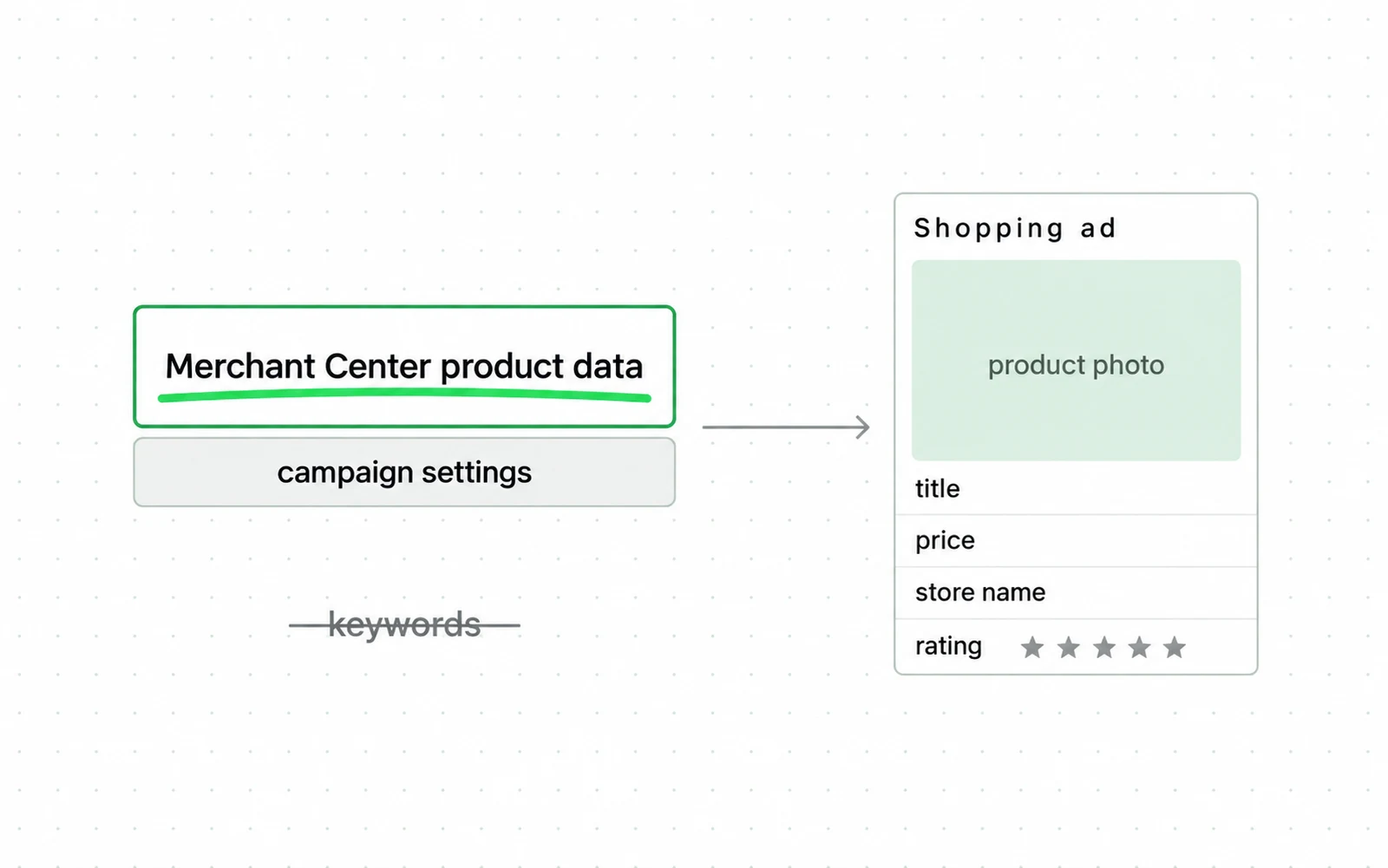
- The example is the explanation. A Shopping ad is a photo, a price, a store name and a rating, assembled by Google from your product data.
- The page names the source of that data twice: your campaign settings and your product data, fed through Merchant Center.
- Further down, the page says it in brackets: Shopping ads use your existing Merchant Center product data (not keywords) to decide how and where to show your ads.
Five answers follow from that one parenthesis, and the last is the uncomfortable one:
- What triggers the ad. A match between a search and your product data.
- What you write. The feed, not the ad.
- Where the shopper lands. The link attribute in the feed.
- What you can exclude. Queries, through negative keywords.
- What you cannot choose. The queries you appear for, which is the direct consequence of the line above it.
That single line reassigns the work. There is no keyword list to write, no ad copy to test, and no landing page to choose per query. Google reads a file of product attributes, and matches a search against the whole file, not any one field in it.
The same reassignment is now happening inside agentic commerce: ChatGPT Ads match on a product feed too, and the feed is the lever there as well.
| On a Search campaign | On a Shopping campaign |
|---|---|
| You choose keywords | Google matches from your product data |
| You write the ad | Google assembles it from photo, title and price |
| You pick the landing page | The landing page is the one in the feed |
| You improve it by editing ads | You improve it by editing the feed |
| Negative keywords exclude queries | Negative keywords still exclude queries |
Required feed attributes
Merchant Center publishes a specification and the required part of it is short. Some attributes beyond those become required by category or destination. The rest are optional in the sense that Google accepts the product without them, and not optional in the sense that they change what you match.
Seven required fields, and one of them is the sentence a shopper reads.
Why the title is the field worth spending time on
Google matches against your product data as a whole, and the title is the required free-text field a shopper also reads, at 150 characters. The description is required too, at 5,000, and both carry the same instruction about matching the landing page.
Blue Shirt and Oxford Cotton Shirt, Slim Fit, Light Blue, Mens describe one product with different amounts of the vocabulary your shopper might type. Title is one of several fields the matching reads.
Google attaches an instruction to it that is easy to miss: match the title from your landing page. A feed title that promises something the page does not say is a disapproval risk, not a growth tactic.
Where the clicks are going
Product listing ads are counted separately from text ads in the Similarweb analysis Aleyda Solis published in February 2026. Across the top 5,000 US queries per category, comparing January 2025 with January 2026:

How the paid share of clicks has moved overall is a larger question than this format, and SEO vs PPC takes up how much of the page is paid now. Search Engine Land reported the same analysis and added the spending side: Amazon’s paid clicks up 35 percent over the year, Walmart’s up sixfold, Gap’s up 137 percent. One vendor’s panel, four categories. Read it as the direction in those categories, not as the market.
The price a listing pays when it does show is set by the same auction as a text ad, which how Google Ads works takes apart input by input.
Three mistakes from Search habits
Each of these is a habit that works on Search and does nothing here, and the first one is the reason the other two happen.
Optimising keywords nobody uses
There is no keyword list in a Shopping campaign to optimise. Time spent on match types and bid adjustments per keyword is time not spent on the file that decides the matching. The one keyword control that exists is negative. Semrush sets out the structure: campaigns can run as Standard Shopping or as Performance Max, and neither takes a keyword list.
A feed title written for the feed
Merchant Center says to match the title from your landing page. Teams that treat the feed as an ad channel write keyword-stuffed titles, which breaks that instruction and puts the product at risk of disapproval. Teams that treat it as a catalogue export send the raw product name, which carries none of the words people type. The useful version is the product described the way a person would search for it, in the words the page also uses.
Running Performance Max and Shopping without knowing which one serves
Google documents one priority rule clearly, and it is not the one people assume. Search campaigns containing an exact match keyword are prioritised over Performance Max when a query hits that exact match keyword. That covers Search against Performance Max. For Shopping against Performance Max in the same account, Google states no rule at all, so test the split in your own account.
| The Search habit | What it does here | What to do instead |
|---|---|---|
| Build and refine a keyword list | Nothing, there is no list | Rewrite feed titles |
| Write and test ad copy | Nothing, Google assembles the listing | Fix the product image and price |
| Set bids per keyword | Nothing, bids are per product group | Split campaigns by margin |
| Add negative keywords | Works, and is the only keyword control | Keep doing it |
Set up Google Shopping ads: feed first
Every step here is either a feed decision or a structure decision. None of them is ad copy, because a Shopping campaign has none to write: Google assembles the listing from the photo, title and price in your file.
Before you pick a campaign type, Performance Max and Standard Shopping puts the two control surfaces side by side.
Before you change bids, use Google Shopping feed optimization to trace each product field from Merchant Center status to item-level performance.
The file a Shopping campaign is made of
products.tsv — one product, the seven required attributes
id SKU-4471
1title Linen Blazer, Slim Fit, Light Blue, Mens 150 char limit
description Lightweight Italian linen with a half-lining and ... 5000 char limit
2link https://store.example/products/linen-blazer
image_link https://cdn.store.example/linen-blazer-01.jpg
3availability in_stock
4price 189.00 USD
- 1The only free-text field a shopper reads and the only one with a published limit. Matching runs on the record as a whole; this is the part you write.
- 2Google attaches an instruction to the pair above: the title has to match what this page says. A feed title promising something the page does not is a disapproval risk.
- 3This field and the one below it have to agree with the landing page, every time it changes. A sale the feed has not caught up with shows the shopper the wrong number.
- 4Seven attributes, and a product missing any one of them does not serve. Merchant Center reports that per product, not as a total, which is why the share is usually larger than anyone expects.
Say you want your feed, Merchant Center and Shopping settings audited. The ads skill carries 32 checklist rows for exactly that, and each row scores pass, fail or unknown.
The same feed does a second job. Dynamic remarketing shows a visitor the exact products they looked at, and it runs on this feed.
-
Get the seven required attributes correct and complete
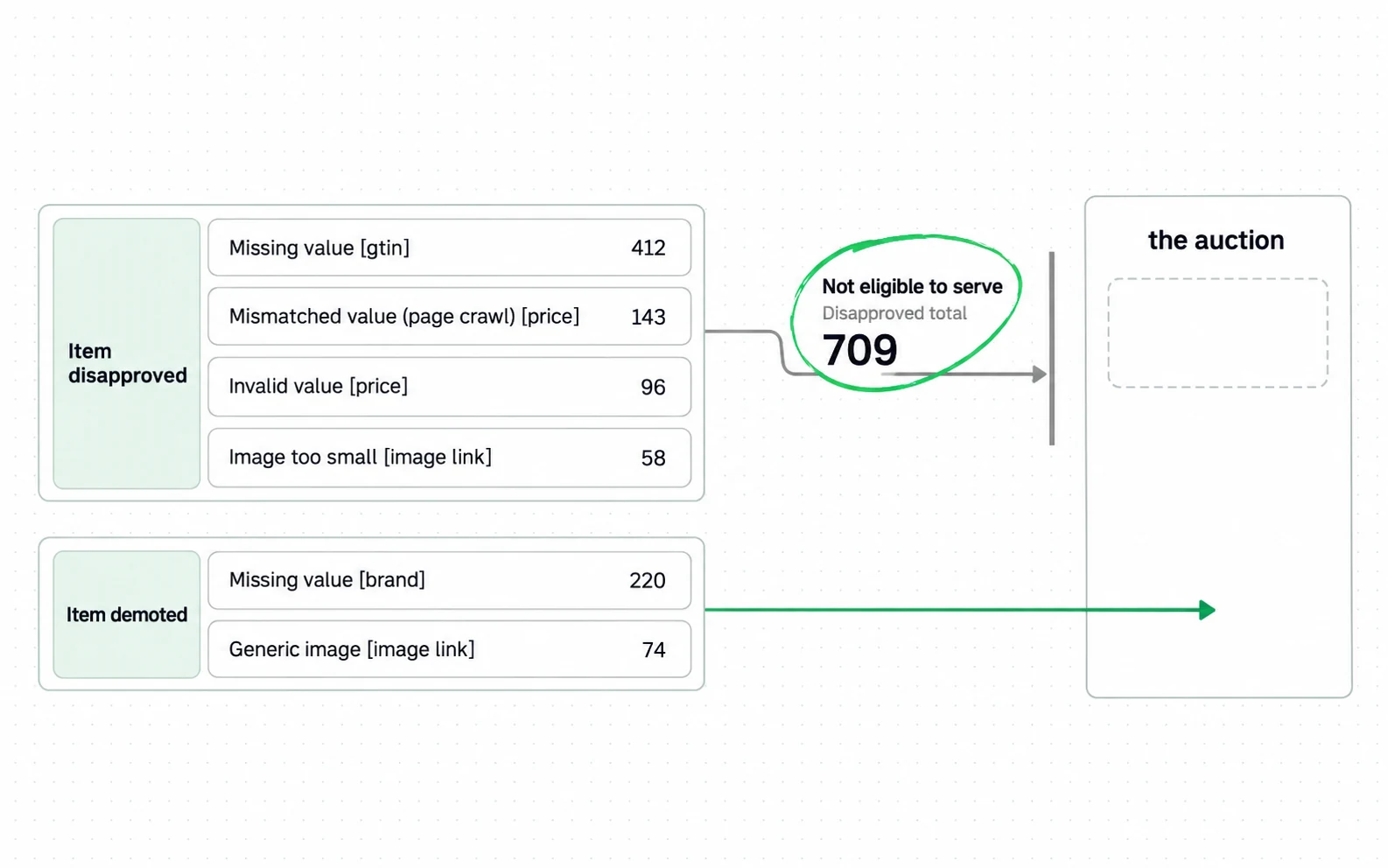
id, title, description, link, image_link, availability, price. Missing or invalid values stop your product serving without announcing it. Merchant Center lists them per issue with a count against each, so your fix is per product.
-
Rewrite the titles for how people search, within 150 characters
Brand, product type, and the attributes people type: colour, size, material, fit. Keep it consistent with the landing page, which is Google’s stated requirement, not a style preference.
-
Check the landing page the feed points at
The price in the feed and the price on the page have to agree, and so does availability. This is where feed problems usually start, and it is a catalogue problem, not an ads problem. That is why ecommerce SEO and the feed tend to break together. On one platform much of that is decided before you arrive, and what Shopify decides for you covers which parts. Ad Rank counts the quality of your ads and landing page as one input among six, and Google does not publish which measurements sit behind that. The separate scale that is published, for organic search, not the auction, is Core Web Vitals.
-
Decide the campaign structure before the bidding strategy
Split by margin or by product role, not by category. What you are steering is where budget goes, and margin decides whether that is worth it.
-
Start with a bidding strategy your data can support
One number is published: Target ROAS, the strategy that bids toward a return you name, needs 15 conversions in 30 days on Search and Shopping. Below that the strategy is not offered to you. Google does not publish one figure covering every automated strategy, so treat that threshold as the one it is stated for. Until you clear whichever applies, manual or click-focused bidding is what buys the history.
-
Add negative keywords, since they are the one keyword control you have
They subtract queries you never want to match. They cannot add the ones you do, and a feed edit is the only thing that can.
Is $20 a day enough?
This usually gets answered as a matter of ambition. It has a real answer, because Google publishes the conversion volume its automated bidding needs before it can work.
The choice is a threshold question, not a budget question.
For Search and Shopping, Google requires at least 15 conversions in the past 30 days before Target ROAS is available. A budget that cannot produce 15 conversions in a month cannot use Target ROAS. Other automated strategies have their own requirements, and this threshold speaks only for that one.

| What the budget can reach | What that unlocks | What it does not |
|---|---|---|
| Under 15 conversions in 30 days | Manual and click-focused bidding remain available | Target ROAS on Search and Shopping |
| 15 or more in 30 days | Target ROAS becomes available | Any guarantee that it performs |
| 50 or more in 35 days | Target ROAS on Demand Gen as well | Any change to the auction itself |
So the answer to whether twenty dollars a day is enough is that it depends on your click price, and the dependency is arithmetic, not opinion. Below the threshold, Target ROAS is not offered to you yet. That says nothing about whether the campaign is working. A campaign under the threshold can be healthy and slow, or it can be broken, and the conversion count alone does not tell you which.
What each of those clicks costs is set in an auction, not by you, and how Google Ads works is where that gets decided.
The feed work that decides which of your products reach that auction at all is the job of a Google Shopping agency.
Metrics for judging a Shopping campaign
That auction price is what the reporting is made of, and the number it gets reported as hides half the question. Shopping campaigns are usually judged on return on ad spend, and that figure is not a verdict on its own. Three numbers make it one, and only the first is on the default screen.
- ROAS against your break-even, which is one divided by your gross margin. BigCommerce’s glossary states a 4 to 1 benchmark with no sample behind it, and no single number can be right across margins. A campaign at 3x is profitable at a 40 percent margin and a loss at 20, and what a good ROAS is is where that division is set out.
- The share of your catalogue that is serving at all. Merchant Center reports disapprovals and missing attributes per product, and a feed at 60 percent coverage is a budget problem disguised as a performance problem.
- Impression share on your best-margin products specifically, not across the account. An account average hides the products you would most like to win.
| The number | Where you read it | What makes it a verdict |
|---|---|---|
| ROAS | Google Ads | Your gross margin, which the ads account does not know |
| Catalogue coverage | Merchant Center | The share of products eligible to serve |
| Impression share on best-margin products | Google Ads, segmented | Reading it per product, not per account |
People get the first one wrong most often, and what a good ROAS is has a different answer for every store, because the margin does.
Disqualified products look like poor performance
A product with a missing or invalid required attribute is not a product with poor performance. It is a product that is not in the auction at all, and it does not appear as a low return, it appears as nothing. That is why catalogue coverage sits second on the list and not last. A campaign can look expensive simply because the products that would have converted are not eligible.
One figure to be careful with while reading around this subject. Shopify’s guide states that Shopping ads are responsible for 76.4 percent of all retail searches and spending in the US, and cites nothing for it. That is the sort of number that gets quoted into a business case, and no sample sits behind it on the page that carries it.
Before you touch a bid, open Merchant Center, sort products by disapproved and by missing attributes, and count what share of your catalogue is not eligible to serve at all. On most catalogues that share runs into double digits, and fixing it costs nothing.
Sources
- Google Ads Help About Shopping ads: they use Merchant Center product data, not keywords, to decide how and where to show
- Google Merchant Center Help Product data specification: seven required attributes, title limited to 150 characters, match the landing page
- Google Ads Help Target ROAS: at least 15 conversions in the past 30 days for Search and Shopping
- Google Ads Help Performance Max: Search campaigns with an exact match keyword are prioritised over Performance Max
- Google Ads Help About Ad Rank: the six inputs that decide position and price
- Google Ads Help Conversion windows: 30-day click default, changes are not retroactive
- Google Search Central Ecommerce best practices: sharing product data with Google is one of eight topics
- Google Search Central Product structured data: richer appearance, shown at each experience’s discretion
- Aleyda Solis Product listing ads counted separately, Similarweb data, Jan 2025 against Jan 2026
- Search Engine Land Paid search click share doubles as organic clicks fall, with advertiser-side figures
- Shopify Google Shopping Ads guide, stating a 76.4 percent share of US retail searches and spending This page carries no publication date of its own.
- Semrush Google Shopping Ads: standard Shopping and Performance Max as the two campaign subtypes This page carries no publication date of its own.
- HTTP Archive Web Almanac 2025 Ecommerce chapter: platform share and Core Web Vitals by storefront platform Dated 2025 with no month given, so its exact age is not knowable from the source.
- Shopify Help Center Marketing reports: last-click default with a 30-day lookback
- BigCommerce Return on ad spend glossary entry, stating a 4 to 1 benchmark with no sample This page carries no publication date of its own.
Questions people ask
How much do Google Shopping ads cost?
You pay per click, and an auction sets the price, so there is no published figure. Ask instead what a click has to cost for your budget to work. At $600 a month, reaching Google’s 15-conversion threshold for Target ROAS needs roughly a 1.25 percent conversion rate at a 50 cent click, or 5 percent at a two dollar click.
Is $20 a day good for Google Ads?
Any budget is enough for Target ROAS if your click price and conversion rate together produce at least 15 conversions in 30 days. That is Google’s stated minimum for the strategy on Search and Shopping. Below that, Target ROAS is unavailable. Manual and click-focused bidding need no conversion history at all. Every other automated strategy carries its own requirement, so check yours before assuming it is open. Whichever you run is buying the history Target ROAS will need later.
How to set up Shopping ads on Google?
A Merchant Center account with a product feed carrying the seven required attributes, linked to a Google Ads account. The setup is the short part.
The feed is your work, and Google reads it whole, with the title one field in it.
How do you use Google Shopping?
As a merchant, through Merchant Center and a linked Google Ads account. Know one thing before you start: you are not buying keywords. Google matches searches against your product data, so improving performance means editing the feed, not editing ads.

