

Why is ecommerce SEO a scale problem?
A blog with forty posts and a store with four thousand products have different problems wearing the same name. The blog decides what to say. You decide which of your thousands of near-identical pages should exist, which should be indexed, and which are worth a human writing something on.
Same discipline, different problem.
That difference shows up in the first hour of any real project. On a content site the work is pages you do not have yet. Ahrefs put a number on the general case in 2023: across roughly 14 billion indexed pages, 96.55 percent get no traffic from Google at all. On a store the work is usually pages you already have too many of. Colour and size combinations, sort orders, paginated pages three through nineteen, and the same product reachable from four different category paths.
| A content site | An ecommerce store | |
|---|---|---|
| The unit of work | A page someone writes | A template that generates thousands |
| The usual failure | Not enough pages worth ranking | Too many pages competing with each other |
| Where budget goes | Research and writing | Structure, templates and data |
| What one fix touches | One page | Every page on that template |
What Google itself says the work is made of
The ecommerce documentation Google publishes is organised around the same split. Its eight topics are: where your content can appear, sharing product data, structured data, launching a site, writing reviews, URL structure, site structure, and pagination. Eight topics, and six are about structure and data. The product feed is one of them, and it is a separate filing from the on-page markup. One is about reviews. None of them is about writing better product descriptions, which is where most ecommerce SEO advice starts.
| Google’s topic | Who does it in practice |
|---|---|
| Structured data for ecommerce | Platform, mostly, and badly on custom themes |
| Designing a URL structure | You, once, and it is hard to undo |
| Help Google understand your site structure | You, and it is the category tree |
| Pagination and incremental loading | Platform, until someone adds infinite scroll |
| Share your product data with Google | You, and it is a separate step from on-page markup |
| Write high quality reviews | Your customers, if you ask them |
The technical half of that work has its own diagnostic pass, and it is the one that finds where a catalogue leaks: an ecommerce SEO audit is the separate piece.
Audit scores near the ceiling
Open any ecommerce SEO guide and you get four headings: keyword research for ecommerce, architecture, on-page, technical. One ecommerce platform builds its published checklist on exactly those. That is a reasonable list, and one part of it can be checked against real stores.
Part of it is already graded.
The Web Almanac measures the pages the HTTP Archive can crawl, every year, platform by platform. Its 2025 ecommerce chapter publishes median Lighthouse scores for each storefront platform, and the SEO category is the one that stands out for how little it varies.

Which platforms this describes
Which platform this describes matters, because ecommerce is not evenly spread across them.

Read that carefully before you act on it. A Lighthouse SEO score is a shallow test: it checks that a title exists, that a meta description exists, that links have text, that the page is not blocked. It does not check whether the title is any good. So the score does not say stores are doing SEO well. It says the mechanical part is handled by the platform, and buying it again is buying something you already have.
What the same measurement says is missing
The Almanac’s SEO chapter measures the whole web, not stores alone. Know two of its numbers before anyone sells you a fix.
| Element | Share of pages that have it | What it means for a store |
|---|---|---|
| Title tag | 98.6% desktop, 98.5% mobile | Effectively universal. Not a differentiator. |
| Meta description | 67.7% desktop, 67.2% mobile | A third of the web omits it. Google may rewrite it anyway. |
| Canonical tag | 68% desktop, 67% mobile | The one a catalogue leans on hardest, and the one a third of pages skip. |
| Internal links, median | 43 desktop, 39 mobile | A web-wide median, including pages with no catalogue behind them. |
Set that measurement against your own catalogue, and use the internal linking guide to decide which category and product routes deserve a contextual link.
Mistakes specific to catalogues
That measurement says the mechanical work is handled. What it cannot see are three failures, and none of them is a generic SEO error. Each is produced by the way a store generates pages, and each is invisible on a page-by-page review because the page itself looks fine. There is a fourth, filters, and it has enough arithmetic behind it to need its own piece.
Treating structured data as a ranking tactic
Schema markup for ecommerce is worth adding and it does less than it is usually credited with. Google’s own product documentation states the benefit in terms of appearance: product information can appear in richer ways in Search, including price, availability, review ratings and shipping. It also says these enhancements are shown at the discretion of each experience and may change over time.
That does not make it optional. A richer result, when one is shown, changes what a searcher sees at a position you already hold. Google does not promise the enhancement will appear, and publishes no click-rate effect. So the case for schema is eligibility, not a number.
Variant pages: too many or none at all
Colour and size are where most catalogues go wrong, in one direction or its opposite. Google publishes a specific recommendation here: each variant can be identified by a separate URL, either as a path segment such as /t-shirt/green or as a query parameter such as /t-shirt?color=green. For the canonical, it says to use the URL with the query parameter omitted, which helps Google understand the relationship between variants.
| What you do with a variant | What Google says | What breaks if you stop halfway |
|---|---|---|
| Give it its own URL | Can be done: a path segment or a query parameter | Nothing, on its own |
| Canonicalise to the parameter-free URL | Recommended where the variant is a query parameter | Google is left to pick which variant to show |
| Give it no URL at all | Not addressed either way | Nothing can link to that variant specifically |
NORTHAM
Linen Blazer, Relaxed Fit
$168
Size
Colour
- Free returns within 30 days
- Ships in 2 to 4 days
- 1Five sizes.
- 2Five colours, so twenty five combinations of one product.
- 3And one address that changes with the selection, which is where the duplicate comes from.
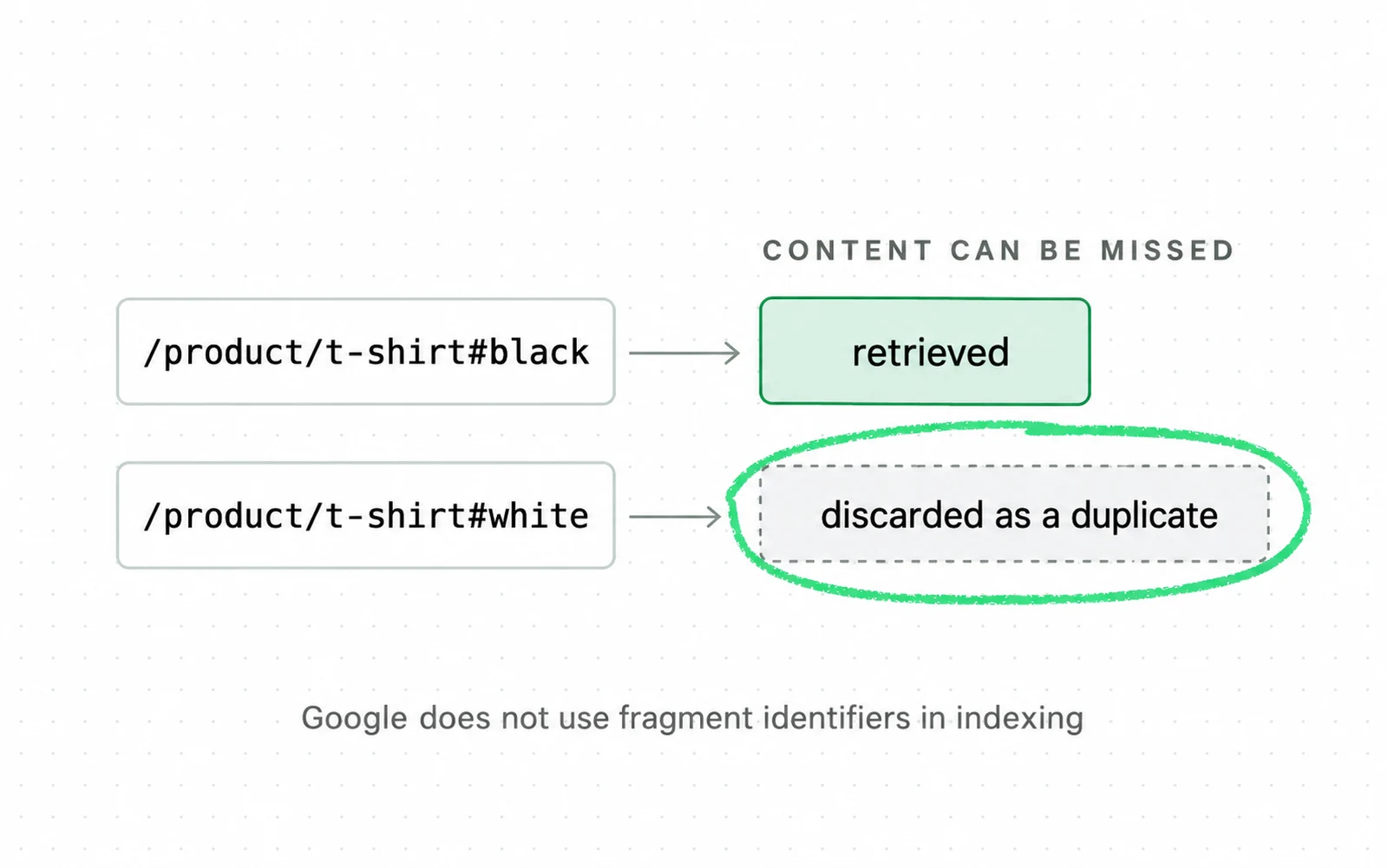
- The cost is not a duplicate. The cost is that one of the two is retrieved and the other is discarded, so whatever was only on the second one is never seen.
- That is the mechanism behind every variant, filter and sort parameter decision on a store.
The half-done version is separate URLs with no canonical relationship, which leaves Google to decide which of them to show. Google says as much: without a declared canonical it will identify which version is objectively the best to show, and your internal links are one of the inputs to that.
Pagination and the most common URL mistake
Google is unusually blunt here. Make sure each page in paginated results has a unique URL, it says, and adds that it sees the most URL mistakes in pagination structures. The mechanism is short. If page two carries the same address as page one, there is no second address to index. Whatever appears only on page two has no URL of its own to rank.
The fourth is filters. Google’s faceted navigation documentation puts the consequence plainly: a crawler cannot tell whether a new-looking URL is useful without crawling it, so they access a very large number of these addresses before working out that they are not. The arithmetic and the fix have their own section in an ecommerce SEO audit. You make the decision per filter group, not once in a setting.
What should you fix first in ecommerce SEO?
Every step below is either a structural decision or a data decision. None of them is a writing task. On a catalogue, writing is what you do after the structure stops fighting you.
Suppose you want the product-page half of that list scored for you. The seo-ecommerce skill reads one of your product pages from its URL and reports schema, images and description against a weighted checklist.
-
Count what is indexed against what you meant to index
Not the raw number. The gap between the two is the diagnosis, and on a catalogue it is typically made of filters, sort orders and paginated pages. Until that gap is understood, every other change is being made in the dark.
-
Decide, per filter group, whether anyone searches for it
Your own search data answers this faster than any rule of thumb, and it is the only version of the answer that describes your catalogue. This is a judgement call and it belongs to whoever knows the catalogue, not to the tooling.
-
Fix canonicals and variant URLs together
They are one decision, not two. Separate URLs for variants, each with a canonical on the parameter-free URL, is Google’s own recommendation. Half of it on its own does damage.
-
Make the category pages worth ranking
A category page with a title, a grid, and nothing else is asking to rank for a commercial term while saying less about it than any page it competes with. This is where writing finally earns its place. Somebody has measured the neighbouring surface more thoroughly. Baymard benchmarked 344 leading stores and logged more than 700 search usability issues across 19 sites. That covers on-site search, not category pages, and it is the closest measured neighbour.
-
Hand Google the product data explicitly
Structured data on the page, and a Merchant Center feed if you sell in a market where the shopping surfaces matter. Google lists these as separate channels for the same information, and they are not redundant.
-
Then look at speed, with the right number
Loading is where storefront platforms differ most. The grade comes from field data at the 75th percentile, not the lab score a speed test shows you. The thresholds are the ones web.dev publishes, and in practice this means the three Core Web Vitals and the three rules that decide how they are counted. Speed sits last here for a reason. What Google does say is that Search always seeks to show the most relevant content even if the page experience is sub-par, which is why the pages-and-data decisions come first.
Why this order and not another
The order is ours, and the reasoning needs stating because the same four headings are usually listed without one. Steps one to three decide which pages exist; steps four and five decide what those pages say; step six decides how fast they say it. Doing them backwards is how an ecommerce SEO budget produces a faster version of the wrong site.
Ecommerce SEO pricing: three drivers
People ask what this costs before anything else, and the answers you find quote ranges with no method behind them. No published survey prices ecommerce SEO specifically. The closest published figure is Ahrefs’ survey of 439 SEO providers, which prices ongoing SEO work generally at $2,917 a month on average and $111 an hour. It does not price ecommerce work, and an average is not a range.
The price turns on three things, and traffic is not one of them.
- How many templates, and how many products. Three hundred products on one template and thirty products on nine bespoke templates are different jobs, and only one of those numbers usually appears in a brief. Ask for both, in the same way you would ask what the three Core Web Vitals look like behind a paid landing page before pricing the campaign.
- Whether the platform lets you change the URLs. This is not a generalisation. Shopify states it plainly in its own help centre: you cannot redirect URLs that use the fixed Shopify paths /products, /collections and /collections/all. That turns a configuration job into a workaround job, and workarounds are where the hours go.
- Whether implementation is included. A findings document and a fixed store are separated by most of the work. A quote that looks cheap is often a quote for the document, and the question is answerable in one sentence before you sign anything.

Ask a prospective supplier two things before you ask the price. Which of my templates are you changing? And what will you not touch? A supplier who answers in pages instead of templates has not looked at your catalogue yet. If the constraint turns out to be conversion and not traffic, conversion rate optimization is the cheaper fix. Buying more visitors is the expensive one. The same question decides a paid budget. What a paid click costs is set in the Google Ads auction, and not by you.
If what you want is the templates changed, not a list of them, that is our ecommerce SEO service.
Three free measurements of success
Three measurements tell you whether catalogue work landed, and all three are free. They are deliberately not conversion metrics: they answer whether the right pages became findable, and nothing more. Findability can improve while revenue does not, so read them next to the store’s own numbers, not instead of them.
- Indexed pages against intended pages, tracked as a gap, not a count. If the gap does not close, the structural work did not land, whatever else improved.
- Impressions on category pages and product pages, tracked separately. They answer different queries and move at different speeds, and an aggregate number hides which half is working.
- Clicks on the templates you changed, compared against the templates you did not. The comparison is not controlled, since query mix and seasonality differ between templates, and it is still a better reference point than comparing the store against itself last quarter.
Three numbers, and two of them are search numbers. What happens after the click is a different discipline with its own metric. How a conversion rate is defined decides whether the two teams are even talking about the same denominator. Traffic that arrives from an assistant is measured differently again. That is the subject of AEO and SEO and of our guide to AI search engine optimization.
Do category pages really earn 3.4 times more?
You will meet a number here: category pages earn around 3.4 times more organic traffic per page than product pages. It points at something most stores under-invest in, and it does not survive being traced.
Open Search Console, filter to your category URLs and then to your product URLs, and divide each group’s clicks by how many URLs are in it. Clicks are the closest free stand-in for the traffic the disputed number counts, so the ratio answers whether category pages out-earn product pages on your store. It does not reproduce anyone else’s multiple, because your catalogue and your query mix are not theirs.
Where the per-page figure comes from

- 1The filter is the whole method. Set it to contains /collections/, then run it again for your product path.
- 2The tab most people never open. Queries answers what people typed; pages answers which of your templates earned it.
- 3Divide the clicks by the number of URLs in the group. That per-page number is comparable between the two groups; the totals are not.
Sources
- Google Search Central Ecommerce best practices: eight topics, six of them about structure and data
- Google Search Central Designing a URL structure for ecommerce sites: variants, canonicals, pagination
- Google Search Central Product structured data: richer appearance in Search, shown at each experience’s discretion
- HTTP Archive Web Almanac 2025 Ecommerce chapter: platform share and median Lighthouse scores by platform Dated 2025 with no month given, so its exact age is not knowable from the source.
- HTTP Archive Web Almanac 2025 SEO chapter: titles 98.6%, meta descriptions 67.7%, canonicals 68%, median 43 internal links Dated 2025 with no month given, so its exact age is not knowable from the source.
- Baymard Institute Ecommerce search UX: 344 sites benchmarked, 4,400 test sessions, 700 search usability issues across 19 sites
- Semrush The Complete Ecommerce SEO Guide for Beginners, the page the 3.4x figure is attributed to This page carries no publication date of its own.
- Ahrefs SEO pricing survey of 439 SEO providers: $2,917 a month average, $111 an hour This page carries no publication date of its own.
- Ahrefs Search traffic study: 96.55% of 14 billion indexed pages get zero traffic from Google
- Shopify Help Center URL redirects: you cannot redirect URLs that use fixed Shopify paths, /products, /collections, /collections/all
- Google Search Central Page experience: Search always seeks to show the most relevant content, even if the page experience is sub-par
- web.dev Web Vitals: the three metrics and the 75th percentile assessment
- Google Search Central Faceted navigation best practices: crawlers access a very large number of these URLs before working out they are not useful
- Google Search Console Help Performance report: impressions and clicks by page
- BigCommerce Ecommerce SEO in 2026: a checklist guide This page carries no publication date of its own.
Questions people ask
What is SEO in eCommerce?
Ecommerce SEO is the work of making a catalogue findable. You decide which of your generated pages should exist and be indexed, structure category and product pages so they answer real searches, and hand product data to Google explicitly. On a store the unit of work is a template, not a page.
How much does eCommerce SEO cost?
No published survey prices ecommerce SEO specifically. The closest is Ahrefs’ survey of 439 SEO providers: $2,917 a month on average and $111 an hour. That prices general SEO, not ecommerce work.
Three things move it. How many templates you have, not how many products. Whether your platform lets you change filter and collection URLs. And whether implementation is included or you are buying a document.
Can I do SEO on my own?
The parts a platform already handles, yes, and it has mostly handled them: median Lighthouse SEO scores across storefront platforms run 92 to 100. Two parts need judgement: which filter combinations deserve to be indexed, and how variants are canonicalised. Both are decisions about your catalogue, not tasks with a right answer.
How do I learn SEO as a beginner?
For a store, start with Google’s own ecommerce documentation, not with a checklist. Eight ecommerce topics, and six are about structure and data. That tells you where the work is before anyone sells you anything.