

What ecommerce site structure decides
Set the number of category levels, the links at each level, each page's URL, and the filter combinations that need their own pages. All four are easier to set now than to change once the catalog has grown.
Later changes can involve new URLs and a wait for Google to recrawl the affected pages.
Google works out how your pages relate from the links between them. Its ecommerce documentation identifies two signals: the number of links Google follows to reach a page, and the number of internal links pointing at it.
The more internal links a page has, the higher its relative importance inside your site.
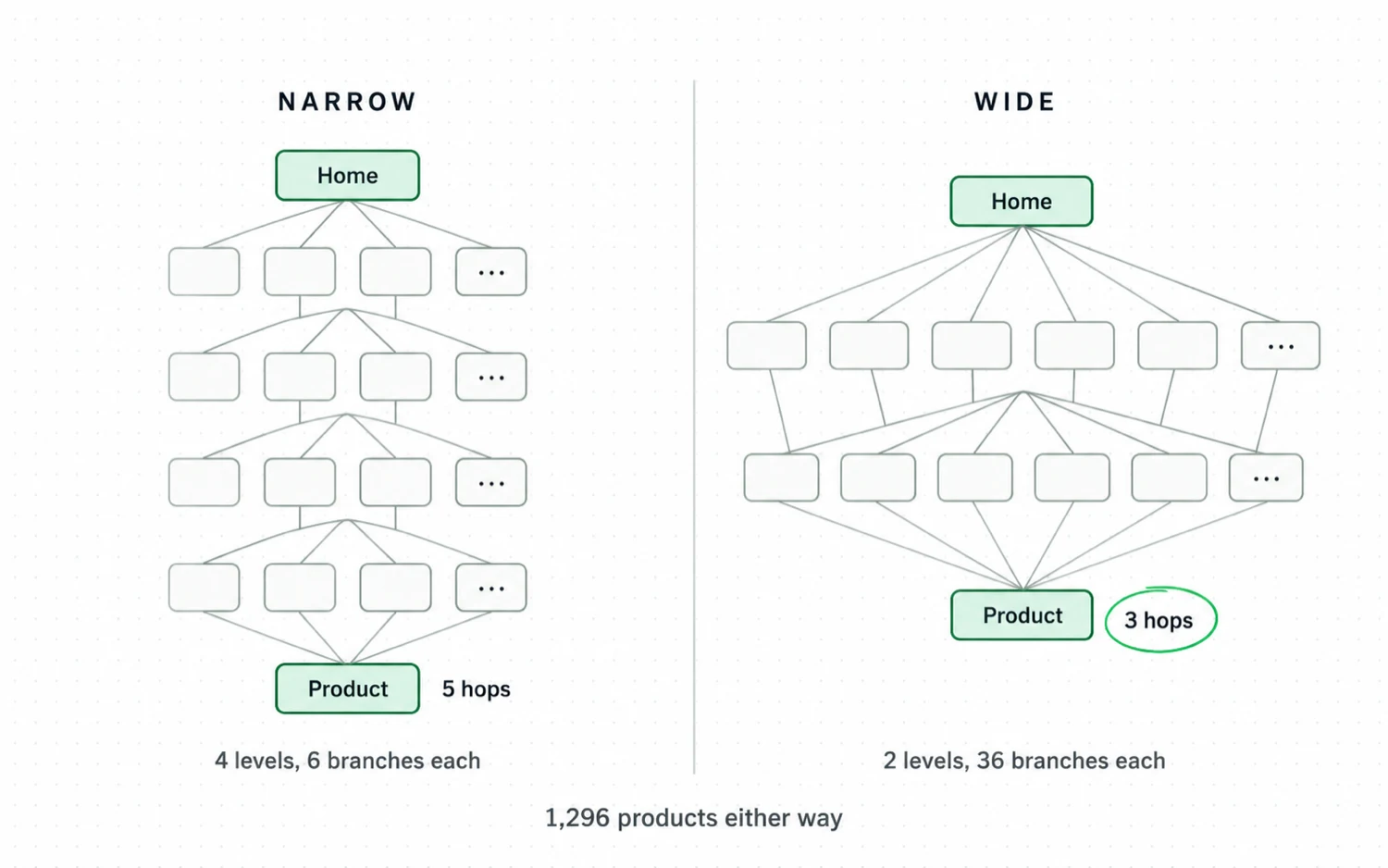
Putting more links at each level shortens the route: the right-hand tree reaches the same products in three clicks instead of five.
For example, a lighting store could organise 1,296 products into 36 ranges without a third level.
Who sets each choice, and what it costs to change
| Who sets it | What changing it costs later | |
|---|---|---|
| Number of levels | You, in the category tree | New URLs, and redirects from the old ones |
| Links per level | You, in the menu and the category template | A template edit, repeated on every page |
| Address of a page | Partly your platform | Redirects, and a wait for recrawling |
| Filters that become pages | You, per filter group | Crawling spent on addresses you no longer want |
Baymard Institute scored 13,000 homepage and category navigation elements across 344 top-grossing US and European stores.
It rated 76 percent of those stores mediocre or worse.
How Google reads your site structure
Googlebot finds your products by following links through the category tree. Google's ecommerce documentation recommends links from menus to category pages, from category pages to subcategory pages, and from subcategory pages to every product page.
If your category pages do not link directly to every product, Googlebot might not find all of them by crawling alone. Google strongly recommends linking to every product you want indexed.
If you cannot link to every page, submit the remaining URLs through a sitemap or a Google Merchant Center feed.
A feed entry does not increase a page's relative importance; that comes from internal links.
The links Google recommends, and what a missing one costs.
| Link | Google's recommendation | What happens if the link is missing |
|---|---|---|
| Menu to category pages | Recommended | Category pages depend on links elsewhere on the site |
| Category to subcategory pages | Recommended | Shoppers need extra clicks to reach subcategories |
| Subcategory to all product pages | Strongly recommended for anything you want indexed | Googlebot might not find all your products by crawling alone |
| Sitemap or Merchant Center feed | Use when you cannot link to every product | Products without internal links may stay undiscovered |
For example, say you sell 1,400 taps. If your range pages show 24 products and never link to page two, the other 1,376 taps exist only in your sitemap.
Use an internal linking map to find the pages that need more links or a shorter path from the home page.
How many levels should an ecommerce site have?
Google does not prescribe how many category levels sit between the home page and a product. When you choose the number of levels, consider how quickly shoppers can reach a product and how many links Googlebot must follow.
Panayiotis Zaphiris asked 17 people to find pages in five link hierarchies, each built over the same 64 destination pages. The result appeared in the Human Factors and Ergonomics Society proceedings in 2000.
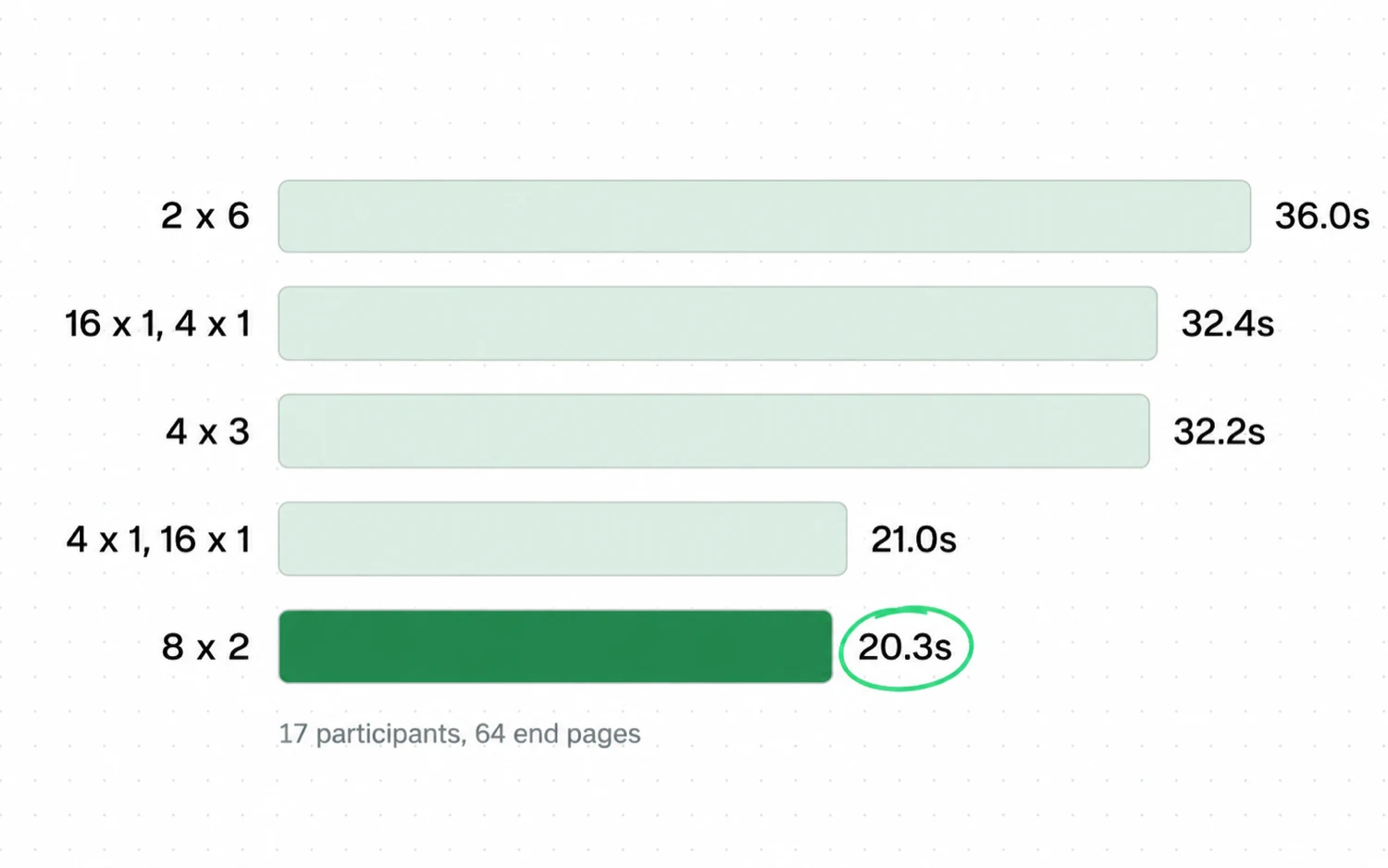
In Zaphiris's experiment, participants took about 20 seconds to find a page in the two-level hierarchies.
Participants took 36.0 seconds in the six-level hierarchy and rated it the hardest to use. The time needed to find a page differed significantly across the five hierarchies, but the number of errors did not.
Zaphiris found that adding a level slowed people down, while increasing the links at a level from two to sixteen did not change how quickly they found a page.
Google counts the links it follows to reach a page, so adding a category level lengthens the route from the home page to every product beneath it.
For example, a store with separate levels for range, material and finish can usually combine material and finish into one. Shoppers then reach the same products with one fewer click from the home page.
How many links should each level of the site have?
Most category trees use fewer links per level than they could. In Cyrus Shepard's study the association between internal link count and Google clicks was strongest at around forty links per page, and it weakened above about fifty.
Cyrus Shepard compared internal link counts with Search Console clicks across 1,800 websites and about 520,000 URLs. The study covers 23 million internal links and was last updated on 23 February 2026.
URLs with 0 to 4 internal links averaged two Google clicks. URLs with 40 to 44 internal links averaged four times as many.
Average Google clicks by internal link count
Above roughly 45 to 50 internal links, average Google clicks decline again. Shepard attributes much of that decline to links in sitewide navigation, which repeat on every page and often point at URLs nobody visits.
The HTTP Archive measured a median of 43 internal links per desktop page across 16,213,084 websites in its July 2025 crawl.
A 400-item mega menu far exceeds both numbers: the median of 43 internal links per desktop page, and the 40 to 44 band with the highest average Google clicks.
Google states that Googlebot crawls the first 2MB of a supported file type, and your menu's code sits inside that 2MB. For example, on a store with 40,000 URLs, a footer containing 600 links is fetched 40,000 times.
Give each page on the site one address
When a page has two URLs, a search engine may select a different one from the URL your internal links use. A product listed in several collections has more than one URL by default.
Google recommends readable, descriptive words in the URL path instead of long ID numbers, and hyphens instead of underscores. It also asks you to trim parameters that do not change the content.
Should the category appear in the product URL?
Shopify's Liquid documentation describes two URLs for the same product content: a standard product URL and one that includes a collection path. Shopify advises theme developers to consider the SEO implications before using the filter that generates them.
Adobe Commerce leaves the category path out of product URLs by default. When a store turns the path on, the canonical URL still points at the product URL key.
One product, four addresses, one canonical
tap-urls.txt
[ILLUSTRATION] store.example, one brushed brass tap
1/products/brass-basin-tap CANONICAL
/collections/taps/products/brass-basin-tap
/collections/sale/products/brass-basin-tap
/collections/brass/products/brass-basin-tap
- 1Every address is fictional and shows the shape a collection-scoped product URL takes.
- 2The canonical names one address; the internal links decide which one a crawler meets first.
- 3Check which address your category template links to before changing any setting.
So open a category page, inspect a product link, and compare it with the canonical on the product page. A canonical tells Google which address you prefer, and an internal link is the address Googlebot follows.
Before you plan a URL change, check which parts of the URL pattern your platform lets you change. Shopify fixes parts of it, including /products and /collections.
For example, if your collection template uses product URLs that include the collection path, every category page built from it links to a non-canonical URL.
Decide which filters become pages on the site
Filter combinations can generate more URLs for one category page than the catalog has products. Google's faceted navigation documentation says filters can create a near-endless number of addresses, and that crawl time spent on them is time not spent on new pages.
Check whether anyone searches for each filter combination. According to Ahrefs, 99.84 percent of keywords receive fewer than 1,000 monthly searches, and together they account for 39.33 percent of total search demand.
A low monthly volume is not a reason to skip a filter page.
Skip it when nobody searches the combination, or when the page would repeat what the parent category already says.
For filter pages you want crawled, follow Google's URL guidance. Use the standard ampersand as the parameter separator, keep the filter order consistent, prevent duplicate filters, and return a 404 for combinations with no results.
Google blocks the filters and keeps one full listing
robots.txt
User-agent: Googlebot
Disallow: /*?*products=
Disallow: /*?*color=
Disallow: /*?*size=
1Allow: /*?*products=all
- 1The parameter names and the all-products exception follow the example on Google Search Central, improve crawling of faceted navigation URLs, last updated 18 December 2025.
- 2Google calls robots.txt and URL fragments the durable options. It calls canonical and nofollow generally less effective in the long term.
- 3A noindex tag inside a blocked URL never reaches a crawler, because the block stops the fetch.
Search Engine Journal reported in December 2024 that Gary Illyes identified faceted navigation as the leading cause of overcrawling problems reported to Google.
Count the URL combinations each filter group can produce, then decide which of them Google should crawl.
For example, a 300-product category with color, size and price filters can produce more addresses than it has products. If none of those combinations has search demand, do not build pages for them.
On Shopify each collection has its own URL, so this decision happens when you create collections. Check the collection settings when you decide which filter combinations get their own URLs.
What changing the structure later costs
Setting the platform options and the number of category levels costs less while the catalog is small. Later changes require redirects and time for Google to recrawl, and Shopify prevents changes to its fixed URL paths altogether.
Google says a medium-sized site move with URL changes can take a few weeks or more before new URLs start appearing.
It asks you to keep redirects for at least a year.
What each choice costs when you set it, and what it costs when you change it.
| Decision | Cost at launch | Cost to change later |
|---|---|---|
| Number of levels | Planning the category hierarchy | New URLs, redirects for at least a year, weeks of recrawling |
| Links per level | A template edit | A template edit; cached pages still contain the old links |
| Product URL pattern | One platform setting | Redirects; Shopify's fixed URL paths cannot be changed |
| Indexable filter pages | A list of combinations | Removing unwanted pages while crawlers keep visiting their URLs |
Shopify states that you cannot redirect URLs that use its fixed paths: /products, /collections and /collections/all.
For example, Shopify does not allow you to move a catalog from /collections/taps to /taps.
In Adobe Commerce, you can enable automatic redirects when a URL key changes.
Treat a structure change that alters URLs as a site migration. Map the old URLs to the new ones, redirect them, then wait for Google to recrawl.
If you would rather not run that sequence yourself, our SEO migration service plans and carries out the move.
Measure the structure you already have
Use Search Console or a site crawler to record four things about your current structure. Record a baseline before you make changes, then repeat the measurements a few weeks later and compare the results.
Where to find each metric and how to use it.
| What to record | Where to find it | What it tells you |
|---|---|---|
| Clicks from the home page to a product | Any site crawler, depth or structure report | Whether two levels can become one |
| Internal links per URL | Crawler link report, or Search Console links | Which pages your own site treats as important |
| Google's selected canonical URL | Search Console URL Inspection | Whether your chosen address is the one indexed |
| Indexed filter URLs | Search Console page indexing report | How many filter URLs Google has indexed |
Google says crawl budget deserves attention on sites above a million unique pages that change weekly, or above 10,000 pages that change daily. It calls both figures a rough estimate.
So a 900-product store is almost never short of crawl budget.
Focus instead on whether Google can find your pages, and on how internal links signal their relative importance.
Count the products at each click depth instead of relying on the average depth. A five-click path affecting 8,000 products deserves more attention than a seven-click path affecting one.
For example, say 70 percent of your products sit four hops from the home page and your bestsellers sit at two. The shorter paths to your bestsellers signal their importance to Google.
Common ecommerce site structure mistakes
Check for four mistakes that add clicks to your product paths or create duplicate URLs. Each one shows up in the four measurements above, and each one is cheaper to fix before a rebuild than after.
The first is adding a category level to solve a labelling problem. If shoppers cannot tell two categories apart, rename them and rewrite the page copy, because a new parent level moves every product further away.
The second is creating a page for a filter combination because the platform allows it. Check search demand first, using one keyword lookup per filter group.
The third is treating a sitemap as a substitute for internal links. A sitemap helps Google find a URL; relative importance still comes from internal links.
The fourth is letting the theme link to product URLs that differ from the canonical you chose. Compare a category page's product links with the canonical on the product page.
For example, adding a Brands category above the existing ranges would increase the path to 6,000 products from three clicks to four.
Record these metrics before you rebuild, so you can compare them afterwards against the rest of your ecommerce SEO work.
Start with one branch of the site
Test the changes on one category branch before you rebuild anything else. Choose the category branch with the most revenue. Follow the five steps below and compare the numbers a month later.
-
Count the clicks to a best-selling product
Click from your home page to one of your best-selling products and count the clicks. Do it for five products in the same branch.
-
Find two levels you can combine
If two levels in that branch group products by attribute instead of by the categories shoppers search for, write out the combined category names. Check each name for search demand.
-
Check which address your template links to
Open a category page, inspect a product link, and compare it with the canonical on the product page. On Shopify, compare the URL that includes the collection path with the plain product URL.
-
List the filter combinations with demand
Check search demand for each filter combination in that branch. Keep pages for the combinations with demand and plan to block crawling of the rest.
-
Record the four measures and the date
Record the click depth, the number of internal links per URL, the canonical Google selected and the indexed filter count. Repeat all four checks a month after the change and compare the results.
If products take fewer clicks to reach and internal links point to your chosen URLs, check the other branches for the same problems before you combine their levels.
We run this check first in the stores we work on as a search marketing agency.
Sources
- Google Search Central Help Google understand your ecommerce website structure: link count and links needed to reach a page infer relative importance
- Google Search Central Improve crawling of faceted navigation URLs: faceted navigation can generate infinite URL spaces
- Google Search Central Large site owner guide to managing crawl budget: 1 million pages weekly and 10,000 pages daily, called a rough estimate
- Google Search Central Design a URL structure for ecommerce sites: readable words, hyphens, trimmed parameters
- Google Search Central Googlebot: crawls the first 2MB of a supported file type
- Google Search Central Move a site with URL changes: a few weeks or more for new URLs, redirects kept at least a year
- Zyppy 23 million internal links across 1,800 sites and about 520,000 URLs, compared with Search Console clicks (Cyrus Shepard)
- HTTP Archive Web Almanac 2025, SEO chapter: median 43 internal links on desktop, canonical tag on 68 percent of pages
- HTTP Archive Web Almanac 2025 methodology: 16,213,084 websites, July 2025 crawl
- Human Factors and Ergonomics Society Depth Vs Breadth in the Arrangement of Web Links, Panayiotis Zaphiris, Proceedings of the 44th Annual Meeting, pages 139 to 144: five hierarchies, 64 end pages, 17 participants
- Shopify Liquid within filter: a standard product page and a product page in the context of a collection have the same content on separate URLs
- Shopify Help Center URL redirects: you cannot redirect URLs that use fixed Shopify paths, /products, /collections, /collections/all
- Adobe Commerce Meta data: the product canonical points to the product URL key, and remains there when the category path is included
- Adobe Commerce Catalog and product URLs: by default the category path is not included in product URLs, and a URL key change can create an automatic redirect
- Baymard Institute Homepage and Category Navigation UX benchmark: 344 top-grossing US and European sites, 13,000 navigation elements scored, 76 percent mediocre or worse
- Ahrefs Faceted Navigation: 99.84 percent of keywords get fewer than 1,000 monthly searches and carry 39.33 percent of total search demand (Sam Underwood)
- Search Engine Journal Google formalizes decade-old faceted navigation guidelines: Illyes names faceted navigation as the leading cause of reported overcrawling (Matt G. Southern)
- Botify How does Google crawl the web: 413 million pages, 6.2 billion Googlebot requests, 270 retail, publisher and classified sites, 30 days of server logs each
- Semrush Ecommerce category page SEO: subfolder hierarchy, breadcrumbs and category to product linking (Sydney Go)
Questions people ask
What is ecommerce site structure?
The category hierarchy, internal links and URLs that connect your home page to your product pages. Your menu and the filter combinations you allow to become pages are part of that structure.
How many levels should an ecommerce site have?
Google does not specify how many category levels a site should have. In Zaphiris's 2000 experiment, adding a level slowed people down, but increasing the links at a level from two to sixteen did not. So add links to an existing level first.
Should the category be in the product URL?
Shopify can serve the same product under each collection path, and Adobe Commerce leaves the category out by default. Pick one URL, then make every internal link point to it.
What does faceted navigation mean?
Faceted navigation is the filter sidebar on a category page: size, color, price, brand. Each selection usually produces a new address, and Google's documentation says filters can create a near-endless number of them. Decide for each filter group whether its pages should be crawlable.
Does crawl budget apply to a small store?
Rarely. Google says crawl budget deserves attention above a million pages changing weekly, or above 10,000 pages changing daily. It calls both thresholds rough estimates. Below that, focus on helping Google find your pages.