
What does internal linking change?
Internal links help people and crawlers find pages, while anchor text explains what those pages contain. Use crawlable HTML links and place them in sentences that explain why readers should visit the linked page.
Google says every page you care about should have a link from at least one other page on your site. After you add a URL to your sitemap, link to it from a page your readers already use.
Suppose you add /collections/linen-shirts to an XML sitemap. The URL is now in the sitemap, but nothing on your site links to it.
Add links from your shirts guide and menswear category so readers can reach the collection.
Put links to your important pages inside content that raises the questions they answer.
Test discovery, context and priority one at a time
| Decision | Direct test | |
|---|---|---|
| Discovery | Choose a source that people and crawlers already reach | Open the rendered source and follow the link |
| Context | Write an anchor that predicts the target answer | Read the anchor without the destination |
| Priority | Give an important page routes from related hubs and detail pages | Count useful incoming routes by page type |
Google can use click depth and the number of links to a page to infer its relative importance. Use click depth and incoming link counts when you decide which pages need more internal links or shorter paths from your home page.
When you review a page for ecommerce SEO, count its menu links first. A large menu can already provide many links before you add any in the body copy.
The 2025 Web Almanac measured a median of 43 same-site links on desktop pages and 39 on mobile pages. At the 90th percentile, the same study found 174 on desktop and 161 on mobile.
On a B2B site, link from a broad solution page to a use case page that answers the reader's next question.
How do internal links work?
Before you choose a page as a source, open it live and check two things: the link uses standard markup, and its anchor text names the target. Links built only with JavaScript click handlers can fail the first check even when they work in a browser.
Google normally crawls links in <a> elements with href attributes. Use this markup for every link.
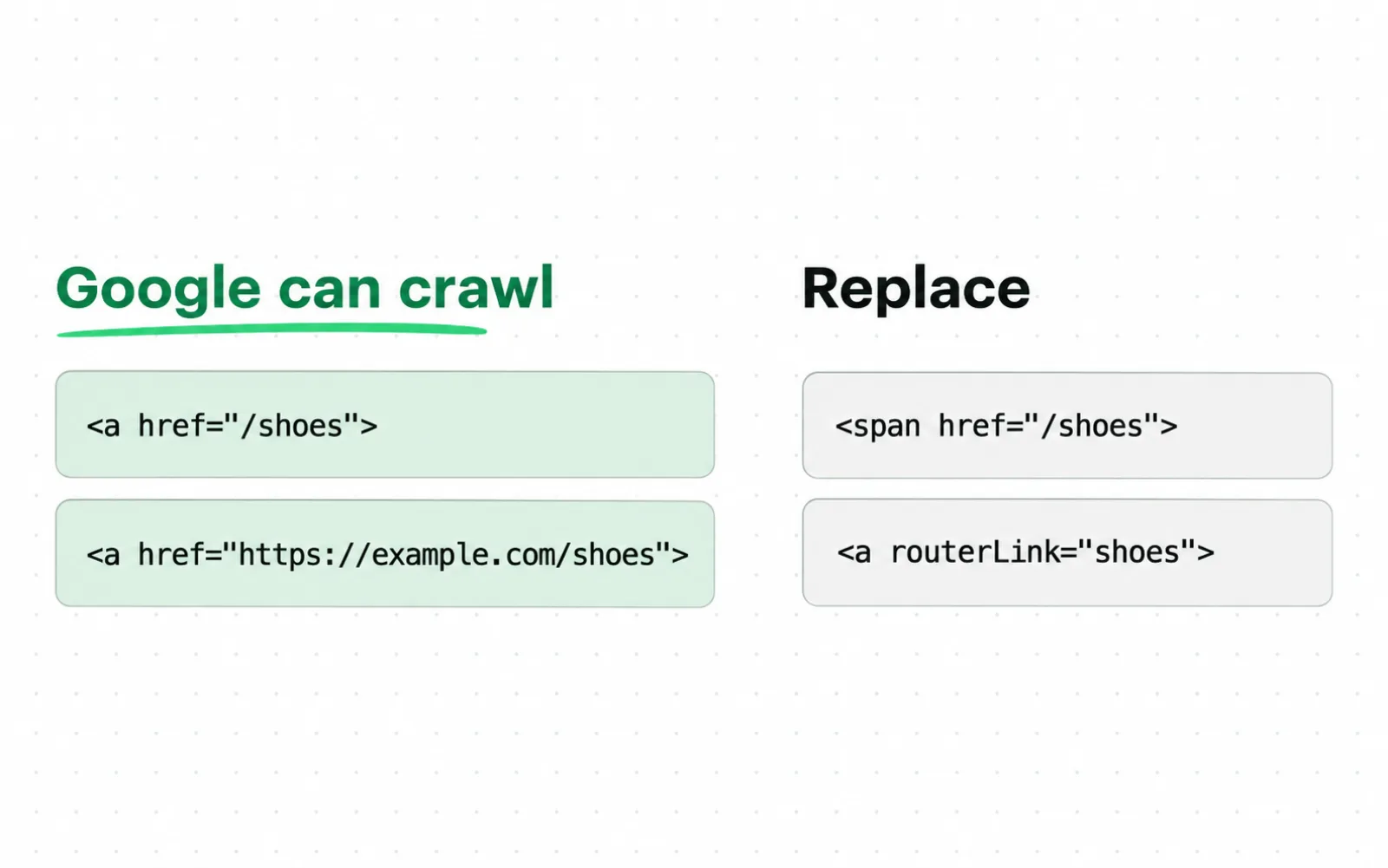
- The recommended examples all use an a element with an href. Relative and absolute URLs both appear in the accepted group.
- Replace a routerLink attribute or an href on a span with a standard a element that carries an href.
Say your product carousel advances with JavaScript and opens /products/blue-mug after a click. Inspect the rendered HTML.
For example, if the product name sits inside <a href="/products/blue-mug">, you have a standard HTML link.
Google uses anchor text and surrounding words to understand the linked page. Use the anchor to describe the destination and the surrounding sentence to explain why the reader should visit it.
W3C's G91 technique recommends using link text that describes the link's purpose. Replace an isolated "learn more" with text that names sizing, shipping or care.
Vary the anchor text from one link to another. Compare each anchor with the target page's title and the answer at the start of the page to check that the anchor describes its content.
Search Engine Land distinguishes structural links in page templates from contextual links in body copy. Use that distinction to decide whether to edit the template or the paragraph.
| Link surface | What it controls | What you decide |
|---|---|---|
| Navigation | Repeated routes across a template | Which page types to include in the navigation |
| Breadcrumb | Where the page sits in the site hierarchy | Which parent page the breadcrumb should link to |
| Contextual body link | A link to a page that answers the reader's next question | Where to place the link, which page to link to and what anchor text to use |
| Related content module | Related-page recommendations repeated across pages | How to select related pages and when individual pages need exceptions |
Your category menu helps readers find the collection, and your buying guide explains why it suits their needs.
The edge is a decision record
internal-link-map.csv / reviewed row
source_url: /guides/how-to-choose-linen-shirts
1target_url: /collections/linen-shirts
2anchor: linen shirts for warm weather
reader_question: Which fabric works in heat?
target_answer: Collection filtered to linen shirts
placement: paragraph after the fabric comparison
owner: merchandising SEO
3status: rendered and followed
- The source contains the question, so the route begins where the reader needs it.
- The target answers that question, and the anchor states the promise before the click.
- The status closes only after the rendered source exposes the final URL and the target returns the intended page.
Reject links that do not fit the source page's topic or lead to a page that does not answer the reader's question.
Build your internal link map
Choose target pages, then search for source pages that discuss the questions they answer, even when those pages never use the target keyword. Review each proposed link before adding it to the map.
List the pages you want indexed and visited by your readers. Give each target an owner and page type.
Record the main question each target answers and how many internal links currently point to it.
For example, your target might be /services/inventory-forecasting. The page offers a forecasting service for operations teams, so an inventory planning article is a better source for a link than a warehouse careers article with high traffic.
Export a list of crawlable HTML pages and the links between them, then compare it with your sitemap and analytics landing page data.
Add URLs from Search Console to find target pages your crawl missed.
Use Screaming Frog's orphan-page workflow to add URLs from sitemaps and landing page exports that the crawl did not find. An orphan page has no link path back to the crawl's starting point.
When a sitemap includes a page with no internal route, choose the page that should link to it.
Use an ecommerce SEO audit when filters, pagination or duplicate templates inflate the inventory.
Use canonical URLs as targets so you do not have to rebuild the map after the first release to replace noncanonical targets.
-
1. Finalize the target list
List indexable pages you want people to use. Remove redirects and duplicate variants. Then exclude search results and targets blocked from indexing before you assign sources.
-
2. Group targets by page type
Group targets by page type, such as categories, products, guides and conversion pages.
-
3. Find source candidates
Search your crawl text and content repository for the problem each target solves. Keep several candidates so you can choose the source page that best matches what the reader needs.
-
4. Read both pages
Check that the target answers a question raised on the source page. If the target page's answer is thin or outdated, revise it before you add more links to it.
-
5. Write descriptive anchor text
Use words that tell readers what they will find on the target page. Place the anchor in a sentence that explains why the linked page is useful, and avoid grouping several links without context.
-
6. Assign placement and owner
Record which paragraph or component will contain the link. Record the template if it controls where the link appears. Give the edit to whoever owns that paragraph or component, so the proposed link goes live in the next release.
-
7. Check the published link
Open the live source and inspect its HTML. Then follow the link and record the final response. Close the row only after those checks pass.
Say you run a Shopify store with a global related-products component. Check links in that shared component separately from links in buying guides.
| Target | Best source type | Anchor text | Owner | Status |
|---|---|---|---|---|
| /collections/linen-shirts | Fabric guide | linen shirts for warm weather | Content | Ready for review |
| /products/linen-overshirt | Linen category | linen overshirt | Merchandising | Rendered |
| /services/inventory-forecasting | Inventory planning guide | inventory forecasting service | B2B content | Target needs revision |
| /guides/shirt-care | Product detail page | how to wash a linen shirt | Product content | Proposed |
Ahrefs suggests 3 to 5 contextual links for a typical article. Semrush suggests adding at least 2 or 3 internal links to a new page.
The 2026 WebKnoGraph experiment on arXiv compared automated link selection with selection assisted by experts, using two configurations of the link graph on one live site. Automated selection spread more authority through the link graph but linked pages that were less closely related in meaning.
Links selected with expert review more closely matched the reader's question. Use automation to suggest source pages, then have your editor check whether each target answers a question raised by the source.
What does internal linking cost?
Internal linking mostly costs review time: someone lists the pages, writes the links, ships them and checks them. Estimate the cost of each task for the initial work and each subsequent release.
Base the initial scope on the number of indexable pages.
One navigation change affects every product page and needs broader testing than a paragraph edit.
If five of your pages mention the same phrase, choose the source where your linked page best answers the reader's question.
The work behind an internal link map
| Input | Output | Cost driver | |
|---|---|---|---|
| Inventory | Crawl, sitemap, landing pages | Indexable target list | URL duplication and data joins |
| Editorial review | Source and target copy | Approved edge rows | Candidate volume and target quality |
| Implementation | Body or template change | Rendered links | CMS access and template reach |
| Validation | Rendered HTML and responses | Closed evidence | Release process and crawl cadence |
Suppose you have 600 indexable pages and 1,800 parameter URLs. Exclude parameter URLs that should not be link targets before you estimate the cost of choosing source pages.
Budget separately for your initial setup and your ongoing maintenance. The first pass builds the inventory and priority rules.
For each later release, review new, removed and changed pages.
Review the editorial pages that point to any changed target.
For every approved target, deliver a working link, an accurate anchor, a named owner and a recorded test result.
Allow time for regression testing when you change a shared component. Test Core Web Vitals after a shared link component changes the layout or how users interact with the page.
Follow each link as a buyer would and check that the destination is the next step they expect. Include that check in your cost estimate.
Fix common internal linking failures
A link can still work long after the reason for adding it has gone. First, check that the target loads and delivers what the anchor text describes. Then check where your link appears and who on your team maintains it.
The first mistake is assuming that a crawl has found every page. Supply disconnected URLs from a sitemap or landing page export when your crawl begins at the home page.
Check which disconnected pages you want indexed and which you excluded on purpose.
The second failure is linking to a redirect instead of the final URL. Update links that redirect so they point directly to the final URL.
Say /guides/old-size-chart redirects to /guides/size-chart. Update the source link to point directly to /guides/size-chart.
The third failure is a generic anchor. Replace "Read more" with link text that names the product, definition, comparison or service.
The fourth failure is automated insertion without review. A phrase match can connect two pages that use the same words for different problems.
Search Engine Journal recommends assessing three parts of a link: the source topic, the target topic and the anchor text. Check the three parts Search Engine Journal recommends you assess: source topic, target topic and anchor text.
For example, "model" on an apparel page can mean a person wearing a product. On a forecasting page, it can mean a statistical model.
Reject a phrase match when it sends your reader to the wrong answer.
The fifth mistake is treating a listing in llms.txt as an internal link. List pages in llms.txt for an agent, then add a standard site link for readers and crawlers to follow.
The sixth problem is content that AI tools cannot retrieve. Link to pages with evidence and explanations related to the source page's topic, then test whether AI tools can retrieve your pages for AI Overviews.
| Failure | What you observe | Next test |
|---|---|---|
| Disconnected target | URL appears outside the crawl graph | Check whether the page should be indexed and choose a page to link to it |
| Redirected link | Source points to a 3xx response | Replace it with the final canonical URL |
| Broken target | Source points to a 4xx or 5xx response | Restore the target page or link to a replacement. Otherwise, remove the link. |
| Generic anchor | Link text says "Read more" | Replace it with the target name |
| False phrase match | The linked page answers a different question from the one discussed on the source page | Read the paragraph around the link and the opening of the target page |
| Unowned proposal | Row remains proposed across releases | Assign an owner for the component and schedule the change for a release |
Redirected and broken links often come from a shared template or a migration. Fix the component that generates your links. If your team cannot trace a fault in the deployed HTML, our technical SEO service can trace it.
Keep titles and anchors short enough to read at a glance.
Validate your internal link map after publishing
Mark the map as complete only after confirming that all your links appear on the live source page and that its target delivers what the anchor text describes. Test each link before you review aggregate reports.
Open the source URL in your browser. Find the anchor and read its sentence.
Then follow it and record the target that loads.
For example, follow the anchor "linen shirts for warm weather" in your fabric guide. The destination should be the indexable collection you approved, without a redirect or an empty product list.
-
1. Inspect the rendered source
Confirm the intended anchor appears inside a standard link with an href. Test mobile and desktop when their navigation or modules differ.
-
2. Check the destination URL
Record the response and redirect path. Record the canonical URL and indexing directive. The target should be the approved page. Duplicates and temporary routes fail the check.
-
3. Check that the anchor describes the target
Read the anchor beside the target title and opening answer. If the words promise more than the page delivers, revise the anchor or target.
-
4. Crawl the release
Confirm that the new link appears in the crawl graph and that template changes have not created unexpected links across the site.
-
5. Compare URL and link exports
Compare the new crawl, sitemap, landing page and Search Console exports side by side. Record which URLs and links appear in each.
-
6. Record the outcome
Close the row with the live source and final target. Record the observed anchor and test date. Reopen the row when either page changes.
Check Search Console's Links report against your own crawl. Export the 1,000 rows available in each table and compare them with your crawl.
Open every source page in the Links report, confirm that the link is live and record the source and target URLs in your release log.
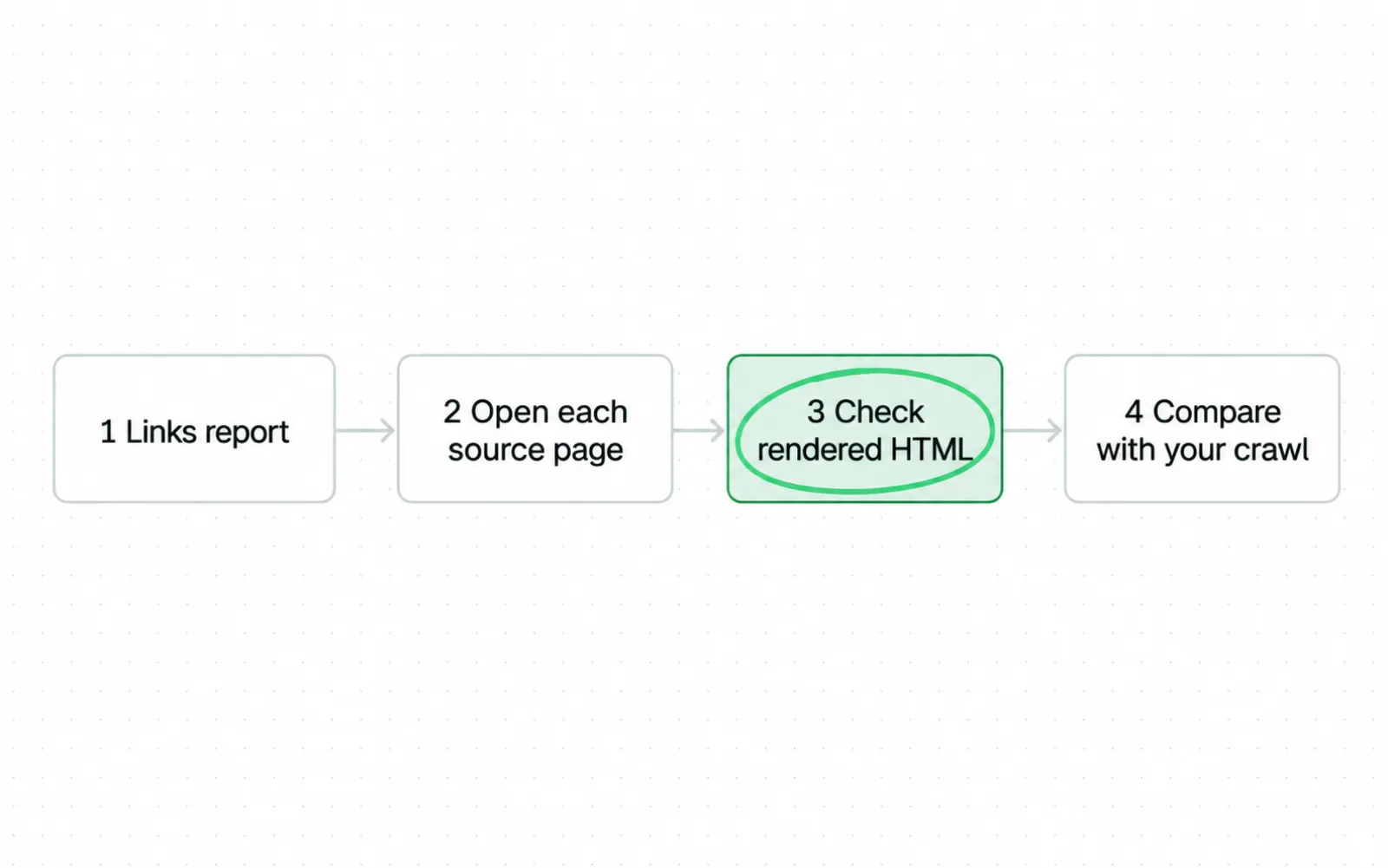
- Compare the report with your own crawl and release record.
- Open each reported source and verify the current link in its rendered HTML.
Use site search or B2B keyword research to find passages where you could add a link. Check that the passage raises a question your target page answers.
Run five checks before you close a row
| Action | Record | |
|---|---|---|
| Rendered HTML | Open the live source | Anchor text and href |
| Final response and canonical | Follow the route | Response, redirect and canonical |
| Fresh crawl graph | Crawl the release | Observed source and target |
| Search Console | Compare the report with your crawl | Google reported source URLs |
| Editorial review | Read the source and target together | Question and answer fit |
Internal linking questions
A link you add in an editor such as Google Docs or WordPress points wherever the pasted address points, so paste the final canonical URL, not a redirect. The answers below cover the remaining basics: what an internal link is, how to create one and why it matters.
Sources
- Google Search Central Link best practices for Google
- Google Search Central Help Google understand your ecommerce site structure
- Google Search Central Sitelinks
- Google Search Console Help Links report
- Google Docs Editors Help Work with links and bookmarks
- Semrush Internal links: ultimate guide and strategies
- Ahrefs Internal Links for SEO: An Actionable Guide
- Ahrefs On-Page SEO: How to Optimize for Robots and Readers
- Backlinko Internal Links: The Definitive Guide
- Search Engine Land Internal linking: The complete guide
- Search Engine Land Website structure: The complete guide
- Search Engine Journal Is Your Internal Linking Helping or Hurting Topical Authority?
- Yoast Internal linking for SEO: Why and how?
- Siteimprove Technical and structural signals that support authority
- HTTP Archive SEO, 2025 Web Almanac
- W3C Technique G91: Providing link text that describes the purpose of a link
- Screaming Frog How To Find Orphan Pages This page carries no publication date of its own.
- arXiv WebKnoGraph: GNN-Powered Internal Linking
Questions people ask
What do you mean by internal linking?
Internal linking connects one page on your domain to another. The anchor text describes the destination.
How do you create an internal link?
Choose a page that answers a question raised by the source page, then write descriptive anchor text. Add an <a> element with an href attribute, then follow the link after publishing.
Why is internal linking important for SEO?
Crawlers follow internal links using href attributes, while anchor text provides context about the linked pages. Internal links also signal which pages matter most across your site.
How do you add an internal link in Google Docs?
Google Docs lets you create a link by highlighting text and choosing Insert then Link. Before publishing, check that the link text names the target and the URL is the final canonical URL.