

Which technical decisions has Shopify already made?
On a self-hosted store, the technical SEO conversation starts with what to configure. On Shopify it starts with what has already been configured, because the platform ships defaults and documents that several of them cannot be changed at all.
The defaults are the starting position.
One of those defaults is documented plainly. The robots.txt file arrives preconfigured, in Shopify’s own words: all Shopify stores have a preconfigured and optimized robots.txt.liquid template, so you do not need to make any changes unless you have a specific reason to do so.
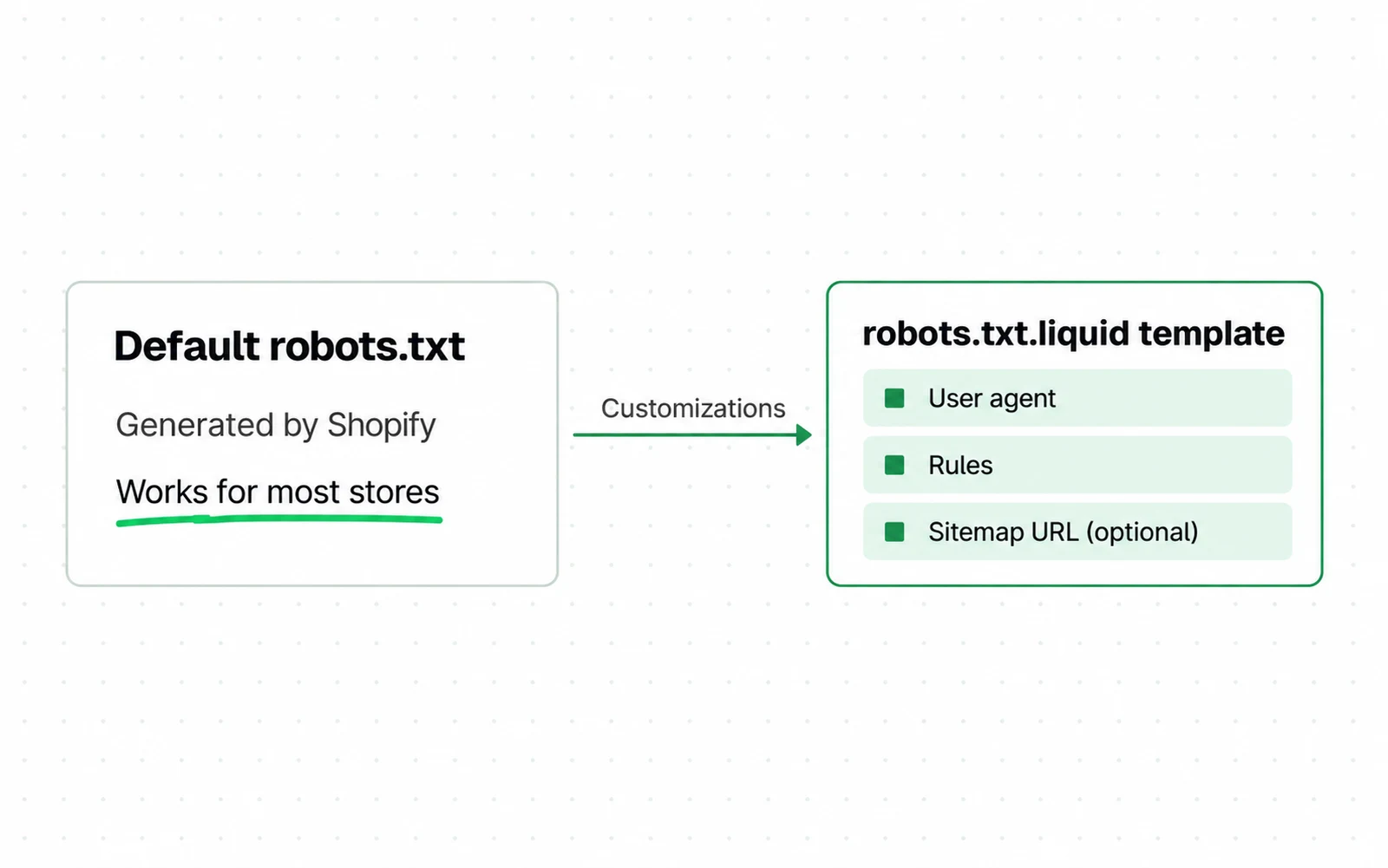
- The default is generated by Shopify and the page says it works for most stores. Editing it is an exception, not a setup step.
- The mechanism is a Liquid template, not a file you upload, which is why advice written for other platforms does not transfer.
- The three components are named: the user agent, the rules, and an optional sitemap URL. Everything a store can change lives inside those three.
The addresses you did not choose
One product, every address Shopify will generate for it
1/products/linen-blazer
/collections/all/products/linen-blazer
/collections/summer/products/linen-blazer
/collections/sale/products/linen-blazer
/collections/new-in/products/linen-blazer
2/products, /collections and /collections/all cannot be redirected.
- 1The one you would pick, and the one a theme should be pointing every other version at.
- 2Shopify states this in its own documentation. The most common URL restructure an SEO would propose on another platform is not available here.
URL paths you cannot change
Others are locks. Shopify states plainly that you cannot redirect URLs that use its fixed paths: /products, /collections and /collections/all. That single sentence rules out the most common URL restructure an SEO would propose on any other platform, so check it before anyone quotes you for one. Google’s own ecommerce URL guidance assumes you control the structure; on Shopify a large part of it is decided.
| What | Who controls it on Shopify |
|---|---|
| sitemap.xml | Shopify. Generated by the platform. |
| The /products and /collections path prefixes | Shopify. Cannot be redirected. |
| robots.txt rules | You, through robots.txt.liquid, on top of Shopify’s defaults. |
| Canonical tags | Your theme, in practice. Shopify’s within documentation does not mention them. |
| Product and collection handles | You. Changing one does not create a redirect on its own. |
| Which pages exist at all | Your theme, through the links it generates. |
Product markup belongs on that list too, and what it buys is the same wherever it comes from. Google frames product structured data as eligibility for a richer result shown at each experience’s discretion, not as a ranking input.
The general catalogue work still applies here, and it is the same work on any platform: ecommerce SEO covers the order of it. Only the part that is different because it is Shopify follows.
How does Shopify compare on Core Web Vitals?
Whether Shopify is good for SEO is usually answered by Shopify or by someone selling an alternative. There is a published measurement that involves neither, taken across the pages the HTTP Archive can crawl, not any vendor’s customer base.
It leads the major platforms, on one axis.
The Web Almanac measures the storefront platforms it can crawl, once a year. On mobile Core Web Vitals, Shopify passes on 76 percent of stores against 35 percent for WooCommerce. Its median mobile Lighthouse performance score is 55 against WooCommerce’s 38, figures published in the Web Almanac’s 2025 ecommerce chapter. On the SEO category of the same audit it scores 92, the same as WooCommerce, with Wix at 100. Eight points at the top of a hundred-point scale, against a twenty-six point spread on performance.

So: is Shopify good for SEO? Shopify is strong on the part anyone has measured, page speed, and identical to everything else on the part that is named. A store on Shopify starts inside a population where most stores pass. That is a starting position, not a guarantee about yours, and a heavy theme can put you in the other part of the distribution. It does not remove the catalogue decisions, and two of its defaults create their own.
That number is the share of stores where the metrics web.dev publishes come in under their thresholds at the 75th percentile of real visits. Why it is taken at a percentile, not as an average, and the two counting rules behind it, is how Core Web Vitals are counted.
Two problems the platform documents
Neither of these is a secret and neither is a bug. Shopify writes both of them down in its own developer documentation, which is the best evidence that they are structural, not accidental.
A second address per product
Shopify’s Liquid language has a filter called within. Given a product and a collection, it returns the product URL inside that collection: /products/draught-of-immortality becomes /collections/sale-potions/products/draught-of-immortality. Themes use it on collection pages so the breadcrumb and the back link stay in context. Whether your store has these URLs at all depends on whether your theme calls the filter.
Shopify attaches a caution to it, and the wording is unusually direct for platform docs. A standard product page and a product page in the context of a collection have the same content on separate URLs, and developers should consider the search engine optimization consequences of using this filter.
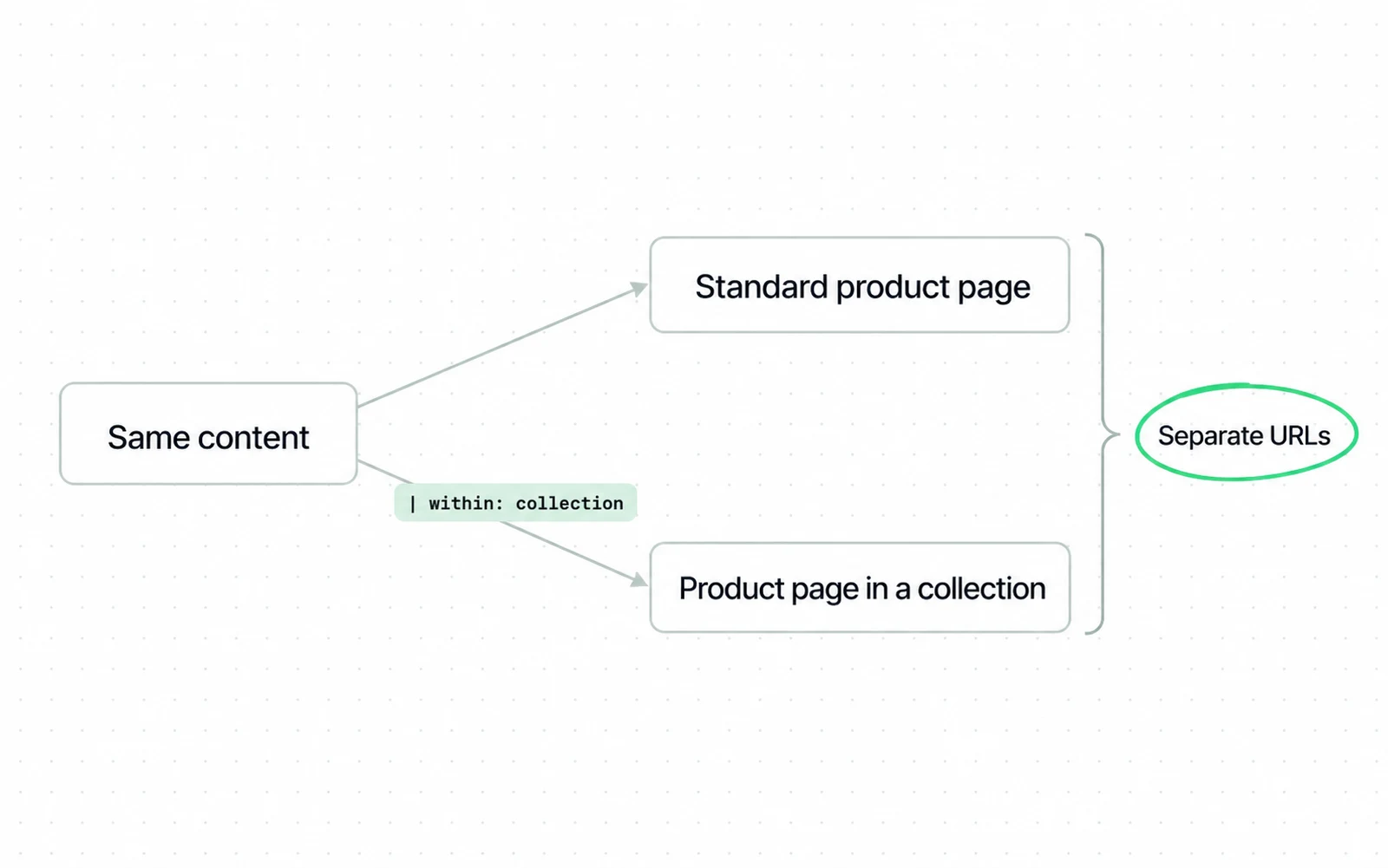
- The caution is Shopify’s and it is unusually direct: same content, separate URLs, consider the SEO implications.
- The code sample shows exactly how the second URL is produced, which is one filter applied to a product inside a collection.
- The output line is the duplicate. One product now answers at two addresses, and nothing on this page tells you which one Google should keep.

Themes conventionally set a canonical on the collection-context URL pointing back to the plain product URL. Shopify’s own within documentation does not mention canonicals at all, so whether yours does is a question for your theme, not for the platform. Where the tag is present it is the right default, and it is not a guarantee. Google describes rel=canonical as a strong signal that the specified URL should become canonical. A signal is not a directive. Google also says that if you do not specify a canonical it will identify which version is objectively the best to show. Your internal links are one of the inputs to that decision, and a store whose every product card links to the collection-context URL is voting against its own canonical.
Check hreflang when a Shopify market shows the wrong country or language URL in search.
How noindex and unlisted differ
Shopify offers two ways to keep a page out of search. A noindex metatag in the theme hides the page from search engines while leaving it visible to your own storefront search. Setting a product to unlisted hides it from both. Choose the first when you meant the second and the product stays findable inside your store. Sometimes that is exactly right. Often it is not what the person asking for it meant.
| noindex metatag | Unlisted product | |
|---|---|---|
| Hidden from Google | Yes | Yes |
| Hidden from your own storefront search | No | Yes |
| Where it is set | Theme code, with a Liquid condition | The product’s own status |
| Reversible without a developer | No | Yes |
The choice is worth making explicitly, because the two are set in different places by different people.
Robots.txt rules blocked by default
Both of those are decisions someone can make. The next one was made for you. Shopify’s robots.txt is the least discussed of its defaults, and Shopify does not list the rules. It does not have to: every one of these files is public, and eleven of them are named below so the reading can be checked, not taken on trust.
Two different files are in circulation.
A site migration changes which of them you inherit. Read the new store file on launch day, and do not assume the old rules came with you.
Eleven addresses below, and five served one variant of the default. It blocks sort orders and tag combinations on collections, and it blocks on-site search and the policy pages. Six Disallow rules match sort_by, eighteen match tag combinations, plus /search and /policies. Google names faceted navigation as a crawl cost, and those rules ask crawlers to skip the addresses that generate it. Whether they change what gets crawled on your store is not something these eleven files show.
Five others served a different file. The file opens with comments addressed to AI agents, points agents at their own endpoints, and states that checkouts are for humans, not for software. That file drops the /search and /policies blocks entirely and cuts the filter rules to two sort_by and six tag-combination lines. Whether an unblocked search page is an improvement is a separate question from whether it is crawlable. Baymard benchmarked on-site search across 344 stores and logged more than 700 usability issues, on no stated platform and with indexing not the question it was asking. What it does establish is that the average internal search page is a weak page, and a weak page that a crawler can now reach is not obviously a gain.
Two default files, one platform, one morning
robots.txt — two Shopify stores, the same day
VARIANT A served by 5 of the 11 stores read
1Disallow: /*sort_by* 6 rules
Disallow: /collections/*+* 18 rules
2Disallow: /search
Disallow: /policies
VARIANT B served by the other 5
3Disallow: /*sort_by* 2 rules
Disallow: /collections/*+* 6 rules
4User-agent: UCP-agent
Allow: /agent
- 1Six rules against sort parameters in one variant. The rule count is the crawl surface, and nobody in either store chose it.
- 2Variant A blocks the internal search and the policy pages. Variant B does not, so two stores on the same platform expose different things.
- 3Two rules for the same job. A store cannot tell which variant it has without opening the file.
- 4Only one of the two variants says anything about AI agents at all.
What this changes about the advice you will read
Both files share one thing to know before you read either. A Disallow rule asks a crawler not to fetch a URL, and Google’s own robots.txt specification is explicit that a blocked page can still appear in results if other pages link to it. Blocking is not removing. Read your own file before you act on any Shopify SEO advice about what the platform blocks. Guidance that says Shopify blocks your on-site search held on five files and failed on the other six. Five others carried a newer default without that rule, and the eleventh had been edited by its store.
| Storefront | Which default it served on 1 September 2026 |
|---|---|
| allbirds.com/robots.txt | Long-standing |
| www.kyliecosmetics.com/robots.txt | Long-standing |
| www.mejuri.com/robots.txt | Long-standing |
| ruggable.com/robots.txt | Long-standing |
| www.hiutdenim.co.uk/robots.txt | Long-standing |
| gymshark.com/robots.txt | New, with agent instructions |
| www.redbullshopus.com/robots.txt | New, with agent instructions |
| www.brooklinen.com/robots.txt | New, with agent instructions |
| www.deathwishcoffee.com/robots.txt | New, with agent instructions |
| www.tula.com/robots.txt | New, with agent instructions |
| www.jaxxon.com/robots.txt | Customised: the new comment block with no filter rules at all |
Say you want one product page read the way a crawler reads it. The seo-ecommerce skill does that from the URL alone and checks your theme’s Product JSON-LD against Google’s required fields.
-
Read your own robots.txt before anything else
Open yourstore.com/robots.txt. Which of the two defaults you are on decides whether your search and filter pages are crawlable at all, and no dashboard tells you.
-
Check whether your theme calls the within filter
Search the theme for "within: collection". A match tells you the second address form exists somewhere in your store. Which templates and which links use it is the next question, and you answer it by reading those templates, not by the count of matches.
-
Decide which collections deserve to exist
This is the Shopify version of the filter decision, and it is made in collection setup, not in a config file. Automated collections built on tags multiply the same way filters do on other platforms. Google’s faceted navigation documentation describes what that costs: crawlers access a very large number of these addresses before working out they are not useful. The arithmetic is in the faceted-navigation section of an ecommerce SEO audit.
-
Only then change robots.txt.liquid, and prefer the Liquid objects
Shopify documents four operations: add a rule to a group, remove a default rule, add custom rules, and add extra sitemap URLs. It strongly recommends using the provided Liquid objects wherever possible, because the default rules are updated regularly. Those defaults are not a fixed text you can memorise; the eleven files above are what they looked like from outside on one day.
-
Leave the sitemap alone unless you have a reason
Shopify generates it, and no documentation page states what a merchant can change about it. Time spent on it is time not spent on the theme, which is the part that decides what the sitemap has to describe.
-
Decide about the AI crawlers separately from the search crawlers
The new default speaks to shopping agents, and blocking a training crawler is a different decision from blocking a search one. Which is which, and what each is for, is set out in AI search engine optimization; whether the two surfaces need different work at all is AEO and SEO.
How the Shopify platform shapes an SEO quote
People ask this before they ask anything else, and the pages answering it quote ranges with no method behind them. No published survey prices Shopify SEO. Ahrefs’ survey of 439 SEO providers prices general ongoing SEO at $2,917 a month and $111 an hour, which is a different job on a different scale.
The platform changes the shape of the quote.
| Line item | On Shopify | Why |
|---|---|---|
| Performance work | Different starting distribution | 76% of Shopify stores pass Core Web Vitals against 35% on WooCommerce; yours is one store, not the distribution |
| Sitemap configuration | Removed | Generated by the platform, and no documented merchant control over it |
| robots.txt setup | Reduced | Preconfigured, and Shopify updates the defaults itself |
| URL restructuring | Partly impossible | The /products and /collections prefixes cannot be redirected |
| Theme and Liquid work | Added | The decisions that are left live in template code, not in a dashboard |
What we would ask a prospective supplier: which Liquid templates will you change, and will you touch robots.txt.liquid. If the answer to the second is yes, ask which of the two current defaults your store is on, because the right edit is different for each. Ask too whether traffic is the constraint at all, a question conversion rate optimization settles, because if it is not, the cheaper end of the work is somewhere else entirely.
Both questions have the same shape, and our Shopify SEO service answers them on your own theme.
Three checks to run after changes
The robots defaults above are read once and then forgotten, and the check that keeps yours honest is short. Three jobs, and two are the same on any platform. The first is Shopify-specific, and it is the one that catches the problem described above.
- The share of indexed product URLs that carry the /collections/ prefix, read from a crawl or the index report, not the performance report, which does not break URLs down this way. If collection-context URLs are being indexed, not the plain product URL, something is outweighing the canonical, and internal links are the first place to look because they are the input you control.
- Impressions on collection pages against product pages, tracked separately in the Search Console performance report. They answer different queries and a combined figure hides which half moved.
- Core Web Vitals in field data at the 75th percentile, not the speed score a test gives you. Shopify starts you ahead here and a heavy theme can give the advantage back.
The first of those is the one worth watching after theme work, because internal links are theme code. A ratio that has not moved is a reason to ask what changed, not proof that nothing did. Whether a conversion rate is even the right second number depends on what a conversion rate is, because the same store scores differently under each definition.
Open yourstore.com/robots.txt and read it, which takes about a minute. Look for whether sort_by and tag-combination rules are present, and whether /search is blocked. Those lines are the answer; a comment block mentioning agents tells you which variant you are looking at but not what rules it carries, as the eleventh store above shows.
Sources
- Shopify Help Center URL redirects: you cannot redirect URLs that use fixed Shopify paths, /products, /collections, /collections/all
- Shopify Help Center Hide a page from search engines: robots.txt.liquid is preconfigured; noindex leaves the page in storefront search
- Shopify.dev Liquid within filter: a standard product page and a product page in the context of a collection have the same content on separate URLs
- Shopify.dev Customize robots.txt: four documented operations, and a warning that default rules are updated regularly
- Shopify.dev robots.txt.liquid template: rules are output through the Liquid robots object
- Google Search Central Robots.txt specification: how a Disallow rule is matched, and its limits
- HTTP Archive Web Almanac 2025 Ecommerce chapter: Shopify 76% good CWV on mobile, WooCommerce 35%, Lighthouse medians by platform Dated 2025 with no month given, so its exact age is not knowable from the source.
- Google Search Central Consolidate duplicate URLs: rel=canonical is a strong signal that the specified URL should become canonical
- Google Search Central Designing a URL structure for ecommerce sites: variant URLs and the parameter-free canonical
- Google Search Central Faceted navigation: crawlers access a very large number of these URLs before working out they are not useful
- Google Search Console Help Performance report: impressions and clicks by page
- web.dev Web Vitals: the three metrics assessed at the 75th percentile of real visits
- Ahrefs SEO pricing survey of 439 SEO providers: $2,917 a month average, $111 an hour This page carries no publication date of its own.
- Baymard Institute Ecommerce search UX: 344 sites benchmarked, more than 700 search usability issues across 19 sites
- Google Search Central Product structured data: richer appearance in Search, shown at each experience’s discretion
Questions people ask
Can I do SEO myself on Shopify?
On the part that is measured, the platform starts you ahead: 76 percent of Shopify stores pass Core Web Vitals on mobile against 35 percent for WooCommerce. On the audit category named SEO, Shopify and WooCommerce both score 92 and Wix scores 100, so it separates nobody.
What Shopify does not remove is the catalogue work, and two of its defaults create their own problems.
How to improve Shopify SEO?
Start by reading your own robots.txt, because Shopify is currently serving two different defaults and they disagree about whether your search and filter pages are crawlable. Then check whether your theme calls the within filter at all, because that is what decides whether your products have a second URL. Those two answers decide most of what is worth doing next.
Can I do SEO myself?
Much of the configuration arrives done. Some of it can be changed, including the robots rules and the canonical your theme sets; the fixed URL prefixes cannot. The parts that are left are theme edits and collection decisions, and they need someone who can read Liquid, not fill in a form.
How much does Shopify SEO cost?
No published survey prices it. Ahrefs’ survey of 439 SEO providers puts general ongoing SEO at $2,917 a month and $111 an hour, which prices a different job.
On Shopify specifically, ask what the quote assumes about performance. The platform population passes Core Web Vitals at a much higher rate than the self-hosted one. Then ask which Liquid templates are being changed. A quote with sitemap configuration on it is quoting for something Shopify generates.