
What changes during a site migration?
A site migration changes your domain, platform, URLs or templates. Search engines then have to relearn the site, so document every planned change before development begins.
A move may change your domain or platform. You may also switch the site to HTTPS or introduce a redesign while some URL paths move.
For example, a store may move to Shopify yet keep its domain. Its collection and product paths can still change.
| Migration | What changes | Keep stable first |
|---|---|---|
| Platform | Templates and URL rules | Page purpose and primary content |
| Domain | Host and every indexed address | Paths where the business allows it |
| Redesign | Markup and internal links | URL set and search intent |
| HTTP to HTTPS | Protocol | Paths, content and navigation |
| Merger | Domain, taxonomy and ownership | A clear destination for each useful page |
That distinction matters because Google advises changing one major thing at a time. Change the domain and content together, and you may not know which one affected search performance.
During an ecommerce SEO migration, keep each category page's purpose and product availability signals stable. Preserve the buying intent it serves too, or a later loss will be harder to trace.
In your recovery report, track search-engine processing separately from business performance. Measure processing through URL discovery, then measure business performance through qualified visits and revenue.
Google says visibility can fluctuate temporarily while its systems process new URLs. Temporary volatility is normal, but you should still investigate technical problems such as broken redirects.
Say you move /collections/office-chairs to /collections/ergonomic-chairs. A working redirect may help search engines process the change. Lower demand for the new category wording can still limit revenue.
Set a baseline figure for every priority page in your pre-launch criteria. Without one, you cannot tell a normal dip from a real loss.
Measure the old site before you move
A baseline gives you a record of the old site for page-level testing after the migration. Capture it early, before launch deadlines tempt your team to redefine success under pressure.
Record the page-level search and business metrics you need beside the technical baseline. If you rely on one traffic figure, you cannot see which valuable page failed.
Build the old-site inventory from a crawl of every known URL, then add analytics and Search Console data. Your sitemap and CMS export may reveal more URLs that still need a migration decision.
Next, crawl the old live site and staging in Screaming Frog, then compare the two. Decide the destination of every unmatched old URL before launch.
Use an ecommerce SEO audit to find problems beyond the move itself. Keep the migration baseline narrower, with only the fields needed to compare each old page with its replacement.
| Layer | Record before launch | Compare after launch |
|---|---|---|
| Search | Clicks, impressions, queries and indexed state | New URL discovery and page-level movement |
| Business | Organic sessions, leads, orders and revenue | Entry-page value under the new URL |
| Technical | Status code, canonical, indexability and internal links | Signal agreement at the destination |
| Experience | Template speed and field data | Template regression after the move |
The old URL remains the join key
migration-baseline.csv
old_url,organic_entries,qualified_actions,canonical,indexable
1/pricing,recorded,recorded,self,yes
/collections/office-chairs,recorded,recorded,self,yes
2/guides/chair-sizing,recorded,recorded,self,yes
- 1The old address keeps search and business evidence attached to the same page decision.
- 2The baseline records states, while the live export holds the actual values.
Track Core Web Vitals separately from rankings and revenue. A faster template may improve the experience, but it does not prove that URL signals transferred.
For example, a B2B pricing page may bring only a small share of sessions yet produce most qualified form submissions. Rank pages by traffic alone, and you will give that page the wrong priority.
Four moves that make a baseline usable
- 1 Freeze the window Pick a representative period, then note promotions, launches, outages and seasonal demand beside it.
- 2 Export page-level measures Keep each old URL next to its clicks, impressions, organic entries, conversions and value.
- 3 Crawl the live site Record each technical field on your site, from response status through crawl depth.
- 4 Assign an owner Give every high-value URL one person who approves its destination. An unowned row will not get a decision.
Keep your old crawl so pages are not dropped without anyone noticing. It also gives you the source list for staging checks and post-launch redirect tests.
Your baseline should end with an acceptance rule. For example, require the new pricing page to return a successful status code and use a self-referencing canonical tag.
Put each acceptance rule beside its owner and test result. This lets you see unresolved dependencies before search engines crawl your new site.
Run migration day in this order
At launch, redirects, canonical tags, internal links and sitemaps should point to the intended URL. A fixed order helps you detect a broken dependency before declaring the launch successful.
Four moves the address tool does not cover
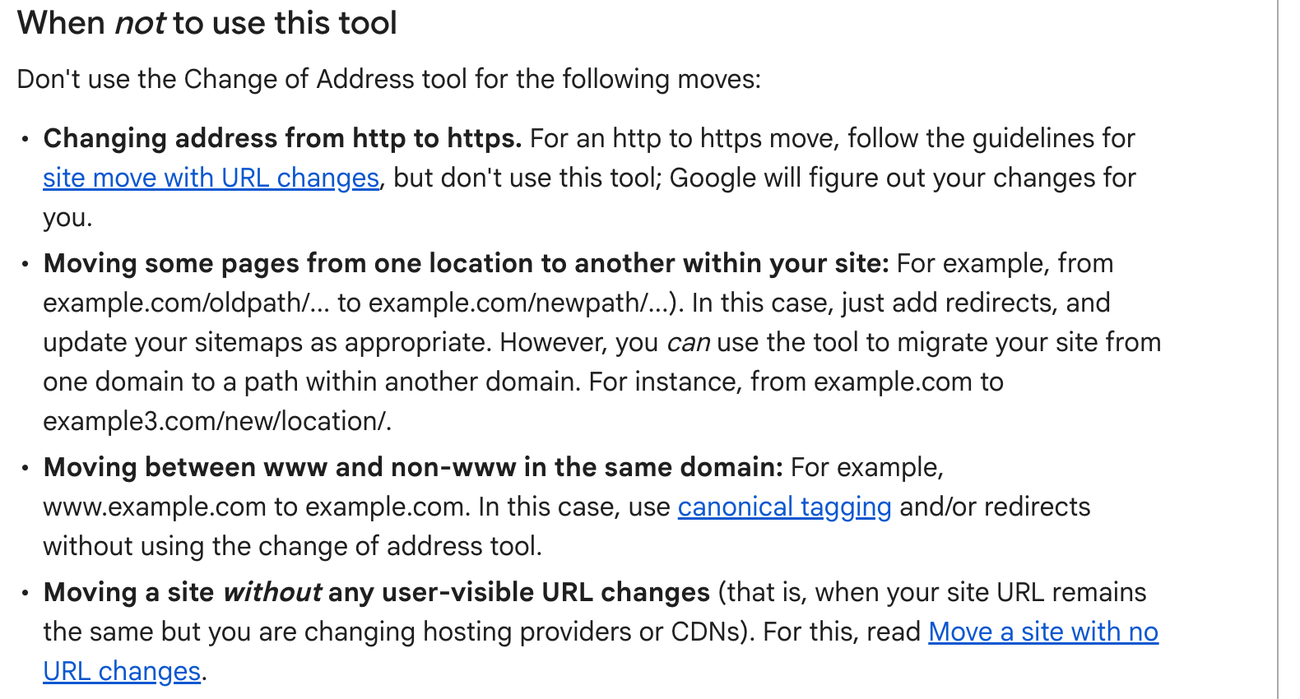
- 1An http to https move is handled without the tool. Filing one anyway adds a step and changes nothing.
- 2Moving pages inside the same site is a redirect and sitemap job. The tool operates at domain level, so it cannot help you there.
- 3A www to non-www switch is a canonical decision. Use canonical tags and redirects instead of the tool.
- 4A hosting or CDN change with the same URLs is a different procedure. If your addresses do not change, this tool is not the one you want.
Make the URL map your central launch document. It tells the developer where each old address goes and gives the reviewer a test plan.
Do not send every retired page to the homepage. Point a permanent redirect to the closest useful replacement, and record an explicit retirement decision when no replacement exists.
Google recommends server-side permanent redirects when URLs change permanently. Google also says permanent redirects do not cause a loss of PageRank.
One row carries one redirect decision
migration-map.csv
old_url,new_url,response,owner,validated
1/collections/office-chairs,/collections/ergonomic-chairs,301,merchandising,yes
/products/mesh-chair,/products/air-mesh-chair,301,ecommerce,yes
2/guides/chair-sizing,/pages/chair-size-guide,301,content,no
/sale/summer,,retire,commercial,no
- 1The source and destination stay on the same row, so the final test cannot drift from the approved map.
- 2A failed validation stays visible instead of disappearing inside a launch chat.
Say you're moving from WooCommerce to Shopify. Test both the old /product/ URL and its new /products/ destination.
Shopify lets you redirect old paths to new ones, though some fixed paths cannot be redirected. Check those restrictions before approving the URL map. The Shopify SEO guide explains which URLs the platform controls.
-
Confirm the rollback point
Keep the previous release and latest crawl available for rollback and comparison. Preserve the DNS values and redirect file as well.
-
Publish the destination
When you publish each page, use the correct status code and approved content. Its title, canonical and meta robots setting must match your launch sheet.
-
Activate redirects
Implement the approved redirect map in the system that handles each incoming request. Then test every priority URL and a sample from each pattern.
-
Remove staging controls
Check every staging control against the launch sheet. A robots or noindex directive copied from staging can prevent the new site from appearing in search.
-
Publish the new sitemap
Your new sitemap should list only canonical destination URLs. Submit it in your verified Search Console property, and keep the old sitemap available during the transition.
-
Run the acceptance crawl
Crawl old sources and new destinations. Compare the result with the baseline before your team declares the launch complete.
Google says redirects should generally stay in place for at least one year. Users and other systems may still need them after Google has processed the move.
For a domain or subdomain move, add Google's Change of Address tool after the redirects are live.
Do not use the tool for HTTP to HTTPS changes or path moves within the same site.
Put redirects where your stack can enforce the approved map reliably. Cloudflare accepts bulk lists, while Shopify manages redirects inside the store.
Test the redirect where the request first enters your stack. This catches an edge rule that prevents the application from receiving the intended URL.
Add the failed launch checks to the project scope. Their number and business value determine the recovery work that still needs an owner.
Price the migration by risk
Failed launch checks raise the price when they affect valuable URLs or search-related elements. The price should reflect the decisions needed before launch and the validation needed afterward.
Two migrations with the same URL count can require very different levels of analysis. That is why a checklist on its own is a poor basis for a price.
A flat fee per URL misses the hard part. A domain move that keeps every path may need one redirect rule, while a merger may require a separate decision for every page.
For example, you can keep every URL during a B2B redesign. Weaker copy or navigation can still reduce traffic and conversions on important lead-generation pages.
If your platform changes generated paths, you need more mapping and test work even when the store copy stays intact.
| Exposure | What adds work | Evidence to request |
|---|---|---|
| URL change | Many unique old-to-new decisions | Approved map and redirect test |
| Platform change | Generated paths and template defaults | Staging crawl and platform rule review |
| Domain change | Property verification and signal transfer | Monitoring for both properties |
| Content change | Intent and value can move together | Page purpose and conversion comparison |
| Merger | Overlap, retirement and ownership decisions | Content inventory and destination rationale |
Ask for a quote that separates discovery from implementation. It should identify who owns each system and who leads recovery if the migration fails.
Ask what happens when a mapped destination fails its acceptance rule. A quote that ends at launch buys implementation without proof.
On a B2B site, list the pages that create qualified demand before estimating the review work. Use the B2B SEO strategy guide to identify those pages when the demand path is unclear.
For an ecommerce move, rank pages by category value and product demand. Refine that order with product margin and assisted conversions.
If mapping or validation exceeds your team's capacity, our SEO migration service covers the same risk factors. It includes a testable URL map, post-launch monitoring and a recovery plan.
Your scope should name the technical, search and commercial evidence delivered after launch. It should also name who on your team owns unresolved issues.
Investigate conflicting migration data
When your technical checks and traffic numbers disagree, the mismatch often points to the cause. Compare pages individually so each test addresses one suspected problem.
A drop only tells you where to look. To find the cause, compare each old and new URL using indexation data, analytics and the page's intended purpose.
For example, the old page may redirect correctly while the new page names the old domain as canonical. The browser journey works, but the indexing signals disagree.
| Observation | Likely fault | Next test |
|---|---|---|
| Old URL returns an error | Missing redirect rule | Test the exact source against the map |
| New URL is excluded | Noindex, robots or canonical conflict | Inspect rendered directives and response headers |
| Clicks move but sessions vanish | Analytics or consent fault | Test landing page collection and tags |
| Traffic returns but leads fall | Intent or conversion regression | Compare content, forms and user path |
| Only one template falls | Template-level technical or content fault | Compare affected and stable templates |
One mismatch narrows the next test
priority-url-check.txt
source: /old-pricing
response: 301
destination: /pricing
1canonical: https://old.example/pricing
indexable: yes
- 1The redirect works, but the canonical points back to the old host.
- 2The next test belongs to the canonical template instead of the redirect layer.
Use each signal mismatch to choose the next test. A canonical conflict belongs to the affected template, while a missing redirect belongs to the URL map.
Start with the narrowest pattern that explains the loss. If product-page traffic falls while category-page traffic remains stable, investigate the product template before assuming a domain-wide problem.
Use the same test on a SaaS site. If only integration pages fall, check their template and internal links first, using your SaaS SEO strategy to identify the priority pages.
On your new site, replace internal links to old URLs with their final destinations. Redirects remain useful when your visitors or external links still use the old addresses.
Next, compare each destination page with its baseline. A URL can be technically valid even when the page no longer serves the same search intent.
If your llms.txt file lists moved pages, update their URLs during the same review. Google does not use llms.txt for indexing, so treat this as housekeeping instead of a migration fix.
Diagnose a migration drop in this order
- 1 Reproduce the mismatch Test one affected source and destination instead of relying on the dashboard average. Save the response, directives and analytics event.
- 2 Find the shared pattern Group failures by their shared trait. One group may share a template or directory, while another shares a redirect rule or release owner.
- 3 Change one mechanism Fix the smallest shared cause and record the release time. Do not rewrite content while testing a redirect defect.
- 4 Verify both outcomes Confirm that search-engine processing and business performance both improve. One successful check does not close the incident.
Watch your affected group on its own after the repair. If it is not recovering, return to that group before changing the rest of the site.
Is the migration drop normal?
A drop in an affected page group is normal only while search engines are processing the move and no lasting fault explains the lost business. Compare search-engine processing with commercial results instead of assuming every decline will fix itself.
What Google says to expect after a move
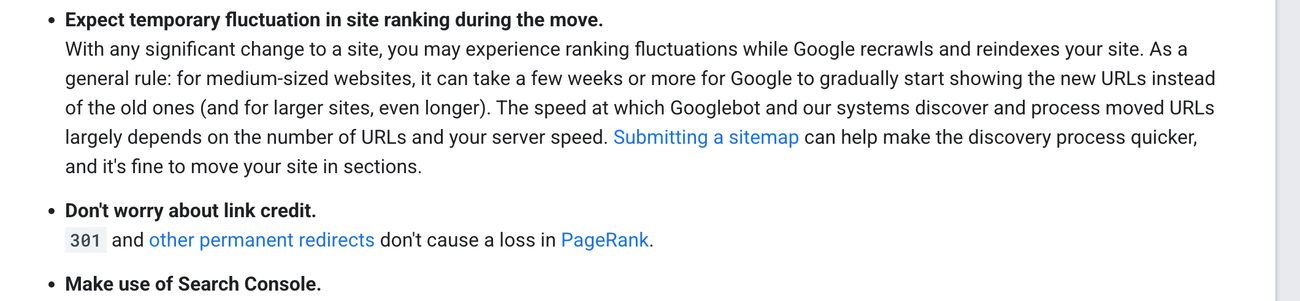
- 1Google describes ranking fluctuation as an expected part of a move. A medium-sized site can take a few weeks or more before the new URLs replace the old ones, and a larger site takes longer.
- 2Speed depends on how many URLs you moved and how fast your server answers. That makes crawl capacity a migration variable you control, while sitemap submission remains a practical way to support discovery.
- 3Permanent redirects do not cost link credit. After a clean one-hop 301 map, monitor discovery before investigating authority loss.
Google says a small or medium site may take a few weeks to settle, while a larger site may take longer. Use that estimate as a monitoring guide instead of a deadline.
How long your move takes depends on how many URLs you have and how quickly Google can crawl the site.
Google's estimate applies to URL discovery and processing. Traffic may recover on a different timetable.
Search Engine Journal's 2025 study of 892 domain migrations used third-party traffic estimates. It reported an average 523 days for the new domain to show the old domain's estimated organic traffic.
Search Engine Journal also found that 17 percent had not reached the old domain's estimated traffic after 1,000 days. That result measures estimated traffic recovery, while Google's guidance measures URL processing.
Escalate when URL processing stalls or priority pages remain excluded. Do not wait for the traffic recovery window to end before investigating a visible technical fault.
For example, impressions may reappear on new category URLs before revenue returns. In that case, search visibility is recovering ahead of sales.
-
Read transfer evidence
Compare indexed destinations with activity on old URLs. Then review crawl behavior and sitemap processing.
-
Read business evidence
Compare organic landing-page visits with qualified leads, orders and revenue. Do not let a homepage recovery hide continued losses on high-value landing pages.
-
Segment before judging
Split your site into groups such as templates or categories. If one group holds steady, the cause is not sitewide.
-
Assign the next test
Give every unresolved page group a named owner and a test. Record the evidence that will trigger the next action.
Processing and business recovery stay separate
migration-weekly-note.md
transfer_clock: improving
1business_clock: unresolved
ruled_out: redirect coverage
2next_test: category intent and internal links
- 1Improving URL processing supports continued monitoring.
- 2Unresolved business performance still needs a named test and owner.
Search Console shows search processing, while analytics shows entry behavior. If moved pages appeared in AI Overviews, check whether the new URLs replaced them there.
Your weekly migration update should cover four points. Record what changed, the current status and which cause you ruled out. Then name the evidence that will guide the next decision.
Say branded demand is stable, yet nonbrand category clicks remain down. You'll inspect category intent and internal linking before blaming the whole migration.
If you need specialist support with recovery, our ecommerce SEO service links technical fixes to category and product performance. The work starts with your affected page group and its recorded evidence.
Close your migration only after every unresolved priority-page issue has an owner, target and expected resolution date.
Sources
- Google Search Central Site moves and migrations with URL changes
- Google Search Central Changing your hosting infrastructure
- Google Search Central Redirects and Google Search
- Google Search Console Help Change of Address tool
- Google Search Central How to specify a canonical URL
- Google Search Central Introduction to robots.txt
- Google Analytics Help Landing page report
- Shopify Help Center Creating and managing URL redirects
- Shopify Help Center Migrating to Shopify
- Shopify Help Center Changing your primary domain
- BigCommerce Prepare migration data
- Cloudflare How Bulk Redirects work
- Cloudflare Bulk Redirect parameters
- Semrush The Website Migration Checklist
- Ahrefs A Website Migration Takes More Than a Checklist to Be Successful Dated 2025 with no month given, so its exact age is not knowable from the source.
- Search Engine Land Website migration checks: Redirects, canonicals, internal links and more
- Search Engine Land The ultimate site migration SEO checklist Dated 2025 with no month given, so its exact age is not knowable from the source.
- Search Engine Journal Study: How Long Should an SEO Migration Take? Dated 2025 with no month given, so its exact age is not knowable from the source.
- Search Engine Journal Essential Steps for a Successful Website Migration Dated 2025 with no month given, so its exact age is not knowable from the source.
- Screaming Frog How to Use the SEO Spider in a Site Migration This page carries no publication date of its own.
- Moz The Website Migration Guide
- llms.txt proposal The /llms.txt file
Questions people ask
What is SEO migration?
Site migration SEO protects search signals when a domain, platform, URL structure, protocol or design changes. Record the old site's performance and each URL's destination before comparing page-level results.
How to migrate a website without losing SEO?
You cannot guarantee unchanged rankings or traffic. To limit the loss, map every valuable URL to its closest replacement, then test redirects and canonical tags before launch. Compare the result with your baseline afterward.
How can I migrate my website?
Measure the old site, then approve a URL map. Publish the new site and redirects before comparing search performance with leads, orders or revenue.
How much does it cost to migrate a website?
Your price depends on how many valuable URLs and search-related elements will change. Your estimate should also cover platform-specific work and post-launch validation.
Is it hard to migrate a website?
Expect more difficulty when more systems change or more pages require individual decisions. A path-preserving domain move requires different checks from a migration that merges two catalogs.