

What schema markup tells a search engine
Schema markup is a block of code that names the things on your page: this is a product, this is its price, this is how many people rated it. Google already reads your visible text, and the markup tells it which value is the price.
The vocabulary is schema.org, a shared list of types and properties. You can write it in three formats: Microdata, RDFa and JSON-LD. Google supports part of that vocabulary, and only that part can produce a richer result.
Use JSON-LD. It sits in a script tag without changing your HTML elements, and your platform probably generates some of it already. The price goes in a nested Offer inside the product.
The smallest block a store page needs
product-page.html · application/ld+json
{ "@context": "https://schema.org",
"@type": "Product",
"name": "Merino Crew Sweater",
1 "image": "https://store.example/img/merino-crew.jpg",
"sku": "MC-1420",
"brand": { "@type": "Brand", "name": "Store Example" },
2 "offers": { "@type": "Offer",
"price": "89.00", "priceCurrency": "USD",
"availability": "https://schema.org/InStock" } }
- 1Google lists name, image and offers as the required properties for a merchant listing.
- 2The nested Offer carries price and currency, and a merchant listing needs a price above zero.
The 2024 Web Almanac found JSON-LD on 41 percent of mobile pages, up from 34 percent in 2022. The Product type appeared on 0.77 percent of pages and BreadcrumbList on 5.66 percent.
A browser-based schema markup generator can draft the block for a page.
Which schema types an ecommerce site needs
An ecommerce site needs four schema types: Product, ProductGroup, Organization and BreadcrumbList. The first two go on the product page, Organization goes on one store-wide page, and BreadcrumbList follows your navigation.
| Type | Where it goes | What it can show in Search | Core properties |
|---|---|---|---|
| Product with nested Offer | Product page | Product snippet or merchant listing | name, image, offers.price, offers.priceCurrency |
| ProductGroup | Product page with variants | Variant details in merchant listings | name, hasVariant, variesBy, productGroupID |
| Organization | One store-wide page | Store-level return policy and loyalty benefits | name, url, hasMerchantReturnPolicy |
| BreadcrumbList | Category and product pages | A category path in place of the URL | itemListElement with at least two ListItems |
| AggregateRating inside Product | Product page | Star rating in the result | ratingValue plus ratingCount or reviewCount |
Google's own ecommerce list adds two more: LocalBusiness if you have physical stores, and VideoObject for a product video.
Say you sell kitchenware. The Organization block goes on your home page once, the BreadcrumbList follows Home to Cookware to Pans, and every pan gets its own Product block with its own price.
Make the breadcrumb trail follow your internal linking map, because the markup describes the visitor's route.
Markup for product snippets and merchant listings
One Product block can qualify for two different results, and each one has its own requirements. Google calls them product snippets and merchant listings, and the merchant listing rules are stricter.
A product snippet is for pages where a shopper cannot buy the item from you, such as an editorial review. Google says meeting the merchant listing requirements also makes a page eligible for product snippets, so the stricter set is the one to build to.
A merchant listing is for the pages where you sell the product yourself. Google asks you for name, image and a nested Offer, and that Offer has to carry a real price.
Unlike product snippets, merchant listing experiences require a price greater than zero.
Google Search Central, Merchant listing (Product, Offer) structured data read 20 October 2026
So a call-for-price page, or a configurator with a zero placeholder, cannot qualify as a merchant listing.
Availability, shipping details and return policy are recommended properties. Google prefers the last two at the Organization level.
Google describes these features as changes to how a page appears in search results, and it does not guarantee that it will display the additional product details.
To raise a page's ranking, work on the other parts of your ecommerce SEO plan: product titles, category structure and internal links to the page.
Product variant markup with ProductGroup
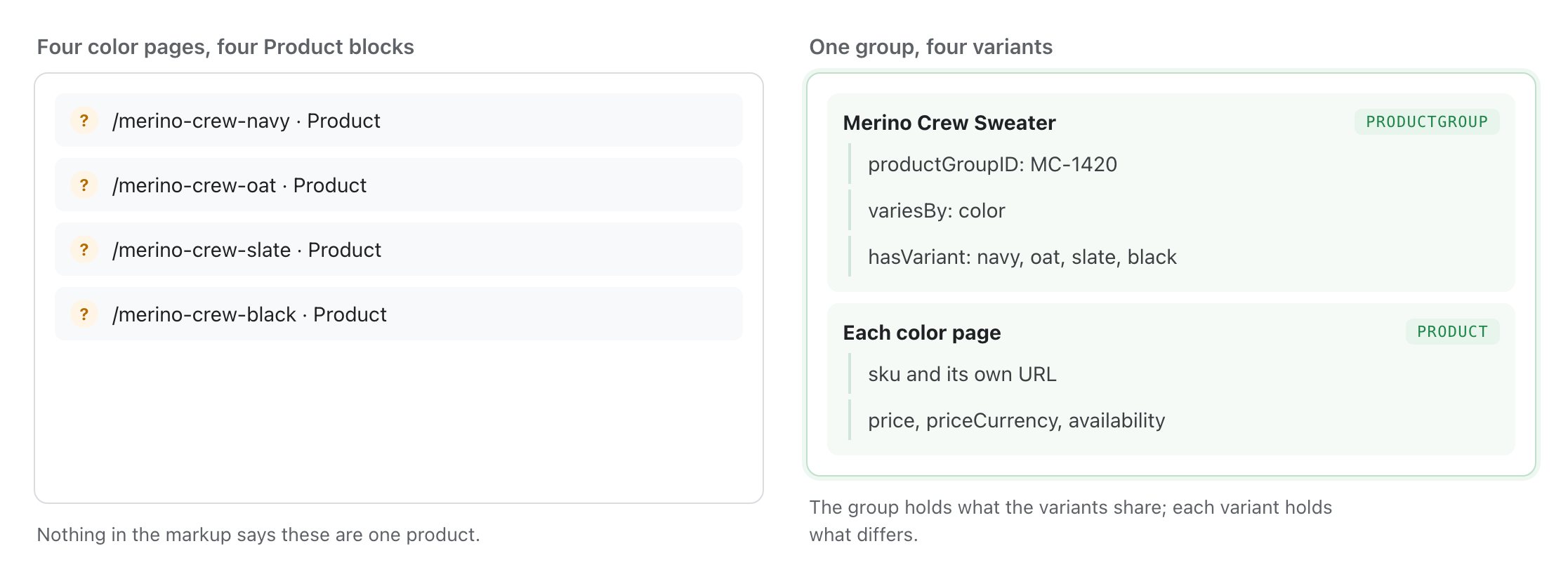
A sweater sold in four colors is one parent product with four variants, but separate Product blocks on the color pages hide that relationship in the merchant listing markup. Google's answer is ProductGroup, with each variant nested under hasVariant.
Put the shared details on the group: brand, description, reviews. Put the differences on each variant, and list the differing properties in variesBy. Google accepts six values there, from color and size to material and pattern.
Put your parent SKU in productGroupID, and give every variant its own unique id, usually a SKU or GTIN.
Variant markup on one page and on many
| What the group needs | What each variant needs | |
|---|---|---|
| One page, variants by query parameter | A canonical url on the ProductGroup, usually the base product URL | A distinct URL the site can preselect |
| One page per variant | No url on the group, and the full group definition repeated on each page | Complete self-contained markup for that page |
On Shopify, the Liquid structured_data filter outputs a product as a schema.org Product when it has no variants and as a ProductGroup when it has one or more.
On WordPress, your SEO plugin usually generates the page's markup as a single connected block.
So check what your platform emits before you add anything. A review app writing its own Product node next to the theme's node is the most common way a store ends up with two prices in its markup.
Give our schema skill a product URL and it lists the markup that page is missing.
Property names from Google’s product variant documentationGroup the shared facts, keep the differences on the variant
Four color pages marked up as four unrelated products, next to the same four as one ProductGroup.
Put the Product markup in the initial HTML. Google says markup generated by JavaScript can make shopping crawls less frequent and less reliable.
Rules for review and rating markup
A star rating is the most visible thing your markup can add to a product result, and Google sets three conditions before it will show one.
First, Google says users should be able to see the aggregate rating on the marked-up page.
Second, aggregateRating needs ratingValue and at least one of ratingCount or reviewCount.
Third, Google says a page is not eligible for the star feature when the entity being reviewed controls the reviews about itself. So Organization and LocalBusiness markup cannot carry your own star rating.
For example, 143 customer reviews on a pan are fine on that pan's Product block. The same 143 reviews turned into a 4.8 rating of your store, in your Organization block, are not.
Organization markup for returns and loyalty
Ratings describe one product, while your return terms and loyalty program describe the whole store. Those store-level facts go in the Organization block, which you write once.
Google asks you to put your store-wide return policy in the Organization block's hasMerchantReturnPolicy property.
If some products have a different return policy, you override the organization-level policy inside the merchant listing markup for those products.
Loyalty programs go in Organization markup through hasMemberProgram, added in 2025, with member prices marked up on the product itself. Google clarified the documentation for both of these in July 2025, so check a block written before then against the current properties.
Say your members get 10 percent off. The program is described once at the organization level, and the member price sits on the products it covers.
How markup and your product feed work together
If you advertise or use free listings, your product data reaches Google twice: once through the Merchant Center feed and once through the markup on the page. Google reads the markup to correct the feed.
Automatic item updates use your page markup to refresh items when your submitted data is stale. That lowers your risk of disapprovals and account suspension over price and availability mismatches.
Google sets one condition: the structured data must match the values shown to the customer. A price in your markup that the shopper never sees counts as a mismatch.
Valid markup also unlocks the website crawl input method, so Google can build a primary product data source from your annotated pages. Treat that as a backstop, because Google says it does not replace regular feed updates.
Feed titles and attributes follow their own rules, covered in Google Shopping feed optimization.
For example, automatic item updates cover a flash sale price that changes on your site but stays unchanged in the feed.
Which schema types Google has retired
Your feed and your markup can both be valid while the result they aim at no longer exists. FAQPage and HowTo are both in that state.
Going forward, FAQ (from FAQPage structured data) rich results will only be shown for well-known, authoritative government and health websites. … While you can drop this structured data from your site, there is no need to proactively remove it.
Google Search Central, Changes to HowTo and FAQ rich results 8 August 2023, read 20 October 2026
Google's FAQPage documentation records that the feature stopped appearing in Google Search on 7 May 2026, and the documentation for it was removed in June 2026.
Dates from Google’s announcement and documentation changelogSort an old checklist by what Google still shows
The same schema types grouped by whether Google still displays their rich results. FAQPage and HowTo sit on the retired side.
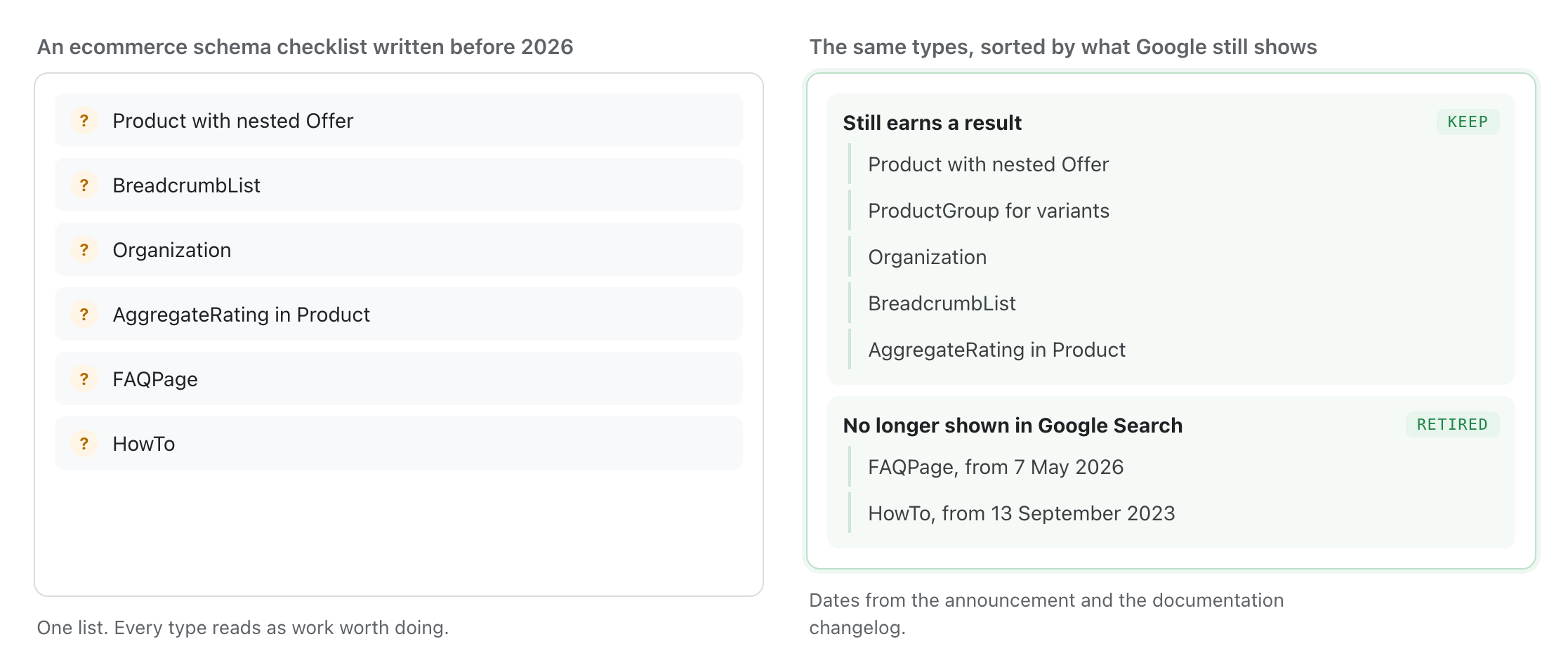
FAQPage and HowTo markup stay valid; they simply produce no result.
| Change | Date | What it means for a store |
|---|---|---|
| HowTo rich results deprecated | 13 September 2023 | HowTo markup earns nothing in Google Search |
| FAQ rich results restricted, then retired | 8 August 2023, then 7 May 2026 | FAQPage markup earns nothing in Google Search |
| Loyalty program markup added | June 2025 | Member prices and benefits can appear on product results |
Google says unused markup causes no problem in Search, so you can leave it until your next template change.
Does schema markup help in AI answers?
Ahrefs tested whether adding markup raises AI citations and found no lift. Rich results come from markup, while eligibility for AI answers comes from ordinary indexing.
Google's documentation on AI features says you do not need new machine readable files or markup to appear, and that there is no special schema.org structured data to add. It states one requirement: the page must be indexed and eligible to be shown with a snippet.
Ahrefs tested this in May 2026. Ahrefs compared 1,885 pages that added JSON-LD with matched control pages that did not, tracking both groups for 30 days before and 30 days after the change.
Change in AI citations after adding JSON-LD
In Ahrefs' analysis of six million URLs, 53 percent of AI-cited pages contained JSON-LD, nearly three times the proportion among pages that were not cited.
That 53 percent may reflect broader page maintenance: sites that keep their markup up to date usually maintain the rest of their pages too.
In December 2025, Search Atlas compared how often OpenAI, Gemini and Perplexity cited domains with different levels of schema markup. Domains with complete schema coverage were cited no more often than those with little or none.
Semrush's correlation study of five million cited URLs found Organization markup on 25 percent of ChatGPT-cited pages and 34 percent of AI Mode citations. Product markup appeared on 1.5 percent of pages cited by ChatGPT and 2.5 percent of those cited by AI Mode.
Semrush's content study of 304,805 AI-cited URLs scored only the text visible on each page, and the cited group scored 21.60 percent higher on what it calls structured data elements. The same study says it did not evaluate schema markup, so that figure is not evidence for adding JSON-LD.
Put nothing in your markup you would not publish on the page. Ahrefs documents a test in which an invented address appeared only in a page's schema, and two assistants repeated it in their answers.
At a conference in March 2025 its search lead said schema markup helps Microsoft's language models make sense of content, as Search Engine Land reported.
Focus on the pages and third-party sources those engines cite, which our generative engine optimization guide covers step by step.
Common ecommerce schema mistakes
Five patterns account for most broken markup on store pages. Of these five, only the price mismatch triggers a Merchant Center disapproval; the other four produce no alert.
What breaks, and what it costs
| Why it happens | What you lose | |
|---|---|---|
| Markup price differs from the page price | Feed, theme and app each write their own value | Merchant Center disapprovals and ineligible rich results |
| Two Product blocks on one page | A review app adds a node next to the theme node | Google picks one set and your ratings may not be in it |
| Markup injected by JavaScript | A front end renders the block client side | Less frequent and less reliable shopping crawls |
| Category page marked up as a Product | A template loop writes Product for a listing | An invalid item and no eligibility |
| Ratings in the code only | Stars in the markup that shoppers never see | Ineligible for the review snippet |
SearchPilot ran a split test in October 2025 for a travel site whose breadcrumb schema was rendered client side. SearchPilot found that adding server-rendered breadcrumb schema alongside visible mobile breadcrumbs produced a statistically significant 5 percent increase in organic traffic.
SearchPilot published the opposite result for an ecommerce site in 2021. SearchPilot estimated that fixing the breadcrumb markup error so the breadcrumbs showed in the snippet reduced organic traffic by 7 percent on category pages, 6 percent on subcategories and 12 percent on product pages.
In the losing test the snippet showed the top-level category instead of the subcategory, so the result described the page less well than the URL had.
So before you ship a markup fix, look at the result it produces on a sample of pages.
Screaming Frog validates both the schema.org vocabulary and Google's required and recommended properties across every URL in a crawl, which is how you find an error that repeats on a template.
If your catalog is too large to crawl in-house, our technical SEO service can run the crawl and group the errors by template.
How to measure what your markup earns
Search Console reports two things about your markup: how many valid items Google found on each template, and how often the result type appeared in search.
Search Console counts valid items and errors for each type in its enhancement reports.
The performance report groups impressions by search appearance, so you can track increases or decreases for each result type.
Read it after Google has recrawled the templates you changed, which on a large catalog takes more than a day.
For example, after you add the nested Offer, watch valid merchant listing items climb and the error count on that template fall. If neither number moves, the block is not being read.
What schema markup costs to put in place
When the nested Offer is missing, you pay for the development work that adds the markup your platform's default templates leave out. For most stores, that takes a few hours. The markup itself costs nothing.
Shopify generates the Product or ProductGroup block for you, and on WordPress the SEO plugin generates a connected block of markup.
The default block usually leaves out four things: a nested Offer with a real price, variant grouping, ratings and your return policy.
A stock theme usually needs one change on the product template and one on the layout that carries your Organization block, so ask for an estimate in hours per template.
Add one round of retesting after deployment, because a template change can break the block it was meant to fix.
Check your product markup this week
You can scope that template work yourself with one product URL, one category URL and your home page. The five steps below use the Rich Results Test, your page source and a crawler.
-
Test one product page in the Rich Results Test
Note which experiences it detects, and read the errors for the merchant listing separately from the product snippet.
-
Compare the markup with the page
Price, availability and rating in the code have to match what the shopper sees. For example, a member price in the markup and a list price on the page is a mismatch.
-
Search the raw HTML for your markup
Look for application/ld+json in the page source rather than the rendered DOM. If the block only appears after JavaScript runs, move it into the initial HTML.
-
Count the Product blocks
More than one means your theme and an app are both writing markup. Keep one and extend it.
-
Crawl the templates
Run a structured data crawl over your product and category templates, then fix by template instead of by page.
Then fix the item that blocks the most pages. On most stores that is a missing nested Offer or a rating that exists only in the code.
If you need to scope that development work, our SEO audit services identify the template and the missing property.
Sources
- Google Search Central Product structured data: the two experience types, shown at each experience’s discretion
- Google Search Central Merchant listing (Product, Offer) structured data: required name, image and offers, price greater than zero
- Google Search Central Product variant (ProductGroup) structured data: hasVariant, variesBy, productGroupID, initial HTML
- Google Search Central Review snippet structured data: visible ratings, required ratingValue and count, self-serving reviews excluded
- Google Search Central Blog Changes to HowTo and FAQ rich results, with the 14 September 2023 update deprecating HowTo
- Google Search Central FAQPage structured data documentation changelog: feature no longer shown from 7 May 2026, documentation removed June 2026
- Google Search Central AI features and your website: no new files or markup needed, indexing and snippet eligibility required
- Google Search Central Include structured data relevant to ecommerce: BreadcrumbList, LocalBusiness, Organization, Product, ProductGroup, Review, VideoObject
- Google Merchant Center Help About structured data markup for Merchant Center: automatic item updates and website crawl
- Ahrefs Does Schema Markup Increase AI Citations? A controlled study of 1,885 pages that added JSON-LD
- Ahrefs Schema Markup: What It Is & How to Implement It, including the fictional-company address test on two engines
- Semrush How Do Technical SEO Factors Impact AI Search? Five million cited URLs across ChatGPT Search and Google AI Mode
- Semrush How We Built a Content Optimization Tool for AI Search: 304,805 AI-cited URLs, 11,882 prompts
- Search Atlas The Limits of Schema Markup for AI Search: visibility across five levels of schema adoption
- Web Almanac Structured Data chapter 2024: JSON-LD on 41 percent of pages, Product 0.77 percent, BreadcrumbList 5.66 percent Measured 22 months ago, on a surface that has moved since.
- SearchPilot Mobile breadcrumbs and server-side schema: a split test with a statistically significant 5 percent organic uplift
- SearchPilot SEO split test lessons: fixing breadcrumb markup errors, negative on category, subcategory and product pages Measured 5 years ago, on a surface that has moved since.
- Schema.org Product: the type definition and its properties
- Schema.org ProductGroup: hasVariant, variesBy and productGroupID
- Schema.org Offer: the nested type that carries price, priceCurrency and availability
- Schema.org AggregateRating: ratingValue, ratingCount and reviewCount
- Shopify Liquid structured_data filter: Product without variants, ProductGroup with variants
- Screaming Frog Structured data testing and validation: schema.org vocabulary plus Google rich result feature validation
- Search Engine Land Microsoft Bing and Copilot use schema markup for their LLMs Measured 18 months ago, on a surface that has moved since.
- Schema.org Getting Started: the vocabulary and the Microdata, RDFa and JSON-LD formats
- Yoast Structured data with schema.org: the connected graph an SEO plugin writes
- PPC Land Google clarifies merchant return policies and loyalty programs documentation Measured 14 months ago, on a surface that has moved since.
Questions people ask
What is schema markup?
Schema markup is code in the schema.org vocabulary that labels the facts on a page, such as the price, the rating and the availability of a product. Search engines read it to interpret the page without inferring which number is which. Google supports part of that vocabulary, and only that part can appear as a richer result.
Which schema types does an ecommerce site need?
Product with a nested Offer goes on every product page, and ProductGroup goes there too when the product comes in variants. Organization goes once on a store-wide page. BreadcrumbList goes on category and product pages. Add aggregateRating only where real customer ratings are visible.
Does schema markup move my rankings?
Google documents product structured data as a change in appearance and does not guarantee the enhancement will be shown. It makes a page eligible for a richer result at the position it already holds.
Do I still need FAQ schema?
No. Google Search no longer shows FAQ or HowTo rich results. FAQ rich results were restricted to government and health sites in August 2023 and stopped appearing on 7 May 2026, and HowTo was deprecated in September 2023. Google says there is no need to remove the markup, so it can stay until your next template change.
Do I need a Merchant Center feed if my pages have Product markup?
Yes, if you want shopping surfaces. Google treats the feed as the primary source and uses your page markup to correct stale price and availability through automatic item updates. A website crawl can build a feed from your markup, but Google says it does not replace regular feed updates.