
Which campaign controls each product?
Make the product your unit of decision before you choose a campaign. Two products in the same catalog can need different margins, reach, and reporting.
Start with the product's margin and demand pattern. Then identify the decisions your team must make by hand.
For example, take a store that sells trail shoes and spare laces. The shoes may justify broader discovery, while the laces may need tighter control over search spend.
In Performance Max, set the goal and budget before supplying products and assets. Audience signals guide learning but do not restrict delivery. Use exclusions for the boundaries the campaign must respect.
In Standard Shopping, build product groups and add negative keywords. Set campaign priority and bids after those boundaries are clear.
Both campaign types can run in one account. Give each campaign its own product set when you need a clean comparison.
Do not judge profit from a handful of orders. Wait until returns, discounts, and product margin no longer let one order swing the result.
Shared and different Shopping controls
Both campaigns use common product data and conversion inputs. Each campaign adds its own inventory and bidding controls. Compare those controls before you compare product performance.
Google Ads controls side by side
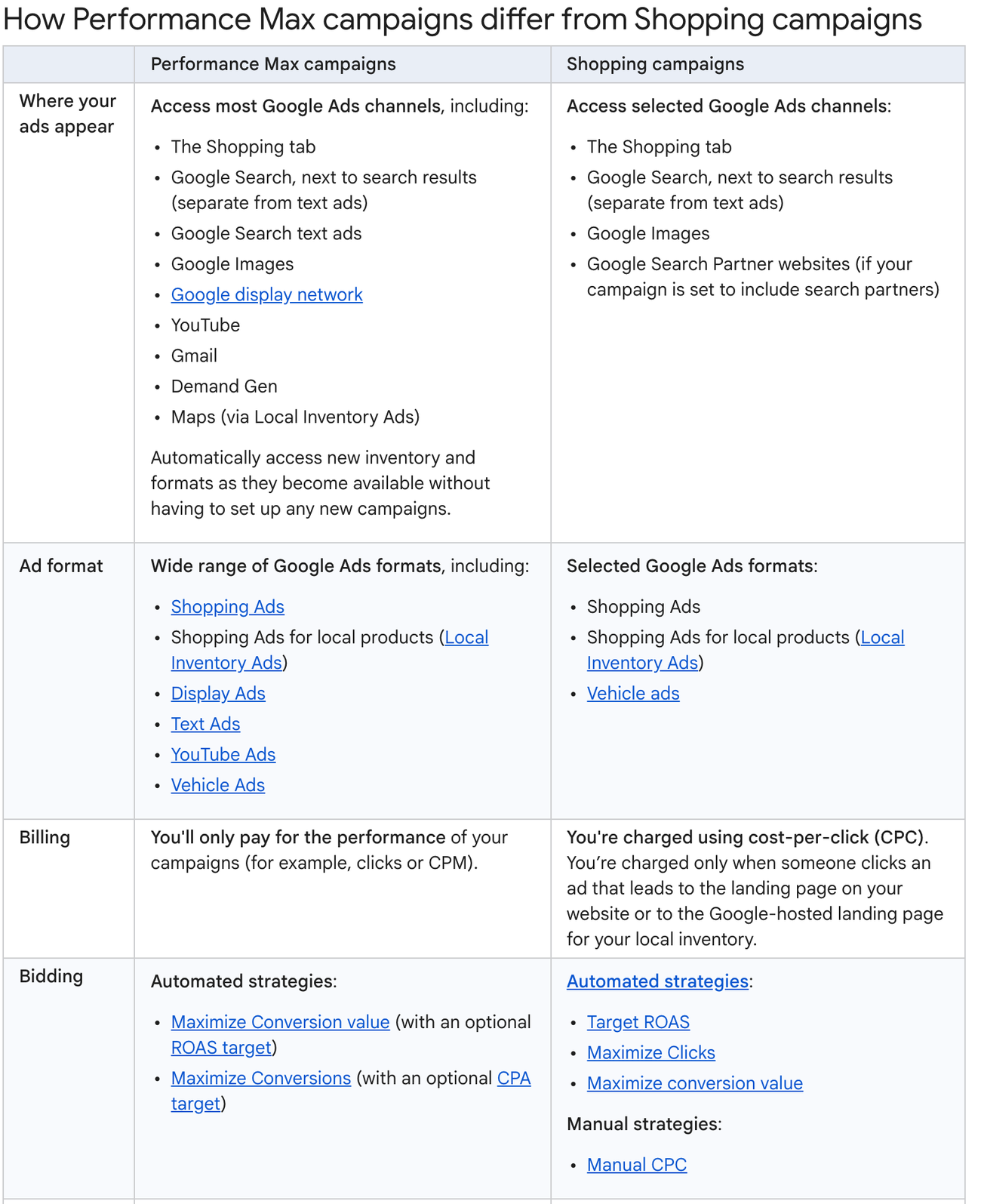
- 1The inventory rows are the main difference. Performance Max reaches YouTube, Gmail, Demand Gen, Display, and Maps. A Shopping campaign reaches the Shopping tab, Search, Images, and search partners.
- 2The billing rows do not match. Performance Max may charge for clicks or impressions, while Shopping charges per click. Cost per click is therefore not a like-for-like comparison.
- 3The bidding rows show which decisions remain manual. Shopping still offers Manual CPC. Performance Max lists automated strategies, so a manual bid becomes an optimization target.
| Shared input | Why it matters |
|---|---|
| Merchant Center product data | Supplies the eligible products and attributes |
| Approved product inventory | Decides which products can appear in ads |
| Conversion tracking | Supplies the business outcome used for optimization |
| Catalog partition | Lets you include or exclude products by a feed attribute |
Only the controls that differ
| Performance Max | Standard Shopping | |
|---|---|---|
| Inventory | Search, Shopping, Images, Display, YouTube, Gmail, Demand Gen, and Maps | Shopping tab, Search shopping formats, Images, and opted-in search partners |
| Bidding | Maximize conversion value or Maximize conversions, with optional targets | Target ROAS, Maximize clicks, Maximize conversion value, or Manual CPC |
| Creative | Product data with asset groups | Product data supplies the ad assets |
| Audience | Signals guide automation without creating a fixed audience wall | Audience targeting can define who is eligible |
| Routing | Final URL expansion and search themes can broaden matching | Product groups and campaign priority shape Shopping delivery |
| Reporting | Campaign, channel, search term, landing page, and product views | Campaign, search term, product, and Shopping impression-share views |
A Google Shopping ads placement can come from either campaign type. Seeing one on Search does not reveal whether the campaign can also spend on YouTube or Display.
Confirm which campaign served the ad before comparing its results. The campaign settings determine the bidding and reporting controls behind that placement.
How does Performance Max use the catalog?
Check inventory first by asking where the campaign can show ads. In Performance Max, your catalog can feed ads across Google. That wider inventory changes the reports and controls you use.
Choose products through listing groups, then add assets and audience signals. Those signals help the system learn, but they do not restrict delivery to the named audience.
For instance, use an exclusion when a product or query must stay outside the campaign. Do the same for a placement you do not want.
Choose Maximize conversion value or Maximize conversions. Add a target ROAS or target CPA when needed. You still state the objective while Google decides where the ads run.
The channel report shows delivery across every Performance Max channel, including which ads used product data. Check that report before you change the campaign budget or its product groups.
Google says its current search terms report includes data from March 2023 onward. It connects queries with landing pages and ad formats. Apply negative keywords at campaign or account level for Search and Shopping inventory.
You still cannot set a separate budget cap for each channel. The campaign optimizes toward one objective, so investigate why spend shifts before you change settings.
PMax share of Google Shopping spend and sales
If both types run, compare each one's share of shopping spend with its share of sales.
Tinuiti's Q4 2025 benchmark found a 3 percent relative conversion-rate deficit for PMax. Tinuiti also found a 1 percent relative ROAS deficit across programs with more than $4 billion in annual ad spend under management.
Smarter Ecommerce's 2025 analysis of more than 4,000 retail PMax campaigns in over 500 advertiser accounts found that feed-based ads typically took 74 to 97 percent of campaign cost, with a 90 percent median.
Skai's Q1 2025 index found PMax in 57 percent of its client accounts, up 11 percentage points year over year. Popularity alone does not make it suitable for a particular product.
For example, a ceramic cookware range with strong images and stable order values can support richer assets. Review its channel report to see where the campaign found demand.
When margins or conversion values are hard to express in your campaign settings, our Performance Max management service can help. Review product and channel results alongside blended ROAS.
How does Standard Shopping use the catalog?
Those product and channel results need a different reading in Standard Shopping. The same catalog stays on Shopping surfaces, while query reports connect searches with each product group.
Automated options include target ROAS, Maximize conversion value, and Maximize clicks. Manual CPC remains available when bids must stay under direct control.
Suppose the same product sits in several Standard Shopping campaigns. Set campaign priority to determine which campaign enters the auction before the bid is considered.
Use Merchant Center attributes to subdivide the catalog into product groups. Search term reports then show which queries triggered those groups.
Product reports break results down by item, brand, and product type. They also show impression share for the Shopping inventory.
For example, add a feed label that identifies low-margin accessories. Place those products in a group with a bid strategy that protects the margin.
Assign each product in the feed
merchant-center-products.tsv
1id title custom_label_0 campaign_assignment
TRAIL-SHOE Trail shoe cross_channel pmax
2SPARE-LACE Spare lace margin_control standard_shopping
CARE-KIT Shoe care kit margin_control standard_shopping
- 1The custom label applies the business rule to campaign assignment.
- 2Each product is assigned to one campaign, so overlap becomes a deliberate exception.
Get the product feed right before changing bids. Our Google Shopping management service can help when product IDs or labels make the campaign structure unreliable.
Review labels whenever margins or stock conditions change. An outdated assignment can keep a product in the wrong bidding group.
Read product-group results alongside their matched queries. That pairing shows whether the bid controls are protecting the intended products.
When Performance Max and Shopping overlap
Overlap begins when the same product is eligible in your Standard Shopping and Performance Max campaigns. Google says Ad Rank decides which eligible campaign serves. Performance Max has no automatic priority for shared products.
A drop in your Standard Shopping traffic does not prove Performance Max is superior. Another eligible campaign may simply have served the ad. Collect product-level and order-level evidence before comparing performance.
For example, take one coffee maker listed in both campaigns for the same country and schedule. Only one campaign serves each eligible opportunity, so the setup cannot produce a clean side-by-side comparison.
How a shared product reaches the auction
- 1 Eligible product The product meets feed and policy conditions. It also meets the market and campaign conditions.
- 2 Campaign candidates Performance Max and Standard Shopping may both qualify for the opportunity.
- 3 Ad Rank selection Google selects the eligible campaign with the stronger Ad Rank.
- 4 Serving campaign The selected campaign receives the impression and reports it in its own context.
Record product eligibility separately from the campaign that served it. Then you can tell whether the product lost delivery or simply moved to the other campaign.
Eligibility is decided before the auction ranks anything. See how Google Ads works for the full sequence.
Give the campaigns exclusive product sets when you want coexistence without ambiguous routing. Reserve overlapping live campaigns for products you do not intend to compare directly.
When should Standard Shopping lead?
Once overlapping products are separated, Standard Shopping should lead only when its extra controls solve a real constraint. Tight margins, query exclusions, and manual bids are the clearest cases.
| Condition | Lead campaign | Reason |
|---|---|---|
| One value goal should allocate across several Google surfaces | Performance Max | The campaign can distribute beyond product ads |
| Shopping results must remain isolated from other inventory | Standard Shopping | The campaign boundary keeps that reporting separate |
| You need direct Manual CPC choices | Standard Shopping | Manual CPC is available here, while Performance Max bids automatically |
| You need assets beyond the product feed | Performance Max | Asset groups can support other formats |
| You need one product set protected from broader allocation | Standard Shopping | The product group can stay inside Shopping inventory |
| You cannot maintain detailed product controls | Performance Max | Automation reduces manual allocation work |
For example, a replacement part with narrow demand may need query visibility and a strict bid. Put that product in Standard Shopping while the hero range follows the account's broader allocation plan.
Standard Shopping adds work compared with PMax. Use it only when your team will maintain the product groups, exclusions, and bids that justify that work.
Performance Max is a poor fit when a product has a constraint the system cannot see. If you can express a thin margin in conversion values or the feed, the system can account for it. Otherwise, keep the product in Standard Shopping.
Optmyzr's October 2024 study of 9,199 accounts and 24,702 campaigns found that 82 percent ran PMax beside another campaign type. Its June 2025 follow-up found that missing channel data made mixed accounts hard to diagnose. Google now provides channel reporting.
If the current setup sends a product's traffic where it loses money, exclude that product or query. Check the resulting margin before widening delivery again.
If you also split budget across platforms, see Google Ads and Meta ads. It keeps campaign choice separate from channel choice.
Test Performance Max against Shopping
A valid test starts with product ownership. Define separate product sets, then align the settings both campaigns share so traffic routing does not skew the result.
SavvyRevenue's June 2026 eight-week ecommerce test produced no clear winner at 95 percent confidence. In two more accounts SavvyRevenue observed for 38 weeks, PMax never improved on its learning-phase performance and remained equally volatile.
Workshop Digital's case study covered one mid-sized B2B retailer. PMax delivered 21 percent higher ROAS and 54.9 percent more conversion value than Standard Shopping.
Stellar Search ran a 12-week 50/50 split for one UK menswear retailer, and PMax outperformed Standard Shopping. Over the same period the whole account recorded 37 percent more revenue and 44 percent higher ROAS year over year.
In NOVA Information Management School's July 2023 90-day test of one tactical-gear retailer, PMax produced 55 conversions against Standard Shopping's 14. It did not deliver higher ROAS in that account.
-
1. Choose comparable product sets
Match products by margin and demand pattern. Balance price position with stock reliability across the groups, keeping every product on one side.
-
2. Align conversion goals
Use the same purchase action and value logic in your campaigns. If the campaigns optimize toward different goals, their results are not directly comparable.
-
3. Align market conditions
Match location, language, and active dates across both groups. Record promotions or stock events that affect one set.
-
4. Keep each campaign type intact
Do not remove defining features merely to make the campaigns look alike. Record any setting that exists on only one side.
-
5. Read product and order economics
Compare contribution margin with stock effects, then review spend and sales beside new-customer share. Keep channel allocation visible for Performance Max.
-
6. Apply a written decision rule
Before launch, write down what would move products to the other campaign. Set the rule for changing bids or extending the test.
For example, split two comparable homeware groups with a stable feed label. Keep each product in one campaign during the test, then compare contribution margin and order quality over the same market window.
If both sides must use the same products, run Google's formal A/B experiment instead of parallel live campaigns. Google offers that experiment for testing Performance Max against Standard Shopping.
A split between non-overlapping product sets compares the campaigns as complete systems. It cannot isolate the Shopping placement inside Performance Max from its other inventory.
Performance Max and Standard Shopping questions
After the test, use the product decision and serving record to resolve the remaining account questions. The answers below cover availability, overlap, performance, and search-term reporting.
For a broader decision, compare the discovery surfaces in ChatGPT shopping vs Google Shopping.
Sources
- Google Ads Help About Shopping ads
- Google Ads Help Create a Shopping campaign
- Google Ads Help Onboarding guide for Shopping ads
- Google Ads Help Monitor and optimize your Shopping campaigns
- Google Ads Help About the search terms report in Performance Max
- Tinuiti Q1 2025 Digital Ads Benchmark Report Dated 2025 with no month given, so its exact age is not knowable from the source.
- Tinuiti Digital Ads Benchmark Report Q4 2025 Dated 2025 with no month given, so its exact age is not knowable from the source.
- Smarter Ecommerce State of Performance Max 2025 Measured 17 months ago, on a surface that has moved since.
- Skai Q1 2025 Quarterly Trends Report Measured 17 months ago, on a surface that has moved since.
- SavvyRevenue PMax vs Standard Shopping: We Ran a Test With Google
- Workshop Digital Performance Max Delivers 21% Higher ROAS for B2B Ecommerce Retailer
- Stellar Search Major Fashion Retailer PMax campaign increased Google Ads revenue by 37% and ROAS by 44% in 3 months
- Optmyzr Performance Max Study: Evaluating Popular Strategies For ROI Measured 23 months ago, on a surface that has moved since.
- Optmyzr Google Listened: 5 PMax Fixes That Solved the Gaps We Found in 24,702 Campaigns Measured 15 months ago, on a surface that has moved since.
- NOVA Information Management School The Impact of Automation-Driven Performance Max Campaign, Smart Bidding Strategies, and Tenscore Measured 3 years ago, on a surface that has moved since.
Questions people ask
Is Standard Shopping still available?
Yes. Google Ads still offers Standard Shopping when you select Shopping as the campaign type.
Can Performance Max and Standard Shopping run together?
Yes. Both can run in one account with the same products, but that overlap prevents a clean live comparison. When both campaigns qualify for an opportunity, Google uses Ad Rank to decide which one serves.
Does Performance Max always beat Standard Shopping?
No. Product economics and available inventory determine the first cut. Your assets, data, and the time your team can give the campaign also matter.
Does Performance Max hide search terms?
No. The current search terms report shows queries and landing pages. It also shows ad formats and performance metrics. Add negative keywords for Search and Shopping inventory when needed.