

What is a Performance Max campaign?
Performance Max is a goal-based campaign that runs across Google’s inventory from a single setup. Google names the surfaces: Search, YouTube, Display, Discover, Gmail and Maps. The consolidation is the product, and the controls that come with it are the trade. Google’s own API documentation describes it the same way: all Google Ads channels and inventory from a single unified campaign.
You buy reach and sell steering.
Performance Max is a goal-based campaign type that allows you to access all Google Ads inventory, including YouTube, Display, Search, Discover, Gmail, and Maps, from a single campaign. You can use Performance Max to complement your keyword-based Search campaigns, to help optimize performance based on specific goals, and to find new ways to help generate more conversions and value.
Google Ads Help read 5 September 2026
- One phrase carries the trade: all Google Ads inventory, from a single campaign. Reach is the product.
- The channels are listed and there are six of them. You are not choosing among them; the campaign is choosing.
- The first stated use is to complement keyword-based Search campaigns, which is the sentence most explanations of this campaign type leave out.
The campaign type is badly explained almost everywhere, and meanwhile the paid share of clicks on product queries has been rising.
In the Similarweb data Aleyda Solis published in February 2026, covering the top 5,000 US headphone queries, product listing ads went from 13 to 20 percent of clicks in a year. A fourth category in the same study showed none at all.
SEO vs PPC sets out the rest of what you are choosing between.
That figure measures product listing ads. Your campaign can serve them, among five other surfaces, so the number describes something next to what you are buying. Search Engine Land, covering the same analysis four days later, added the advertiser side: Amazon’s paid clicks up 35 percent over the year and Gap’s up 137 percent.
| What you still control | What Google decides |
|---|---|
| Negative keywords | Which queries you match |
| Brand exclusions | Which placements you appear on |
| Search themes, up to 50 per asset group | How assets are combined into an ad |
| Audience signals | How budget splits across the six surfaces |
| Final URL expansion, on or off | Which landing page within the site |
| Budget, bidding strategy, location, language | Everything below that |
| Surface | What it looks like | What you would otherwise run |
|---|---|---|
| Search | Text ads on Google search | A Search campaign |
| Search, shopping formats | Product listings with photo and price | Google Shopping ads |
| YouTube, Display, Discover, Gmail | Image and video placements | Separate campaigns per channel |
| Maps | Local placements | A local campaign |
How much of that control has come back since launch
Control has widened since launch, as Search Engine Journal sets out. You now get campaign-level negative keywords, brand exclusions, age and device exclusions, and asset groups of up to 15 headlines, 20 images and 5 videos. It also states the part that has not changed: you do not control keyword targeting directly.
Underneath every one of those surfaces the pricing is still the auction described in how Google Ads works. Performance Max changes who chooses the query, not how the click is priced.
Exact match keywords prioritised over Performance Max
The most useful published fact about Performance Max is not in the page that describes it. It is in the page about how Google prioritises between the things in your account, and it puts your own exact match keyword ahead of Performance Max on that query.
If both run on the same catalog, Performance Max vs Standard Shopping sets out which controls you keep and which ones you hand over.
Your Search campaign is not a bystander.
What that means in an account that runs both
If a query exactly matches a keyword you own, that keyword is prioritised over Performance Max for it. Google states the priority; it does not state that your ad always serves, and the same page notes a budget-restricted keyword may not trigger at all. On the next rung down, a search theme identical to the query is prioritised over a phrase keyword that is not. Themes and phrase keywords are ordered by how closely they match, not being interchangeable. So a published rule governs the overlap people worry about, not chance. Your lever is the keyword list, not the Performance Max settings.
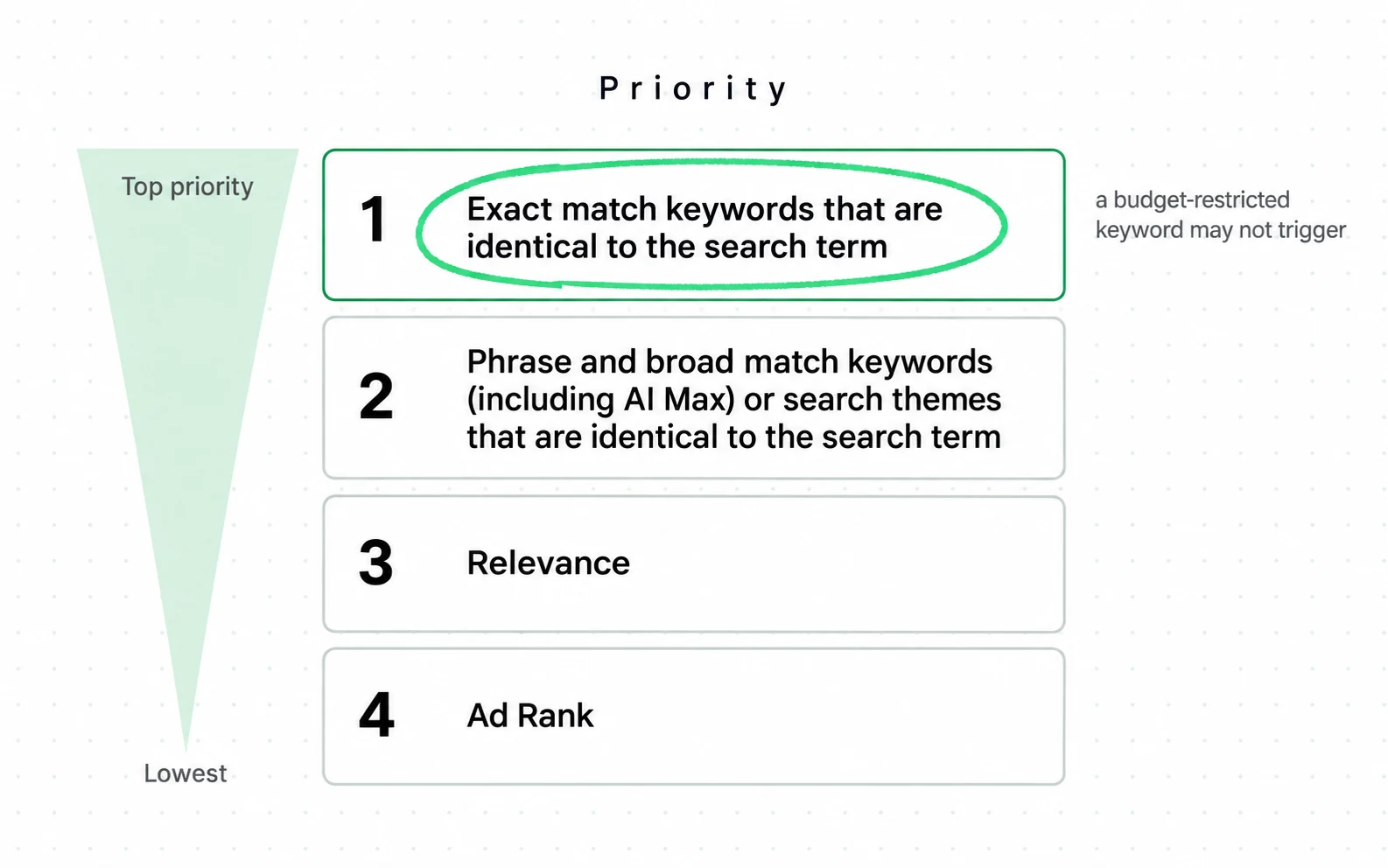
- Four rungs, numbered by Google. An exact match keyword identical to the search term is first, and Performance Max is not on that rung at all.
- Search themes sit on rung two, beside phrase and broad keywords, ordered by how closely each matches. That is the sentence that settles most overlap arguments.
- Rung four is Ad Rank, which means that when nothing above it decides the question, the ordinary auction does.
The condition attached to it is the part worth acting on. Google states that a keyword in a budget-restricted campaign will not always trigger an ad even when it otherwise could. If your Search campaign runs out of budget by mid-afternoon you are not just losing impressions. Your keyword that was first in line may not trigger, and the rule says nothing about what happens next. Google documents that gap and stops there, so where your query goes instead is not something you can read anywhere.
Why search themes are signals
You can add up to 50 search themes per asset group, and Google describes them as optional and additive to the queries and placements Performance Max predicts will perform well. That wording matters: they are an input to a prediction, not a targeting instruction. Exclusions and negative keywords still apply on top.
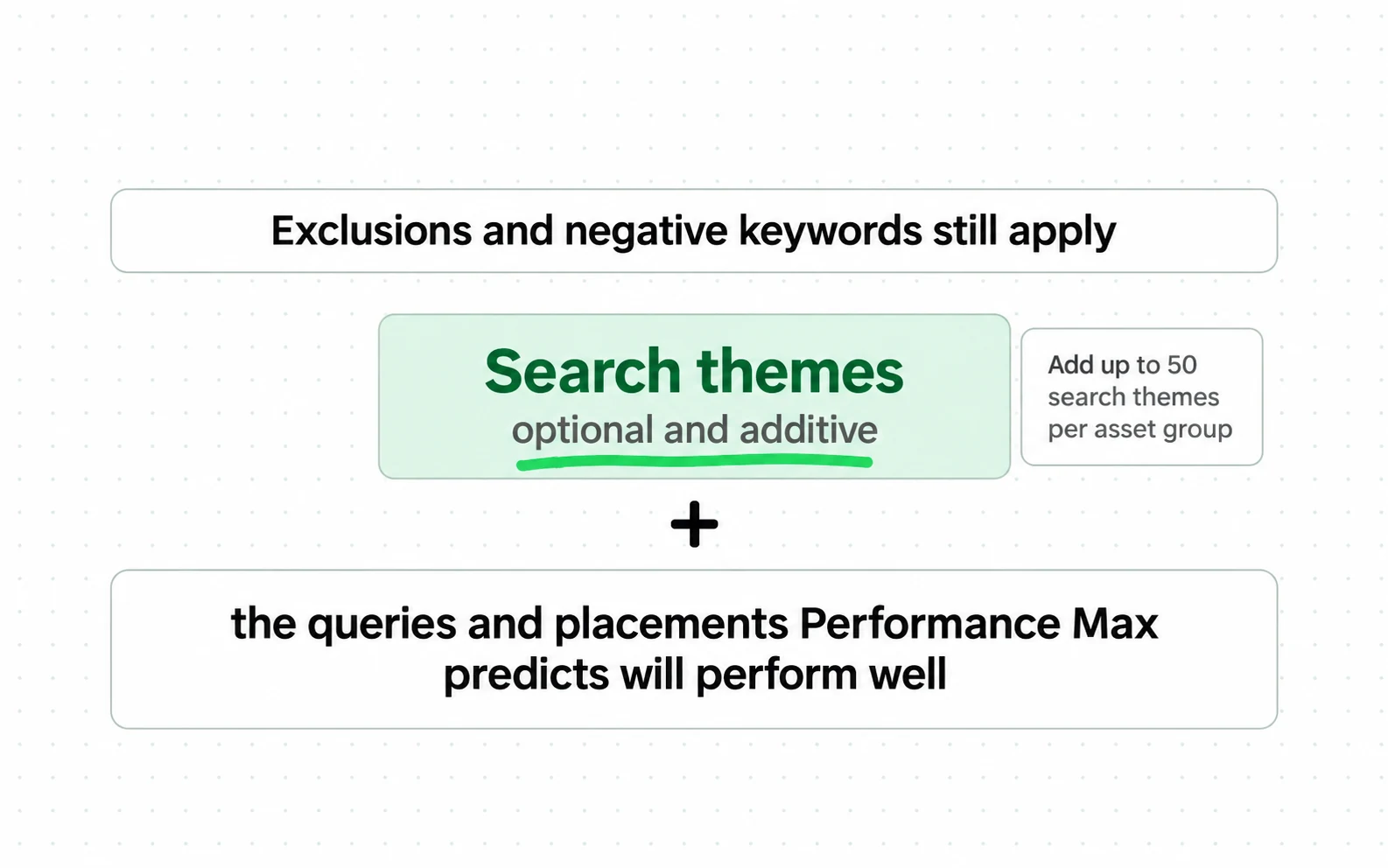
- Optional and additive. A search theme is added to what the campaign already predicts, not swapped in for it.
- Fifty per asset group is the ceiling, and it is a hard number on Google’s page, not a best practice from a blog.
- The last two lines are the ones worth acting on: exclusions and negative keywords still apply, and themes carry the same prioritisation as phrase and broad keywords.

Three common reporting mistakes
Performance Max reports at the asset, asset group and channel level. Placement-level transparency is limited, not absent, and the query detail a Search campaign gives is missing. Each of these mistakes is what happens when a team acts as if it did.
Reading themes as search terms
The reporting shows themes grouped by relevance, not the exact queries a Search campaign lists. Search Engine Journal puts it plainly: high-level themes grouped by relevance, not exact queries. A theme is enough to notice a pattern and not enough to build a negative list from. So write your negative list from what you already know, not from what the report shows.
What each report gives you, in its own column headings
The column headings each report gives you
SEARCH CAMPAIGN search-terms-report.csv
1search_term,match_type,clicks,conv
^ the query someone typed
^ how it was matched
PERFORMANCE MAX search-themes.csv
2search_category,clicks,conv
^ a category name, and no query under it
- 1A Search campaign hands you the query and the match type, which is what a negative keyword list is written from.
- 2Performance Max hands you a category. A category is one column short of the thing you would act on, and no setting adds that column back.
- 3Enough to notice a pattern, not enough to exclude anything: you cannot negate a category, only a query it may or may not contain.
Launching with nothing to optimise
If you intend to use Target ROAS, Google publishes its minimum. At least 15 conversions in the past 30 days for Search and Shopping. At least 50 in 35 days for Demand Gen. Below those, that strategy is unavailable and the campaign is collecting the conversion history it would need. Other strategies carry their own requirements, and this threshold speaks only for that one. And what counts as a conversion is your own setting, not a fact about orders. What a conversion rate is decides whether you are near the threshold or not.
Running it beside Shopping without deciding which should win
Google documents the Search interaction. Several pages state an equivalent rule for Performance Max against a standard Shopping campaign in the same account, and none cites Google for it. The Google page that does state a priority rule states it only for Search. So test the split in your own account. And remember that the one documented lever, an exact match keyword, does not exist in a Shopping campaign.
Setup order for deliberate trade-offs
That is where the evidence stops. The rest is judgement, and it puts the things you still control first, because they are the only places a decision you make survives contact with the automation.
Reading the campaign afterwards is its own discipline, and you should read it before you scale. The ads-performance-analytics skill names the trap: PMax reporting branded search you would have had for free.
For retail campaigns, optimizing your Google Shopping feed determines whether each item is eligible and how accurately Google can read it.
-
Decide what Performance Max is allowed to take before you launch it
List the exact match keywords you want your Search campaign to keep. Those are the queries the published priority rule speaks about. The rule is a priority and not a guarantee, and it is the only such rule Google states.
-
Check that the protecting campaign is not budget-limited
Google states that a keyword in a budget-restricted campaign cannot always trigger. Protection you cannot afford to serve is not protection.
-
Write brand exclusions and negative keywords before spend starts
These are campaign-level and they are the strongest controls you have. Writing them after the first report means paying for the lesson.
-
Add search themes as signals, and keep them few and specific
Up to 50 per asset group is a ceiling, not a target. Google describes them as additive to what the system already predicts, so a theme that describes many things adds a broad signal, not a precise one.
-
Turn final URL expansion off until you have a reason to turn it on
It lets the campaign send traffic to pages you did not choose. On a catalogue that means landing pages you have not checked, and ecommerce SEO work assumes you know which pages people arrive on.
-
Feed it the same product data you would give a Shopping campaign
Retail Performance Max runs on the Merchant Center feed, so the feed quality decisions in Google Shopping ads apply here unchanged. From the outside the structure looks like this, as Semrush sets it out: for a retailer, standard Shopping and Performance Max are the two subtypes of the same campaign family. A product missing a required attribute is not eligible in either campaign type, and it shows up as absence, not as poor performance. The pages it points at are your own, and the Web Almanac’s 2025 measurement of storefront performance is the state most of them start in.
Performance Max pricing and budget thresholds
Feed and landing page decide what it can sell; the budget decides whether it gets to try. Performance Max has no separate fee. You pay per click or per conversion in the same auction as everything else, and how Google Ads works is where the price is set. The budget question is about thresholds, not rates.
The cost is the reporting you give up.
| Budget question | What decides it |
|---|---|
| Is Target ROAS available | Google publishes 15 conversions in 30 days for Search and Shopping, and no figure for this campaign type |
| Will it learn across six surfaces | Whether the conversions are spread or concentrated |
| Can you tell where the money went | Asset, asset group and channel reporting, with limited placement detail |
| Can you protect your best terms | Whether your Search campaign has budget to serve them |
Four conditions decide most of the answer, each checkable before launch, and only the first is about money:
- Fewer than 15 conversions in 30 days, which is the Search and Shopping minimum Google publishes. Performance Max carries no published figure of its own, so treat it as the nearest documented floor.
- A Search campaign limited by budget. Performance Max is standing behind terms you meant to protect.
- A feed with missing required attributes. It is working from a smaller catalogue than you think.
- No written answer to what failure looks like. It will be judged on a number you cannot inspect.
One measured figure sits above that floor. Optmyzr studied 9,199 accounts across 24,702 campaigns, and reports Performance Max performing best above 60 conversions in 30 days. That is four times the minimum you were asked to check above.
That is an observation across other people’s accounts, not a rule Google enforces on yours, and the study is dated October 2024. Read it as the level other advertisers found this campaign type working at, and check your own thirty days against it.
What we would ask before launching it: which queries are you willing to stop seeing, and what would tell you this campaign is failing. If neither has an answer, the campaign will be judged on a blended number that moves for reasons you cannot inspect.
Settle those two before launch, while the answer can still change what you build. That is the first job of the Performance Max agency team at Addition, a search marketing agency.
Measurement without a query report
Three measurements survive the reporting limits. None of them needs a placement report, and the first one is the reason to keep a Search campaign running alongside.
- Your Search campaign’s impression share on the exact match terms you meant to keep. If it falls, look at budget before you look at Performance Max, because Google names a budget-restricted campaign as a reason a keyword may not trigger.
- Return on ad spend against your break-even, not a published benchmark such as the 4 to 1 figure BigCommerce states without a sample. Break-even is one divided by your gross margin.
- Channel-level reporting over time, read as a mix, not as a score. A campaign quietly moving budget from Search to Display is a different campaign than the one you launched. Expect the store and the ad account to disagree about what it produced: Shopify’s marketing reports default to last click with a 30-day lookback, and an ad account applies its own model and window. Which is closer to the truth for your store is a question about your setup, and what Shopify decides for you covers the store side of it.
| What you can see | What you cannot |
|---|---|
| Asset performance, rated by Google | Which query produced which conversion |
| Asset group performance | Placement detail at the granularity a Display campaign gives |
| Channel-level breakdown | The exact search terms behind a theme |
| Search term themes, grouped by relevance | A list you could build a negative from |
That is the trade stated as plainly as it can be. A Search campaign hands you the query and asks you to decide. This one decides and hands you a summary. Neither is dishonest. Both hand you numbers you can check; only one of them hands you the queries behind them, and that is the level at which an exclusion gets written.
The campaign type that keeps the placement decision with you is a different bargain, and Demand Gen campaigns set out what it asks in return.
The second of those is where disagreements about Performance Max usually end up, and what a good ROAS is is a different number for every store.
Where the two campaigns meet on your own screen
The published rule bites in one place, so go and look. Open your Search campaign, check whether it is limited by budget, and list the exact match keywords in it. The published priority rule turns on that list, which is why it belongs written down somewhere other than the interface.
Sources
- Google Ads Help About keyword and search theme prioritization: an exact match keyword is prioritized over a Performance Max campaign
- Google Ads Help Search themes: optional and additive to the queries Performance Max predicts, up to 50 per asset group
- Google Ads Help About Performance Max campaigns: the six surfaces and the controls that remain
- Google Ads Help Target ROAS: at least 15 conversions in 30 days for Search and Shopping, 50 in 35 days for Demand Gen
- Semrush Google Shopping Ads: standard Shopping and Performance Max are the two campaign subtypes This page carries no publication date of its own.
- Google Merchant Center Help Product data specification: the required attributes retail campaigns run on
- Google Ads Help About Shopping ads: product data, not keywords, decides where they show
- Google Ads API Performance Max overview: all Google Ads channels and inventory from a single unified campaign
- Search Engine Journal Google Performance Max: controls, asset group limits, and reporting that shows themes, not queries This page carries no publication date of its own.
- Aleyda Solis Product listing ad click share, Similarweb data, Jan 2025 against Jan 2026
- Search Engine Land Paid search click share doubles as organic clicks fall, with retailer spend figures
- Shopify Help Center Marketing reports: last-click default with a 30-day lookback
- HTTP Archive Web Almanac 2025 Ecommerce chapter: storefront platform performance by platform Dated 2025 with no month given, so its exact age is not knowable from the source.
- BigCommerce Return on ad spend glossary entry, stating a 4 to 1 benchmark with no sample This page carries no publication date of its own.
- Navah Hopkins, Optmyzr Performance Max Study: 9,199 accounts and 24,702 campaigns, each at least 90 days old and spending between $1,000 and $5 million a month, published 7 October 2024
Questions people ask
What does Performance Max do?
It runs one campaign across Search, YouTube, Display, Discover, Gmail and Maps, deciding placements and query matching itself. You keep negative keywords, brand exclusions, search themes, audience signals and the final URL expansion setting.
Is Performance Max worth it?
The trade is reach and consolidation against steering and reporting. It is worth it when you can accept themes instead of exact search terms, and when the bidding strategy you intend to use is available to your conversion volume.
If you need to know which query produced which order, that data is not in this campaign type, and no setting turns it on.
When should I use Performance Max?
Switch it on when three things are true. The account produces the conversion volume your chosen strategy requires. The product feed is clean. And the queries you most want to own are already covered by exact match keywords in a Search campaign that has the budget to serve them.
What are two benefits of Performance Max?
One campaign reaches inventory that would otherwise need several, and the bidding optimises across those surfaces together, not in separate silos. Both depend on the bidding strategy you choose being available to your conversion volume.

